Compare commits
12
Commits
| Author | SHA1 | Date | |
|---|---|---|---|
 anuraghazra |
084ce7fc8d | ||
|
anuraghazra
|
171f970bee | ||
|
anuraghazra
|
5514f4e8f1 | ||
|
anuraghazra
|
ebc8ce4b7d | ||
|
Anurag Hazra
|
bec23af5f9 | ||
|
anuraghazra
|
0582a2adae | ||
|
anuraghazra
|
683b919c20 | ||
|
anuraghazra
|
70f11b0018 | ||
|
anuraghazra
|
c6e2a7998b | ||
|
anuraghazra
|
dfe91e3596 | ||
|
anuraghazra
|
777a3ae786 | ||
|
anuraghazra
|
1fa476ac6e |
@@ -1,2 +0,0 @@
|
||||
themes: themes/index.js
|
||||
doc-translation: docs/*
|
||||
@@ -1,11 +0,0 @@
|
||||
name: "Pull Request Labeler"
|
||||
on:
|
||||
- pull_request_target
|
||||
|
||||
jobs:
|
||||
triage:
|
||||
runs-on: ubuntu-latest
|
||||
steps:
|
||||
- uses: actions/labeler@v2
|
||||
with:
|
||||
repo-token: "${{ secrets.GITHUB_TOKEN }}"
|
||||
@@ -1,7 +1,7 @@
|
||||
name: Theme preview
|
||||
|
||||
on:
|
||||
pull_request_target:
|
||||
pull_request:
|
||||
types: [opened, synchronize, reopened]
|
||||
branches:
|
||||
- master
|
||||
@@ -26,3 +26,5 @@ jobs:
|
||||
env:
|
||||
CI: true
|
||||
PERSONAL_TOKEN: ${{ secrets.PERSONAL_TOKEN }}
|
||||
with:
|
||||
token: ${{ secrets.GITHUB_TOKEN }}
|
||||
|
||||
+6
-1
@@ -38,7 +38,12 @@ module.exports = async (req, res) => {
|
||||
parseBoolean(include_all_commits)
|
||||
);
|
||||
} catch (err) {
|
||||
return res.send(renderError(err.message, err.secondaryMessage));
|
||||
return res.send(
|
||||
renderError(
|
||||
err.message,
|
||||
"Make sure the provided username is not an organization"
|
||||
)
|
||||
);
|
||||
}
|
||||
|
||||
const cacheSeconds = clampValue(
|
||||
|
||||
+3
-1
@@ -4,6 +4,7 @@ const {
|
||||
parseBoolean,
|
||||
clampValue,
|
||||
CONSTANTS,
|
||||
logger,
|
||||
} = require("../src/common/utils");
|
||||
const fetchRepo = require("../src/fetchers/repo-fetcher");
|
||||
const renderRepoCard = require("../src/cards/repo-card");
|
||||
@@ -28,7 +29,8 @@ module.exports = async (req, res) => {
|
||||
try {
|
||||
repoData = await fetchRepo(username, repo);
|
||||
} catch (err) {
|
||||
return res.send(renderError(err.message, err.secondaryMessage));
|
||||
logger.error(err);
|
||||
return res.send(renderError(err.message));
|
||||
}
|
||||
|
||||
let cacheSeconds = clampValue(
|
||||
|
||||
+1
-1
@@ -30,7 +30,7 @@ module.exports = async (req, res) => {
|
||||
try {
|
||||
topLangs = await fetchTopLanguages(username);
|
||||
} catch (err) {
|
||||
return res.send(renderError(err.message, err.secondaryMessage));
|
||||
return res.send(renderError(err.message));
|
||||
}
|
||||
|
||||
const cacheSeconds = clampValue(
|
||||
|
||||
@@ -1,332 +0,0 @@
|
||||
<p align="center">
|
||||
<img width="100px" src="https://res.cloudinary.com/anuraghazra/image/upload/v1594908242/logo_ccswme.svg" align="center" alt="GitHub Readme Stats" />
|
||||
<h2 align="center">GitHub Readme Stats</h2>
|
||||
<p align="center">동적으로 생성된 Github의 통계를 여러분의 README에 올려보세요!</p>
|
||||
</p>
|
||||
<p align="center">
|
||||
<a href="https://github.com/anuraghazra/github-readme-stats/actions">
|
||||
<img alt="Tests Passing" src="https://github.com/anuraghazra/github-readme-stats/workflows/Test/badge.svg" />
|
||||
</a>
|
||||
<a href="https://codecov.io/gh/anuraghazra/github-readme-stats">
|
||||
<img src="https://codecov.io/gh/anuraghazra/github-readme-stats/branch/master/graph/badge.svg" />
|
||||
</a>
|
||||
<a href="https://github.com/anuraghazra/github-readme-stats/issues">
|
||||
<img alt="Issues" src="https://img.shields.io/github/issues/anuraghazra/github-readme-stats?color=0088ff" />
|
||||
</a>
|
||||
<a href="https://github.com/anuraghazra/github-readme-stats/pulls">
|
||||
<img alt="GitHub pull requests" src="https://img.shields.io/github/issues-pr/anuraghazra/github-readme-stats?color=0088ff" />
|
||||
</a>
|
||||
<br />
|
||||
<br />
|
||||
<a href="https://a.paddle.com/v2/click/16413/119403?link=1227">
|
||||
<img src="https://img.shields.io/badge/Supported%20by-VSCode%20Power%20User%20%E2%86%92-gray.svg?colorA=655BE1&colorB=4F44D6&style=for-the-badge"/>
|
||||
</a>
|
||||
<a href="https://a.paddle.com/v2/click/16413/119403?link=2345">
|
||||
<img src="https://img.shields.io/badge/Supported%20by-Node%20Cli.com%20%E2%86%92-gray.svg?colorA=61c265&colorB=4CAF50&style=for-the-badge"/>
|
||||
</a>
|
||||
</p>
|
||||
|
||||
<p align="center">
|
||||
<a href="#demo">View Demo</a>
|
||||
·
|
||||
<a href="https://github.com/anuraghazra/github-readme-stats/issues/new/choose">Report Bug</a>
|
||||
·
|
||||
<a href="https://github.com/anuraghazra/github-readme-stats/issues/new/choose">Request Feature</a>
|
||||
</p>
|
||||
<p align="center">
|
||||
<a href="/docs/readme_cn.md">简体中文</a>
|
||||
·
|
||||
<a href="/docs/readme_es.md">Español</a>
|
||||
·
|
||||
<a href="/docs/readme_de.md">Deutsch</a>
|
||||
·
|
||||
<a href="/docs/readme_ja.md">日本語</a>
|
||||
·
|
||||
<a href="/docs/readme_pt-BR.md">Português Brasileiro</a>
|
||||
·
|
||||
<a href="/docs/readme_kr.md">한국어</a>
|
||||
</p>
|
||||
</p>
|
||||
<p align="center">이 프로젝트가 마음에 드나요? 괜찮으시다면 더 나은 개선을 위해 <a href="https://www.paypal.me/anuraghazra">기부</a>를 고려해주세요!
|
||||
|
||||
# Features
|
||||
|
||||
- [GitHub Stats Card](#github-stats-card)
|
||||
- [GitHub Extra Pins](#github-extra-pins)
|
||||
- [상위 언어 카드](#상위-언어-카드)
|
||||
- [테마](#테마)
|
||||
- [사용자정의](#사용자정의)
|
||||
- [직접 배포하기](#자체-Vercel-인스턴스에-배포하기)
|
||||
|
||||
# GitHub Stats Card
|
||||
|
||||
아래 코드를 복사해서 당신의 마크다운 파일에 넣으면 됩니다. 간단합니다!
|
||||
|
||||
`?username=` 영역의 값은 당신의 Github 계정의 이름으로 바꿔주세요.
|
||||
|
||||
```md
|
||||
[](https://github.com/anuraghazra/github-readme-stats)
|
||||
```
|
||||
|
||||
_참고: 순위는 사용자의 통계를 기반으로 계산됩니다. [src/calculateRank.js](./src/calculateRank.js) 참고_
|
||||
|
||||
### 개별 통계 숨기기
|
||||
|
||||
특정 통계를 숨기려면 콤마로 구분된 값을 `?hide=` 쿼리 파라미터 값으로 나열하면 됩니다.
|
||||
|
||||
> 예시: `&hide=stars,commits,prs,issues,contribs`
|
||||
|
||||
```md
|
||||

|
||||
```
|
||||
|
||||
### 총 커밋 수에 private 컨트리뷰트 개수 추가하기
|
||||
|
||||
`?count_private=true` 쿼리 파라미터를 사용하면 총 커밋 수에 private 컨트리뷰트 개수를 추가할 수 있습니다.
|
||||
|
||||
\_참고: 이 프로젝트를 직접 배포하는 경우 private 컨트리뷰트는 기본적으로 계산된다. 그렇지 않은 경우 private 컨트리뷰트 개수를 추가하도록 설정해야 합니다.
|
||||
|
||||
_Note: If you are deploying this project yourself, the private contributions will be counted by default otherwise you need to chose to share your private contribution counts._
|
||||
|
||||
> 예시: `&count_private=true`
|
||||
|
||||
```md
|
||||

|
||||
```
|
||||
|
||||
### 아이콘 표기
|
||||
|
||||
아이콘을 활성화하려면 다음과 같이 `show_icons=true` 쿼리 파라미터를 사용하세요.
|
||||
|
||||
```md
|
||||

|
||||
```
|
||||
|
||||
### 테마
|
||||
|
||||
내장된 테마를 사용하여 수동 [사용자정의](#사용자정의)할 필요 없이 카드의 모양을 커스터마이징할 수 있습니다.
|
||||
|
||||
아래와 같이 `?theme=THEME_NAME` 파라미터를 사용하세요. :-
|
||||
|
||||
```md
|
||||

|
||||
```
|
||||
|
||||
#### 모든 내장된 테마 :-
|
||||
|
||||
dark, radical, merko, gruvbox, tokyonight, onedark, cobalt, synthwave, highcontrast, dracula
|
||||
|
||||
<img src="https://res.cloudinary.com/anuraghazra/image/upload/v1595174536/grs-themes_l4ynja.png" alt="GitHub Readme Stat Themes" width="600px"/>
|
||||
|
||||
[사용 가능한 모든 테마](./themes/README.md)의 미리보기와 [테마 설정 파일](./themes/index.js)을 확인할 수 있습니다. 괜찮으시다면 **새로운 테마를 만드셔서, 코드를 기여** 해주세요 :D
|
||||
|
||||
### 사용자정의
|
||||
|
||||
URL 파라미터를 사용하여 원하는대로 `Stats Card` 또는 `Repo Card` 모양을 사용자 정의할 수 있습니다.
|
||||
|
||||
#### Common Options:
|
||||
|
||||
- `title_color` - 카드 제목 색상 _(hex color)_
|
||||
- `text_color` - 본문 글자 색상 _(hex color)_
|
||||
- `icon_color` - 아이콘 색상(활성화된 경우) _(hex color)_
|
||||
- `bg_color` - 카드 배경 색상 _(hex color)_
|
||||
- `theme` - 테마의 이름, [사용 가능한 모든 테마](./themes/README.md)에서 선택
|
||||
- `cache_seconds` - 캐시 헤더를 수동으로 설정 _(min: 1800, max: 86400)_
|
||||
|
||||
> 캐시 관련 참고: Repo 카드는 fork 개수와 star 카운트가 1천 개 미만인 경우 기본 캐시가 30분(1800초)이고, 그렇지 않은 경우 2시간(7200초) 입니다. 또한 캐시는 최소 30분 및 최대 24시간으로 고정됩니다.
|
||||
|
||||
#### Stats Card의 제외 옵션:
|
||||
|
||||
- `hide` - 통계에서 특정 항목을 제외한다. _(콤마로 구분된 값)_
|
||||
- `hide_title` - _(boolean)_
|
||||
- `hide_rank` - _(boolean)_
|
||||
- `show_icons` - _(boolean)_
|
||||
- `include_all_commits` - 현재 년도 대신 전체 커밋 개수 카운트 _(boolean)_
|
||||
- `count_private` - private 커밋도 카운트 _(boolean)_
|
||||
- `line_height` - 글자 사이의 line-height 값 설정(자간) _(number)_
|
||||
|
||||
#### Repo Card의 제외 옵션:
|
||||
|
||||
- `show_owner` - repo의 소유자 이름 표기 _(boolean)_
|
||||
|
||||
#### Language Card의 제외 옵션:
|
||||
|
||||
- `hide` - 카드에서 특정 언어 숨기기 _(콤마로 구분된 값)_
|
||||
- `hide_title` - _(boolean)_
|
||||
- `layout` - `default` & `compact` 레이아웃 간의 전환
|
||||
- `card_width` - 카드의 너비를 수동으로 설정 _(숫자)_
|
||||
|
||||
> :warning: **중요:**
|
||||
> 언어 이름은 URI 이스케이프 처리되어야 합니다. [Percent Encoding](https://en.wikipedia.org/wiki/Percent-encoding)를 참고하세요.
|
||||
> (i.e: `c++` 는 `c%2B%2B`, `jupyter notebook` 는 `jupyter%20notebook`, etc.)
|
||||
|
||||
---
|
||||
|
||||
# GitHub Extra Pins
|
||||
|
||||
GitHub extra pins을 사용하면 Github readme 프로필에 6개 이상의 저장소를 고정할 수 있습니다.
|
||||
그렇습니다! 더 이상 고정된 6개의 저장소로 제한되지 않습니다.
|
||||
|
||||
GitHub extra pins allow you to pin more than 6 repositories in your profile using a GitHub readme profile.
|
||||
|
||||
Yey! You are no longer limited to 6 pinned repositories.
|
||||
|
||||
### 사용법
|
||||
|
||||
이 코드를 복사해서 readme에 넣고 링크를 변경해주세요.
|
||||
|
||||
Endpoint: `api/pin?username=anuraghazra&repo=github-readme-stats`
|
||||
|
||||
```md
|
||||
[](https://github.com/anuraghazra/github-readme-stats)
|
||||
```
|
||||
|
||||
### 데모
|
||||
|
||||
[](https://github.com/anuraghazra/github-readme-stats)
|
||||
|
||||
[show_owner](#사용자정의) 값을 사용하여 저장소 소유자 이름을 포함할 수 있습니다.
|
||||
|
||||
[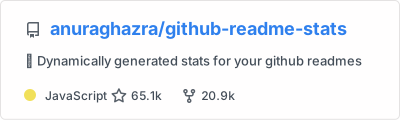](https://github.com/anuraghazra/github-readme-stats)
|
||||
|
||||
# 상위 언어 카드
|
||||
|
||||
상위 언어 카드는 그 Github 사용자가 가장 많이 사용하고 있는 언어가 표시됩니다.
|
||||
|
||||
_참고: Top languages는 사용자의 기술 수준을 나타내는 것이 아니라 GitHub에서 어떤 언어로 코드를 많이 작성하는지 나타내는 Github 지표이며 github-readme-stats의 새로운 기능입니다._
|
||||
|
||||
### 사용법
|
||||
|
||||
이 코드를 복사해서 readme에 넣고 링크를 변경해주세요.
|
||||
|
||||
Endpoint: `api/top-langs?username=anuraghazra`
|
||||
|
||||
```md
|
||||
[](https://github.com/anuraghazra/github-readme-stats)
|
||||
```
|
||||
|
||||
### 개별 언어 숨기기
|
||||
|
||||
`?hide=language1,language2` 파라미터를 사용하여 특정 언어를 숨길 수 있습니다.
|
||||
|
||||
```md
|
||||
[](https://github.com/anuraghazra/github-readme-stats)
|
||||
```
|
||||
|
||||
### 컴팩트 언어 카드 레이아웃
|
||||
|
||||
`&layout=compact` 파라미터를 사용하여 카드의 디자인을 변경할 수 있습니다.
|
||||
|
||||
```md
|
||||
[](https://github.com/anuraghazra/github-readme-stats)
|
||||
```
|
||||
|
||||
### 데모
|
||||
|
||||
[](https://github.com/anuraghazra/github-readme-stats)
|
||||
|
||||
- 컴팩트 레이아웃
|
||||
|
||||
[](https://github.com/anuraghazra/github-readme-stats)
|
||||
|
||||
---
|
||||
|
||||
### 모든 데모
|
||||
|
||||
- 기본 설정
|
||||
|
||||

|
||||
|
||||
- 특정 통계 숨김
|
||||
|
||||

|
||||
|
||||
- 아이콘 표기
|
||||
|
||||

|
||||
|
||||
- 모든 커밋 표기
|
||||
|
||||

|
||||
|
||||
- 테마
|
||||
|
||||
[default themes](#테마)에서 선택
|
||||
|
||||

|
||||
|
||||
- Stats 카드 사용자 정의
|
||||
|
||||

|
||||
|
||||
- Repo 카드 사용자 정의
|
||||
|
||||

|
||||
|
||||
- 상위 언어
|
||||
|
||||
[](https://github.com/anuraghazra/github-readme-stats)
|
||||
|
||||
---
|
||||
|
||||
### 꿀팁 (Repo 카드 정렬)
|
||||
|
||||
일반적으로 사진을 나란히 배치할 수 없습니다. 따라서 다음과 같은 방법을 사용할 수 있습니다.
|
||||
|
||||
```md
|
||||
<a href="https://github.com/anuraghazra/github-readme-stats">
|
||||
<img align="left" src="https://github-readme-stats.vercel.app/api/pin/?username=anuraghazra&repo=github-readme-stats" />
|
||||
</a>
|
||||
<a href="https://github.com/anuraghazra/convoychat">
|
||||
<img align="left" src="https://github-readme-stats.vercel.app/api/pin/?username=anuraghazra&repo=convoychat" />
|
||||
</a>
|
||||
```
|
||||
|
||||
## 자체 Vercel 인스턴스에 배포하기
|
||||
|
||||
Github API는 시간당 5k 요청만을 허용하기 때문에, 이 `https://github-readme-stats.vercel.app/api`이 제한에 도달할 수 있습니다.
|
||||
물론 자신의 Vercel 서버에서 호스팅하는 것이라면 아무것도 걱정할 필요가 없습니다. 시작하려면 배포 버튼을 클릭하세요!
|
||||
|
||||
참고: [#58](https://github.com/anuraghazra/github-readme-stats/pull/58) 이슈 이후로는 5k 이상의 요청을 처리할 수 있게 되어, 다운 타임의 문제가 발생하지 않습니다 :D
|
||||
|
||||
[](https://vercel.com/import/project?template=https://github.com/anuraghazra/github-readme-stats)
|
||||
|
||||
<details>
|
||||
<summary><b> Guide on setting up Vercel 🔨 </b></summary>
|
||||
|
||||
1. [vercel.com](https://vercel.com/)에 접속하세요.
|
||||
1. `Log in` 클릭합니다.
|
||||
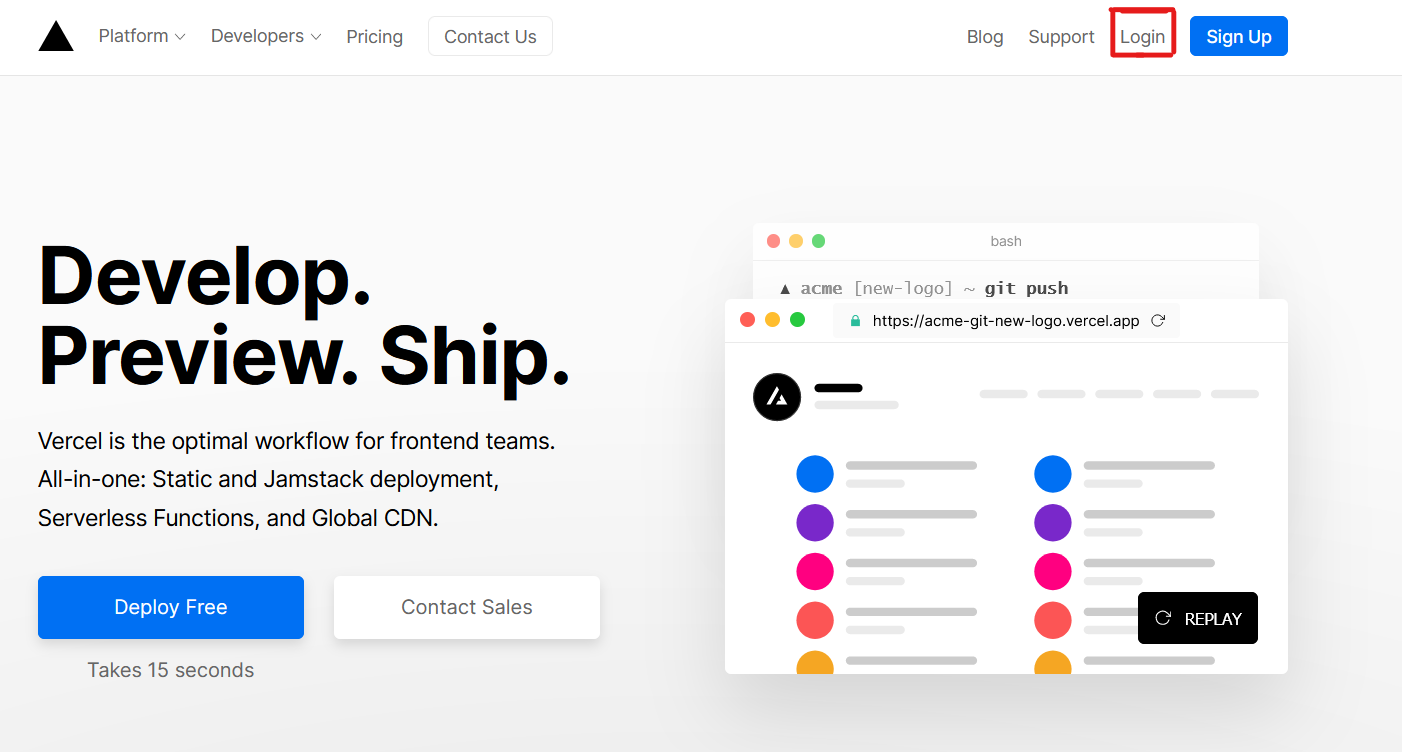
|
||||
1. `Continue with GitHub` 를 클릭하여 Github로 로그인하세요.
|
||||
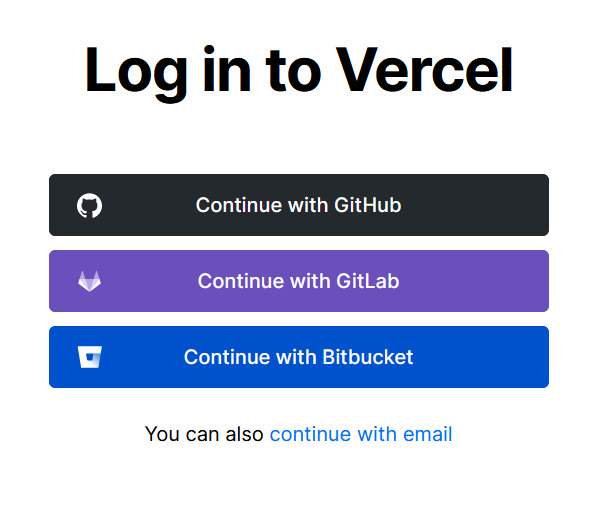
|
||||
1. Github에 로그인하고 메시지가 표시되면 모든 저장소에 대한 접근을 허용합니다.
|
||||
1. 이 저장소를 fork 합니다.
|
||||
1. [Vercel dashboard](https://vercel.com/dashboard)로 돌아갑니다.
|
||||
1. `Import Project` 를 선택합니다.
|
||||

|
||||
1. `Import Git Repository` 를 선택합니다.
|
||||
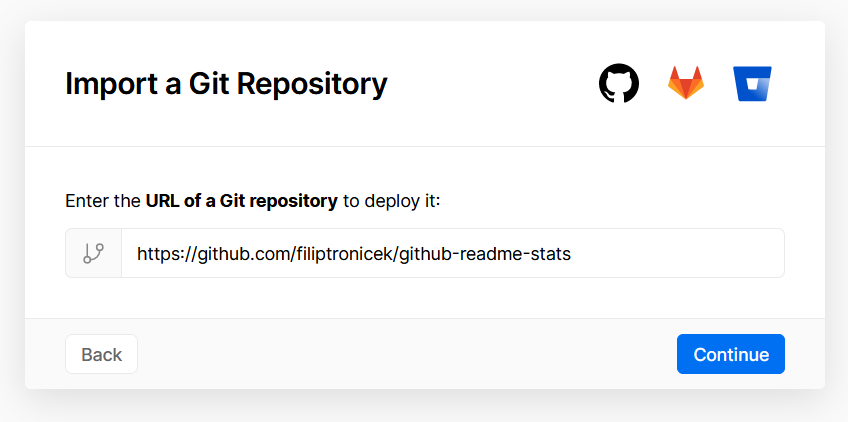
|
||||
1. 루트를 선택한 다음에 다른 것들은 그대로 두고 PAT_1 이라는 환경 변수(아래처럼)를 추가합니다. 여기에는 개인 접근 토큰(PAT)이 포함되며, 토큰은 [여기](https://github.com/settings/tokens/new)에서 쉽게 만들 수 있습니다. (모두 그대로 두고, 이름만 지정하면 됩니다.)
|
||||

|
||||
1. 배포를 클릭하면 완료됩니다. API를 사용하기 위해 당신의 도메인을 참조하세요!
|
||||
|
||||
</details>
|
||||
|
||||
## :sparkling_heart: 프로젝트 후원
|
||||
|
||||
저는 제가 할 수 있는 거의 모든 것을 오픈소스로 제공하고, 이 프로젝트를 사용하면서 도움이 필요한 분들에게 회신하려고 합니다.
|
||||
분명한 것은, 이는 시간이 걸리는 일입니다. 하지만 여러분은 이 서비스를 무료로 사용할 수 있습니다.
|
||||
|
||||
하지만 여러분이 이 프로젝트를 사용하고 거기에 만족한다면, 아니면 제가 하는 활동을 격려하고자 싶다면 몇가지 방법이 있습니다. :-
|
||||
|
||||
- readme에서 github-readme-stats를 사용하고 다시 링크해주세요 :D
|
||||
- star를 눌러주거나 이 프로젝트를 공유해주세요. :rocket:
|
||||
- [](https://www.paypal.me/anuraghazra) - PayPal을 통해서 일회성 기부를 할 수 있습니다. 저는 아마 ~~커피~~ 차를 살겁니다.
|
||||
|
||||
고맙습니다! :heart:
|
||||
|
||||
---
|
||||
|
||||
코드 기여는 환영합니다!
|
||||
|
||||
:heart: and JavaScript로 만들어졌습니다.
|
||||
@@ -34,17 +34,15 @@
|
||||
<a href="https://github.com/anuraghazra/github-readme-stats/issues/new/choose">Request Feature</a>
|
||||
</p>
|
||||
<p align="center">
|
||||
<a href="/docs/readme_cn.md">简体中文</a>
|
||||
<a href="readme_cn.md">简体中文</a>
|
||||
·
|
||||
<a href="/docs/readme_es.md">Español</a>
|
||||
<a href="readme_es.md">Español</a>
|
||||
·
|
||||
<a href="/docs/readme_de.md">Deutsch</a>
|
||||
<a href="readme_de.md">Deutsch</a>
|
||||
·
|
||||
<a href="/docs/readme_ja.md">日本語</a>
|
||||
·
|
||||
<a href="/docs/readme_pt-BR.md">Português Brasileiro</a>
|
||||
·
|
||||
<a href="/docs/readme_kr.md">한국어</a>
|
||||
<a href="readme_ja.md">日本語</a>
|
||||
·
|
||||
<a href="readme_pt-BR.md">Português Brasileiro</a>
|
||||
</p>
|
||||
</p>
|
||||
<p align="center">Loved the project? Please consider <a href="https://www.paypal.me/anuraghazra">donating</a> to help it improve!
|
||||
@@ -127,18 +125,10 @@ You can customize the appearance of your `Stats Card` or `Repo Card` however you
|
||||
- `title_color` - Card's title color _(hex color)_
|
||||
- `text_color` - Body text color _(hex color)_
|
||||
- `icon_color` - Icons color if available _(hex color)_
|
||||
- `bg_color` - Card's background color _(hex color)_ **or** a gradient in the form of _angle,start,end_
|
||||
- `bg_color` - Card's background color _(hex color)_
|
||||
- `theme` - name of the theme, choose from [all available themes](./themes/README.md)
|
||||
- `cache_seconds` - set the cache header manually _(min: 1800, max: 86400)_
|
||||
|
||||
##### Gradient in bg_color
|
||||
|
||||
You can provide multiple comma saperated values in bg_color option to render a gradient, the format of the gradient is :-
|
||||
|
||||
```
|
||||
&bg_color=DEG,COLOR1,COLRO2,COLOR3...COLOR10
|
||||
```
|
||||
|
||||
> Note on cache: Repo cards have default cache of 30mins (1800 seconds) if the fork count & star count is less than 1k otherwise it's 2hours (7200). Also note that cache is clamped to minimum of 30min and maximum of 24hours
|
||||
|
||||
#### Stats Card Exclusive Options:
|
||||
@@ -258,10 +248,6 @@ Choose from any of the [default themes](#themes)
|
||||
|
||||

|
||||
|
||||
- Gradient
|
||||
|
||||

|
||||
|
||||
- Customizing stats card
|
||||
|
||||

|
||||
|
||||
@@ -35,17 +35,11 @@
|
||||
<a href="https://github.com/anuraghazra/github-readme-stats/issues/new/choose">请求增加功能</a>
|
||||
</p>
|
||||
<p align="center">
|
||||
<a href="/docs/readme_cn.md">简体中文</a>
|
||||
<a href="readme.md">English</a>
|
||||
·
|
||||
<a href="/docs/readme_es.md">Español</a>
|
||||
<a href="readme_es.md">Español</a>
|
||||
·
|
||||
<a href="/docs/readme_de.md">Deutsch</a>
|
||||
·
|
||||
<a href="/docs/readme_ja.md">日本語</a>
|
||||
·
|
||||
<a href="/docs/readme_pt-BR.md">Português Brasileiro</a>
|
||||
·
|
||||
<a href="/docs/readme_kr.md">한국어</a>
|
||||
<a href="readme_ja.md">日本語</a>
|
||||
</p>
|
||||
</p>
|
||||
<p align="center">喜欢这个项目?请考虑<a href="https://www.paypal.me/anuraghazra">捐赠</a>来帮助它完善!
|
||||
@@ -61,7 +55,7 @@
|
||||
|
||||
# GitHub 统计卡片
|
||||
|
||||
将这行代码复制到你的 markdown 文件中,就是如此简单!
|
||||
将这行代码复制到你的 markdown 文件中,简单如此!
|
||||
|
||||
更改 `?username=` 的值为你的 GitHub 用户名。
|
||||
|
||||
@@ -69,7 +63,7 @@
|
||||
[](https://github.com/anuraghazra/github-readme-stats)
|
||||
```
|
||||
|
||||
_注: 等级基于用户的统计信息计算得出,详见 [src/calculateRank.js](./src/calculateRank.js)_
|
||||
_注: 排名基于用户的统计信息计算得出,详见 [src/calculateRank.js](./src/calculateRank.js)_
|
||||
|
||||
### 隐藏个别统计项
|
||||
|
||||
@@ -81,9 +75,9 @@ _注: 等级基于用户的统计信息计算得出,详见 [src/calculateRank.
|
||||

|
||||
```
|
||||
|
||||
### 将私人项目贡献添加到总提交计数中
|
||||
### 把私人贡献计数添加到总提交计数中
|
||||
|
||||
你可以使用参数 `?count_private=true` 把私人贡献计数添加到总提交计数中。
|
||||
你可以用参数 `?count_private=true` 把私人贡献计数添加到总提交计数中。
|
||||
|
||||
_注:如果你是自己部署本项目,私人贡献将会默认被计数,如果不是自己部署,你需要分享你的私人贡献计数。_
|
||||
|
||||
@@ -95,7 +89,7 @@ _注:如果你是自己部署本项目,私人贡献将会默认被计数,
|
||||
|
||||
### 显示图标
|
||||
|
||||
如果想要显示图标,你可以调用 `show_icons=true` 参数,如下:
|
||||
想要显示图标,你可以调用 `show_icons=true` 参数,如下:
|
||||
|
||||
```md
|
||||

|
||||
@@ -105,7 +99,7 @@ _注:如果你是自己部署本项目,私人贡献将会默认被计数,
|
||||
|
||||
你可以通过现有的主题进行卡片个性化,省去[手动自定义](#自定义)的麻烦。
|
||||
|
||||
通过调用 `?theme=THEME_NAME` 参数,像这样:
|
||||
调用 `?theme=THEME_NAME` 参数,如下:
|
||||
|
||||
```md
|
||||

|
||||
@@ -117,7 +111,7 @@ dark, radical, merko, gruvbox, tokyonight, onedark, cobalt, synthwave, highcontr
|
||||
|
||||
<img src="https://res.cloudinary.com/anuraghazra/image/upload/v1595174536/grs-themes_l4ynja.png" alt="GitHub Readme Stat Themes" width="600px"/>
|
||||
|
||||
在 [theme config 文件](./themes/index.js) 中查看更多主题,或者你可以 **贡献新的主题** :D
|
||||
在 [theme config 文件](./themes/index.js) 中查看更多主题,或者 **贡献新的主题** :D
|
||||
|
||||
### 自定义
|
||||
|
||||
@@ -177,7 +171,7 @@ _注意:热门语言并不表示我的技能水平或类似的水平,它是
|
||||
|
||||
### 使用细则
|
||||
|
||||
将此代码复制粘贴到您的`README.md`文件中,并修改链接。
|
||||
将此代码复制粘贴到您的`README.md`文件中,并改变链接。
|
||||
|
||||
Endpoint: `api/top-langs?username=anuraghazra`
|
||||
|
||||
@@ -28,17 +28,11 @@
|
||||
</p>
|
||||
|
||||
<p align="center">
|
||||
<a href="/docs/readme_cn.md">简体中文</a>
|
||||
<a href="#alle-beispiele">Beispiel ansehen</a>
|
||||
·
|
||||
<a href="/docs/readme_es.md">Español</a>
|
||||
<a href="https://github.com/anuraghazra/github-readme-stats/issues">Fehler melden</a>
|
||||
·
|
||||
<a href="/docs/readme_de.md">Deutsch</a>
|
||||
·
|
||||
<a href="/docs/readme_ja.md">日本語</a>
|
||||
·
|
||||
<a href="/docs/readme_pt-BR.md">Português Brasileiro</a>
|
||||
·
|
||||
<a href="/docs/readme_kr.md">한국어</a>
|
||||
<a href="https://github.com/anuraghazra/github-readme-stats/issues">Funktionalität anfragen</a>
|
||||
</p>
|
||||
</p>
|
||||
<p align="center">Du magst das Projekt? Wie wäre es mit einer kleinen <a href="https://www.paypal.me/anuraghazra">Spende</a> um es weiterhin am Leben zu erhalten?
|
||||
@@ -32,17 +32,11 @@
|
||||
<a href="https://github.com/anuraghazra/github-readme-stats/issues/new/choose">Solicita una mejora</a>
|
||||
</p>
|
||||
<p align="center">
|
||||
<a href="/docs/readme_cn.md">简体中文</a>
|
||||
<a href="readme.md">English</a>
|
||||
·
|
||||
<a href="/docs/readme_es.md">Español</a>
|
||||
<a href="readme_cn.md">简体中文</a>
|
||||
·
|
||||
<a href="/docs/readme_de.md">Deutsch</a>
|
||||
·
|
||||
<a href="/docs/readme_ja.md">日本語</a>
|
||||
·
|
||||
<a href="/docs/readme_pt-BR.md">Português Brasileiro</a>
|
||||
·
|
||||
<a href="/docs/readme_kr.md">한국어</a>
|
||||
<a href="readme_ja.md">日本語</a>
|
||||
</p>
|
||||
</p>
|
||||
<p align="center">¿Te gusta este proyecto? ¡Por favor considera <a href="https://www.paypal.me/anuraghazra">donar</a> para ayudar a mejorarlo!
|
||||
+302
-308
@@ -1,308 +1,302 @@
|
||||
<p align="center">
|
||||
<img width="100px" src="https://res.cloudinary.com/anuraghazra/image/upload/v1594908242/logo_ccswme.svg" align="center" alt="GitHub Readme Stats" />
|
||||
<h2 align="center">GitHub Readme Stats</h2>
|
||||
<p align="center">あなたのREADMEに動的に生成されたGitHubの統計情報を載せましょう!</p>
|
||||
</p>
|
||||
|
||||
<p align="center">
|
||||
<a href="https://github.com/anuraghazra/github-readme-stats/actions">
|
||||
<img alt="Tests Passing" src="https://github.com/anuraghazra/github-readme-stats/workflows/Test/badge.svg" />
|
||||
</a>
|
||||
<a href="https://codecov.io/gh/anuraghazra/github-readme-stats">
|
||||
<img src="https://codecov.io/gh/anuraghazra/github-readme-stats/branch/master/graph/badge.svg" />
|
||||
</a>
|
||||
<a href="https://github.com/anuraghazra/github-readme-stats/issues">
|
||||
<img alt="Issues" src="https://img.shields.io/github/issues/anuraghazra/github-readme-stats?color=0088ff" />
|
||||
</a>
|
||||
<a href="https://github.com/anuraghazra/github-readme-stats/pulls">
|
||||
<img alt="GitHub pull requests" src="https://img.shields.io/github/issues-pr/anuraghazra/github-readme-stats?color=0088ff" />
|
||||
</a>
|
||||
<br />
|
||||
<br />
|
||||
<a href="https://a.paddle.com/v2/click/16413/119403?link=1227">
|
||||
<img src="https://img.shields.io/badge/Supported%20by-VSCode%20Power%20User%20%E2%86%92-gray.svg?colorA=655BE1&colorB=4F44D6&style=for-the-badge"/>
|
||||
</a>
|
||||
<a href="https://a.paddle.com/v2/click/16413/119403?link=2345">
|
||||
<img src="https://img.shields.io/badge/Supported%20by-Node%20Cli.com%20%E2%86%92-gray.svg?colorA=61c265&colorB=4CAF50&style=for-the-badge"/>
|
||||
</a>
|
||||
</p>
|
||||
|
||||
<p align="center">
|
||||
<a href="#demo">View Demo</a>
|
||||
·
|
||||
<a href="https://github.com/anuraghazra/github-readme-stats/issues/new/choose">Report Bug</a>
|
||||
·
|
||||
<a href="https://github.com/anuraghazra/github-readme-stats/issues/new/choose">Request Feature</a>
|
||||
</p>
|
||||
<p align="center">
|
||||
<a href="/docs/readme_cn.md">简体中文</a>
|
||||
·
|
||||
<a href="/docs/readme_es.md">Español</a>
|
||||
·
|
||||
<a href="/docs/readme_de.md">Deutsch</a>
|
||||
·
|
||||
<a href="/docs/readme_ja.md">日本語</a>
|
||||
·
|
||||
<a href="/docs/readme_pt-BR.md">Português Brasileiro</a>
|
||||
·
|
||||
<a href="/docs/readme_kr.md">한국어</a>
|
||||
</p>
|
||||
</p>
|
||||
<p align="center">このプロジェクトを気に入っていただけましたか?<br>もしよろしければ、プロジェクトのさらなる改善のために<a href="https://www.paypal.me/anuraghazra">寄付</a>を検討して頂けると嬉しいです!</p>
|
||||
|
||||
# Features
|
||||
|
||||
- [GitHub Stats Card](#github-stats-card)
|
||||
- [GitHub Extra Pins](#github-extra-pins)
|
||||
- [Top Languages Card](#top-languages-card)
|
||||
- [Themes](#themes)
|
||||
- [Customization](#customization)
|
||||
- [Deploy Yourself](#deploy-on-your-own-vercel-instance)
|
||||
|
||||
# GitHub Stats Card
|
||||
|
||||
以下の構文をコピーして、あなたの Markdown ファイルに貼り付けるだけです。
|
||||
簡単ですね!
|
||||
|
||||
`?username=` の値は、あなたの GitHub アカウントのユーザー名に変更してください。
|
||||
|
||||
```md
|
||||
[](https://github.com/anuraghazra/github-readme-stats)
|
||||
```
|
||||
|
||||
_Note: カードに表示されるランクはユーザの統計情報に基づいて計算されています。詳しくは、[src/calculateRank.js](./src/calculateRank.js)を見てください。_
|
||||
|
||||
### Hiding individual stats
|
||||
|
||||
クエリパラメータ `?hide=` にカンマ区切りの値を渡すことで、特定の統計情報を隠すことができます。
|
||||
|
||||
> Options: `&hide=stars,commits,prs,issues,contribs`
|
||||
|
||||
```md
|
||||

|
||||
```
|
||||
|
||||
### Adding private contributions count to total commits count
|
||||
|
||||
クエリパラメータ `?count_private=true` を使用することで、private contributions の数をコミット総数に追加することができます。
|
||||
|
||||
_Note: このプロジェクトを自分でデプロイしている場合、デフォルトでは非公開の貢献がカウントされます。_
|
||||
|
||||
> Options: `&count_private=true`
|
||||
|
||||
```md
|
||||

|
||||
```
|
||||
|
||||
### Showing icons
|
||||
|
||||
クエリパラメータ `?show_icons=true` を使用することで、アイコンが表示が有効になります。
|
||||
|
||||
```md
|
||||

|
||||
```
|
||||
|
||||
### Themes
|
||||
|
||||
内蔵されているテーマを使用することで、任意の[手動のカスタマイズ](#customization)を行うことなく、カードの外観をカスタマイズすることができます。
|
||||
|
||||
`?theme=THEME_NAME` は以下のように使います。
|
||||
|
||||
```md
|
||||

|
||||
```
|
||||
|
||||
#### All inbuilt themes :-
|
||||
|
||||
dark, radical, merko, gruvbox, tokyonight, onedark, cobalt, synthwave, highcontrast, dracula
|
||||
|
||||
<img src="https://res.cloudinary.com/anuraghazra/image/upload/v1595174536/grs-themes_l4ynja.png" alt="GitHub Readme Stat Themes" width="600px"/>
|
||||
|
||||
用意されている全てのテーマの[プレビュー](./themes/README.md)や[設定ファイル](./themes/index.js)を見ることができます。もしよろしければ、**新しいテーマを投稿してみてください** (´∀` )
|
||||
|
||||
### Customization
|
||||
|
||||
`Stats Card` や `Repo Card` の外観を URL パラメーターを使って好きなようにカスタマイズすることができます。
|
||||
|
||||
Customization Options:
|
||||
|
||||
| Option | type | description | Stats Card (default) | Repo Card (default) | Top Lang Card (default) |
|
||||
| ------------- | --------- | -------------------------------------------- | -------------------- | ------------------- | ----------------------- |
|
||||
| title_color | hex color | タイトルの色 | 2f80ed | 2f80ed | 2f80ed |
|
||||
| text_color | hex color | 文字の色 | 333 | 333 | 333 |
|
||||
| icon_color | hex color | アイコンの色 | 4c71f2 | 586069 | 586069 |
|
||||
| bg_color | hex color | カードの背景色 | FFFEFE | FFFEFE | FFFEFE |
|
||||
| line_height | number | 字間距離 | 30 | N/A | N/A |
|
||||
| hide | CSV | 項目の非表示 | undefined | N/A | undefined |
|
||||
| hide_rank | boolean | ranking の非表示 | false | N/A | N/A |
|
||||
| hide_title | boolean | タイトルの非表示 | false | N/A | false |
|
||||
| hide_border | boolean | 枠線の非表示 | false | N/A | N/A |
|
||||
| show_owner | boolean | オーナー名の表示 | N/A | false | N/A |
|
||||
| show_icons | boolean | アイコンの表示 | false | N/A | N/A |
|
||||
| theme | string | 用意されているテーマ | 'default' | 'default_repocard' | 'default' |
|
||||
| cache_seconds | number | キャッシュコントロール | 1800 | 1800 | 1800 |
|
||||
| count_private | boolean | private contributions 数をコミット総数に追加 | false | N/A | N/A |
|
||||
| layout | string | レイアウトのオプション選択 | N/A | N/A | 'default' |
|
||||
|
||||
> キャッシュに関する注意点: Repo cards のデフォルトのキャッシュは、フォーク数とスター数が 1k 未満の場合は 30 分(1800 秒) で、それ以外の場合は 2 時間(7200) です。また、キャッシュは最低でも 30 分、最大でも 24 時間に制限されていることに注意してください。
|
||||
|
||||
# GitHub Extra Pins
|
||||
|
||||
GitHub extra pins を使うと、GitHub の readme プロフィールを使って、自分のプロフィールに 6 つ以上のリポジトリをピン留めすることができます。
|
||||
|
||||
イェーイ! もはや 6 つのピン留めされたリポジトリに制限されることはありません。
|
||||
|
||||
### Usage
|
||||
|
||||
以下のコードをあなたの readme にコピー & ペーストし、リンクを変更してください。
|
||||
|
||||
Endpoint: `api/pin?username=anuraghazra&repo=github-readme-stats`
|
||||
|
||||
```md
|
||||
[](https://github.com/anuraghazra/github-readme-stats)
|
||||
```
|
||||
|
||||
### Demo
|
||||
|
||||
[](https://github.com/anuraghazra/github-readme-stats)
|
||||
|
||||
リポジトリのオーナーのユーザー名を含める場合は、show_owner 変数を使用します。
|
||||
|
||||
[](https://github.com/anuraghazra/github-readme-stats)
|
||||
|
||||
# Top Languages Card
|
||||
|
||||
Top languages card には、その GitHub ユーザーが最も利用している Top languages が表示されます。
|
||||
|
||||
_NOTE: Top languages は、ユーザのスキルレベルを示すものではなく、GitHub 上でどの言語で最も多くのコードを書いているかを示す GitHub の指標です。_
|
||||
|
||||
### Usage
|
||||
|
||||
以下のコードをあなたの readme にコピー & ペーストし、リンクを変更してください。
|
||||
|
||||
Endpoint: `api/top-langs?username=anuraghazra`
|
||||
|
||||
```md
|
||||
[](https://github.com/anuraghazra/github-readme-stats)
|
||||
```
|
||||
|
||||
### Hide individual languages
|
||||
|
||||
クエリパラメータ `?hide=language1,language2` 使用することで、個々の言語を非表示にすることができます。
|
||||
|
||||
```md
|
||||
[](https://github.com/anuraghazra/github-readme-stats)
|
||||
```
|
||||
|
||||
### Compact Language Card Layout
|
||||
|
||||
クエリパラメータ `&layout=compact` を使用することで、カードのデザインを変更することができます。
|
||||
|
||||
```md
|
||||
[](https://github.com/anuraghazra/github-readme-stats)
|
||||
```
|
||||
|
||||
### Demo
|
||||
|
||||
[](https://github.com/anuraghazra/github-readme-stats)
|
||||
|
||||
- Compact layout
|
||||
|
||||
[](https://github.com/anuraghazra/github-readme-stats)
|
||||
|
||||
---
|
||||
|
||||
### All Demos
|
||||
|
||||
- Default
|
||||
|
||||

|
||||
|
||||
- Hiding specific stats
|
||||
|
||||

|
||||
|
||||
- Showing icons
|
||||
|
||||

|
||||
|
||||
- Themes
|
||||
|
||||
任意の[テーマ](#themes)を選択できます。
|
||||
|
||||

|
||||
|
||||
- Customizing stats card
|
||||
|
||||

|
||||
|
||||
- Customizing repo card
|
||||
|
||||

|
||||
|
||||
- Top languages
|
||||
|
||||
[](https://github.com/anuraghazra/github-readme-stats)
|
||||
|
||||
---
|
||||
|
||||
### Quick Tip (Align The Repo Cards)
|
||||
|
||||
通常、画像を並べてレイアウトすることはできません。そのためには、次のような方法があります。
|
||||
|
||||
```md
|
||||
<a href="https://github.com/anuraghazra/github-readme-stats">
|
||||
<img align="left" src="https://github-readme-stats.vercel.app/api/pin/?username=anuraghazra&repo=github-readme-stats" />
|
||||
</a>
|
||||
<a href="https://github.com/anuraghazra/convoychat">
|
||||
<img align="left" src="https://github-readme-stats.vercel.app/api/pin/?username=anuraghazra&repo=convoychat" />
|
||||
</a>
|
||||
```
|
||||
|
||||
## Deploy on your own Vercel instance
|
||||
|
||||
GitHub API は 1 時間あたり 5k リクエストしか受け付けていないので、私の `https://github-readme-stats.vercel.app/api` がレートリミッターを超えてしまう可能性があります。自分の Vercel サーバーでホストしているのであれば、何も心配する必要はありません。デプロイボタンをクリックして始めましょう!
|
||||
|
||||
NOTE: [#58](https://github.com/anuraghazra/github-readme-stats/pull/58) 以降は 5k 以上のリクエストに対応できるようになり、ダウンタイムの問題もなくなりました (´∀` )
|
||||
|
||||
[](https://vercel.com/import/project?template=https://github.com/anuraghazra/github-readme-stats)
|
||||
|
||||
<details>
|
||||
<summary>Vercelの設定ガイド</summary>
|
||||
|
||||
1. [vercel.com](https://vercel.com/)に行きます。
|
||||
1. `Log in`をクリックします。
|
||||

|
||||
1. `Continue with GitHub` を押して GitHub にサインインします。
|
||||

|
||||
1. GitHub にサインインし、すべてのリポジトリへのアクセスを許可します。
|
||||
1. このリポジトリをフォークします。
|
||||
1. [Vercel dashboard](https://vercel.com/dashboard)に戻ります。
|
||||
1. `Import Project` を選択します。
|
||||

|
||||
1. `Import Git Repository` を選択します。
|
||||

|
||||
1. root を選択して、すべてをそのままにしておき、PAT_1 という名前の環境変数を(下図のように)追加します。これには個人アクセストークン (PAT) が含まれており、[ここ](https://github.com/settings/tokens/new)で簡単に作成することができます (すべてをそのままにしておいて、何かに名前を付けてください。)
|
||||

|
||||
1. デプロイをクリックすれば完了です。API を使用するためにあなたのドメインを参照してください!
|
||||
|
||||
</details>
|
||||
|
||||
## :sparkling_heart: Support the project
|
||||
|
||||
私はできる限りのことをオープンソースで行い、これらのプロジェクトを利用して支援を必要としている皆さんに返信するようにしています。
|
||||
もちろんそれには時間が掛かる場合がありますが、無料でご利用いただけます。
|
||||
|
||||
しかし、もしあなたがこのプロジェクトを使っていて、それに満足しているのであれば、あるいは単に私にものを作り続けることを奨励したいのであれば、いくつかの方法があります。
|
||||
|
||||
- あなたの readme で github-readme-stats を使用して適切なクレジットを付与し、それにリンクします (´∀` )
|
||||
- このプロジェクトにスターを贈り、他の人達にもシェアしてください :rocket:
|
||||
- [](https://www.paypal.me/anuraghazra) - PayPal を介して 1 回限りの寄付を行うことができます。私はおそらく ~~コーヒー~~ お茶を買うでしょう。 :tea:
|
||||
|
||||
Thanks! :heart:
|
||||
|
||||
---
|
||||
|
||||
Contributions を歓迎します! <3
|
||||
|
||||
このプロジェクトは :heart: と JavaScript で作られています。
|
||||
<p align="center">
|
||||
<img width="100px" src="https://res.cloudinary.com/anuraghazra/image/upload/v1594908242/logo_ccswme.svg" align="center" alt="GitHub Readme Stats" />
|
||||
<h2 align="center">GitHub Readme Stats</h2>
|
||||
<p align="center">あなたのREADMEに動的に生成されたGitHubの統計情報を載せましょう!</p>
|
||||
</p>
|
||||
|
||||
<p align="center">
|
||||
<a href="https://github.com/anuraghazra/github-readme-stats/actions">
|
||||
<img alt="Tests Passing" src="https://github.com/anuraghazra/github-readme-stats/workflows/Test/badge.svg" />
|
||||
</a>
|
||||
<a href="https://codecov.io/gh/anuraghazra/github-readme-stats">
|
||||
<img src="https://codecov.io/gh/anuraghazra/github-readme-stats/branch/master/graph/badge.svg" />
|
||||
</a>
|
||||
<a href="https://github.com/anuraghazra/github-readme-stats/issues">
|
||||
<img alt="Issues" src="https://img.shields.io/github/issues/anuraghazra/github-readme-stats?color=0088ff" />
|
||||
</a>
|
||||
<a href="https://github.com/anuraghazra/github-readme-stats/pulls">
|
||||
<img alt="GitHub pull requests" src="https://img.shields.io/github/issues-pr/anuraghazra/github-readme-stats?color=0088ff" />
|
||||
</a>
|
||||
<br />
|
||||
<br />
|
||||
<a href="https://a.paddle.com/v2/click/16413/119403?link=1227">
|
||||
<img src="https://img.shields.io/badge/Supported%20by-VSCode%20Power%20User%20%E2%86%92-gray.svg?colorA=655BE1&colorB=4F44D6&style=for-the-badge"/>
|
||||
</a>
|
||||
<a href="https://a.paddle.com/v2/click/16413/119403?link=2345">
|
||||
<img src="https://img.shields.io/badge/Supported%20by-Node%20Cli.com%20%E2%86%92-gray.svg?colorA=61c265&colorB=4CAF50&style=for-the-badge"/>
|
||||
</a>
|
||||
</p>
|
||||
|
||||
<p align="center">
|
||||
<a href="#demo">View Demo</a>
|
||||
·
|
||||
<a href="https://github.com/anuraghazra/github-readme-stats/issues/new/choose">Report Bug</a>
|
||||
·
|
||||
<a href="https://github.com/anuraghazra/github-readme-stats/issues/new/choose">Request Feature</a>
|
||||
</p>
|
||||
<p align="center">
|
||||
<a href="readme.md">English</a>
|
||||
·
|
||||
<a href="readme_cn.md">简体中文</a>
|
||||
·
|
||||
<a href="readme_es.md">Español</a>
|
||||
</p>
|
||||
</p>
|
||||
<p align="center">このプロジェクトを気に入っていただけましたか?<br>もしよろしければ、プロジェクトのさらなる改善のために<a href="https://www.paypal.me/anuraghazra">寄付</a>を検討して頂けると嬉しいです!</p>
|
||||
|
||||
# Features
|
||||
|
||||
- [GitHub Stats Card](#github-stats-card)
|
||||
- [GitHub Extra Pins](#github-extra-pins)
|
||||
- [Top Languages Card](#top-languages-card)
|
||||
- [Themes](#themes)
|
||||
- [Customization](#customization)
|
||||
- [Deploy Yourself](#deploy-on-your-own-vercel-instance)
|
||||
|
||||
# GitHub Stats Card
|
||||
|
||||
以下の構文をコピーして、あなたの Markdown ファイルに貼り付けるだけです。
|
||||
簡単ですね!
|
||||
|
||||
`?username=` の値は、あなたの GitHub アカウントのユーザー名に変更してください。
|
||||
|
||||
```md
|
||||
[](https://github.com/anuraghazra/github-readme-stats)
|
||||
```
|
||||
|
||||
_Note: カードに表示されるランクはユーザの統計情報に基づいて計算されています。詳しくは、[src/calculateRank.js](./src/calculateRank.js)を見てください。_
|
||||
|
||||
### Hiding individual stats
|
||||
|
||||
クエリパラメータ `?hide=` にカンマ区切りの値を渡すことで、特定の統計情報を隠すことができます。
|
||||
|
||||
> Options: `&hide=stars,commits,prs,issues,contribs`
|
||||
|
||||
```md
|
||||

|
||||
```
|
||||
|
||||
### Adding private contributions count to total commits count
|
||||
|
||||
クエリパラメータ `?count_private=true` を使用することで、private contributions の数をコミット総数に追加することができます。
|
||||
|
||||
_Note: このプロジェクトを自分でデプロイしている場合、デフォルトでは非公開の貢献がカウントされます。_
|
||||
|
||||
> Options: `&count_private=true`
|
||||
|
||||
```md
|
||||

|
||||
```
|
||||
|
||||
### Showing icons
|
||||
|
||||
クエリパラメータ `?show_icons=true` を使用することで、アイコンが表示が有効になります。
|
||||
|
||||
```md
|
||||

|
||||
```
|
||||
|
||||
### Themes
|
||||
|
||||
内蔵されているテーマを使用することで、任意の[手動のカスタマイズ](#customization)を行うことなく、カードの外観をカスタマイズすることができます。
|
||||
|
||||
`?theme=THEME_NAME` は以下のように使います。
|
||||
|
||||
```md
|
||||

|
||||
```
|
||||
|
||||
#### All inbuilt themes :-
|
||||
|
||||
dark, radical, merko, gruvbox, tokyonight, onedark, cobalt, synthwave, highcontrast, dracula
|
||||
|
||||
<img src="https://res.cloudinary.com/anuraghazra/image/upload/v1595174536/grs-themes_l4ynja.png" alt="GitHub Readme Stat Themes" width="600px"/>
|
||||
|
||||
用意されている全てのテーマの[プレビュー](./themes/README.md)や[設定ファイル](./themes/index.js)を見ることができます。もしよろしければ、**新しいテーマを投稿してみてください** (´∀` )
|
||||
|
||||
### Customization
|
||||
|
||||
`Stats Card` や `Repo Card` の外観を URL パラメーターを使って好きなようにカスタマイズすることができます。
|
||||
|
||||
Customization Options:
|
||||
|
||||
| Option | type | description | Stats Card (default) | Repo Card (default) | Top Lang Card (default) |
|
||||
| ------------- | --------- | -------------------------------------------- | -------------------- | ------------------- | ----------------------- |
|
||||
| title_color | hex color | タイトルの色 | 2f80ed | 2f80ed | 2f80ed |
|
||||
| text_color | hex color | 文字の色 | 333 | 333 | 333 |
|
||||
| icon_color | hex color | アイコンの色 | 4c71f2 | 586069 | 586069 |
|
||||
| bg_color | hex color | カードの背景色 | FFFEFE | FFFEFE | FFFEFE |
|
||||
| line_height | number | 字間距離 | 30 | N/A | N/A |
|
||||
| hide | CSV | 項目の非表示 | undefined | N/A | undefined |
|
||||
| hide_rank | boolean | ranking の非表示 | false | N/A | N/A |
|
||||
| hide_title | boolean | タイトルの非表示 | false | N/A | false |
|
||||
| hide_border | boolean | 枠線の非表示 | false | N/A | N/A |
|
||||
| show_owner | boolean | オーナー名の表示 | N/A | false | N/A |
|
||||
| show_icons | boolean | アイコンの表示 | false | N/A | N/A |
|
||||
| theme | string | 用意されているテーマ | 'default' | 'default_repocard' | 'default' |
|
||||
| cache_seconds | number | キャッシュコントロール | 1800 | 1800 | 1800 |
|
||||
| count_private | boolean | private contributions 数をコミット総数に追加 | false | N/A | N/A |
|
||||
| layout | string | レイアウトのオプション選択 | N/A | N/A | 'default' |
|
||||
|
||||
> キャッシュに関する注意点: Repo cards のデフォルトのキャッシュは、フォーク数とスター数が 1k 未満の場合は 30 分(1800 秒) で、それ以外の場合は 2 時間(7200) です。また、キャッシュは最低でも 30 分、最大でも 24 時間に制限されていることに注意してください。
|
||||
|
||||
# GitHub Extra Pins
|
||||
|
||||
GitHub extra pins を使うと、GitHub の readme プロフィールを使って、自分のプロフィールに 6 つ以上のリポジトリをピン留めすることができます。
|
||||
|
||||
イェーイ! もはや 6 つのピン留めされたリポジトリに制限されることはありません。
|
||||
|
||||
### Usage
|
||||
|
||||
以下のコードをあなたの readme にコピー & ペーストし、リンクを変更してください。
|
||||
|
||||
Endpoint: `api/pin?username=anuraghazra&repo=github-readme-stats`
|
||||
|
||||
```md
|
||||
[](https://github.com/anuraghazra/github-readme-stats)
|
||||
```
|
||||
|
||||
### Demo
|
||||
|
||||
[](https://github.com/anuraghazra/github-readme-stats)
|
||||
|
||||
リポジトリのオーナーのユーザー名を含める場合は、show_owner 変数を使用します。
|
||||
|
||||
[](https://github.com/anuraghazra/github-readme-stats)
|
||||
|
||||
# Top Languages Card
|
||||
|
||||
Top languages card には、その GitHub ユーザーが最も利用している Top languages が表示されます。
|
||||
|
||||
_NOTE: Top languages は、ユーザのスキルレベルを示すものではなく、GitHub 上でどの言語で最も多くのコードを書いているかを示す GitHub の指標です。_
|
||||
|
||||
### Usage
|
||||
|
||||
以下のコードをあなたの readme にコピー & ペーストし、リンクを変更してください。
|
||||
|
||||
Endpoint: `api/top-langs?username=anuraghazra`
|
||||
|
||||
```md
|
||||
[](https://github.com/anuraghazra/github-readme-stats)
|
||||
```
|
||||
|
||||
### Hide individual languages
|
||||
|
||||
クエリパラメータ `?hide=language1,language2` 使用することで、個々の言語を非表示にすることができます。
|
||||
|
||||
```md
|
||||
[](https://github.com/anuraghazra/github-readme-stats)
|
||||
```
|
||||
|
||||
### Compact Language Card Layout
|
||||
|
||||
クエリパラメータ `&layout=compact` を使用することで、カードのデザインを変更することができます。
|
||||
|
||||
```md
|
||||
[](https://github.com/anuraghazra/github-readme-stats)
|
||||
```
|
||||
|
||||
### Demo
|
||||
|
||||
[](https://github.com/anuraghazra/github-readme-stats)
|
||||
|
||||
- Compact layout
|
||||
|
||||
[](https://github.com/anuraghazra/github-readme-stats)
|
||||
|
||||
---
|
||||
|
||||
### All Demos
|
||||
|
||||
- Default
|
||||
|
||||

|
||||
|
||||
- Hiding specific stats
|
||||
|
||||

|
||||
|
||||
- Showing icons
|
||||
|
||||

|
||||
|
||||
- Themes
|
||||
|
||||
任意の[テーマ](#themes)を選択できます。
|
||||
|
||||

|
||||
|
||||
- Customizing stats card
|
||||
|
||||

|
||||
|
||||
- Customizing repo card
|
||||
|
||||

|
||||
|
||||
- Top languages
|
||||
|
||||
[](https://github.com/anuraghazra/github-readme-stats)
|
||||
|
||||
---
|
||||
|
||||
### Quick Tip (Align The Repo Cards)
|
||||
|
||||
通常、画像を並べてレイアウトすることはできません。そのためには、次のような方法があります。
|
||||
|
||||
```md
|
||||
<a href="https://github.com/anuraghazra/github-readme-stats">
|
||||
<img align="left" src="https://github-readme-stats.vercel.app/api/pin/?username=anuraghazra&repo=github-readme-stats" />
|
||||
</a>
|
||||
<a href="https://github.com/anuraghazra/convoychat">
|
||||
<img align="left" src="https://github-readme-stats.vercel.app/api/pin/?username=anuraghazra&repo=convoychat" />
|
||||
</a>
|
||||
```
|
||||
|
||||
## Deploy on your own Vercel instance
|
||||
|
||||
GitHub API は 1 時間あたり 5k リクエストしか受け付けていないので、私の `https://github-readme-stats.vercel.app/api` がレートリミッターを超えてしまう可能性があります。自分の Vercel サーバーでホストしているのであれば、何も心配する必要はありません。デプロイボタンをクリックして始めましょう!
|
||||
|
||||
NOTE: [#58](https://github.com/anuraghazra/github-readme-stats/pull/58) 以降は 5k 以上のリクエストに対応できるようになり、ダウンタイムの問題もなくなりました (´∀` )
|
||||
|
||||
[](https://vercel.com/import/project?template=https://github.com/anuraghazra/github-readme-stats)
|
||||
|
||||
<details>
|
||||
<summary>Vercelの設定ガイド</summary>
|
||||
|
||||
1. [vercel.com](https://vercel.com/)に行きます。
|
||||
1. `Log in`をクリックします。
|
||||

|
||||
1. `Continue with GitHub` を押して GitHub にサインインします。
|
||||

|
||||
1. GitHub にサインインし、すべてのリポジトリへのアクセスを許可します。
|
||||
1. このリポジトリをフォークします。
|
||||
1. [Vercel dashboard](https://vercel.com/dashboard)に戻ります。
|
||||
1. `Import Project` を選択します。
|
||||

|
||||
1. `Import Git Repository` を選択します。
|
||||

|
||||
1. root を選択して、すべてをそのままにしておき、PAT_1 という名前の環境変数を(下図のように)追加します。これには個人アクセストークン (PAT) が含まれており、[ここ](https://github.com/settings/tokens/new)で簡単に作成することができます (すべてをそのままにしておいて、何かに名前を付けてください。)
|
||||

|
||||
1. デプロイをクリックすれば完了です。API を使用するためにあなたのドメインを参照してください!
|
||||
|
||||
</details>
|
||||
|
||||
## :sparkling_heart: Support the project
|
||||
|
||||
私はできる限りのことをオープンソースで行い、これらのプロジェクトを利用して支援を必要としている皆さんに返信するようにしています。もちろんです。
|
||||
これは時間がかかります。無料でご利用いただけます。
|
||||
|
||||
しかし、もしあなたがこのプロジェクトを使っていて、それに満足しているのであれば、あるいは単に私にものを作り続けることを奨励したいのであれば、いくつかの方法があります。
|
||||
|
||||
- あなたの readme で github-readme-stats を使用して適切なクレジットを付与し、それにリンクします (´∀` )
|
||||
- 主演とプロジェクトの共有 :rocket:
|
||||
- [](https://www.paypal.me/anuraghazra) - PayPal を介して 1 回限りの寄付を行うことができます。私はおそらく ~~コーヒー~~ お茶買うでしょう。 :tea:
|
||||
|
||||
Thanks! :heart:
|
||||
|
||||
---
|
||||
|
||||
Contributions を歓迎します! <3
|
||||
|
||||
このプロジェクトは :heart: と JavaScript で作られています。
|
||||
@@ -34,17 +34,15 @@
|
||||
<a href="https://github.com/anuraghazra/github-readme-stats/issues/new/choose">Solicitar recursos</a>
|
||||
</p>
|
||||
<p align="center">
|
||||
<a href="/docs/readme_cn.md">简体中文</a>
|
||||
<a href="readme_cn.md">简体中文</a>
|
||||
·
|
||||
<a href="/docs/readme_es.md">Español</a>
|
||||
<a href="readme_es.md">Español</a>
|
||||
·
|
||||
<a href="/docs/readme_de.md">Deutsch</a>
|
||||
<a href="readme_de.md">Deutsch</a>
|
||||
·
|
||||
<a href="/docs/readme_ja.md">日本語</a>
|
||||
<a href="readme_ja.md">日本語</a>
|
||||
·
|
||||
<a href="/docs/readme_pt-BR.md">Português Brasileiro</a>
|
||||
·
|
||||
<a href="/docs/readme_kr.md">한국어</a>
|
||||
<a href="readme_pt-BR.md">Português Brasileiro</a>
|
||||
</p>
|
||||
</p>
|
||||
<p align="center">Gostou do projeto? Por favor considere <a href="https://www.paypal.me/anuraghazra">fazer uma doação</a> para ajudar a melhorá-lo!
|
||||
@@ -308,6 +306,7 @@ Nota: Desde [#58](https://github.com/anuraghazra/github-readme-stats/pull/58) h
|
||||
|
||||
## :sparkling_heart: Apoie o projeto
|
||||
|
||||
|
||||
Disponibilizo como código aberto quase tudo o que posso e tento responder a todos que precisam de ajuda para utilizar esses projetos. Claro,
|
||||
isso demanda tempo. Utilize este serviço gratuitamente.
|
||||
|
||||
@@ -3,25 +3,21 @@ const github = require("@actions/github");
|
||||
const parse = require("parse-diff");
|
||||
require("dotenv").config();
|
||||
|
||||
function getPrNumber() {
|
||||
const pullRequest = github.context.payload.pull_request;
|
||||
if (!pullRequest) {
|
||||
return undefined;
|
||||
const parsePullRequestId = (githubRef) => {
|
||||
const result = /refs\/pull\/(\d+)\/merge/g.exec(githubRef);
|
||||
if (!result) {
|
||||
console.log("Reference not found.");
|
||||
return 297;
|
||||
}
|
||||
|
||||
return pullRequest.number;
|
||||
}
|
||||
const [, pullRequestId] = result;
|
||||
return pullRequestId;
|
||||
};
|
||||
|
||||
async function run() {
|
||||
try {
|
||||
const token = core.getInput("token");
|
||||
const octokit = github.getOctokit(token || process.env.PERSONAL_TOKEN);
|
||||
const pullRequestId = getPrNumber();
|
||||
|
||||
if (!pullRequestId) {
|
||||
console.log("PR not found");
|
||||
return;
|
||||
}
|
||||
const pullRequestId = parsePullRequestId(process.env.GITHUB_REF);
|
||||
|
||||
let res = await octokit.pulls.get({
|
||||
owner: "anuraghazra",
|
||||
|
||||
+1
-28
@@ -85,27 +85,6 @@ class Card {
|
||||
`;
|
||||
}
|
||||
|
||||
renderGradient() {
|
||||
if (typeof this.colors.bgColor !== "object") return;
|
||||
|
||||
const gradients = this.colors.bgColor.slice(1);
|
||||
return typeof this.colors.bgColor === "object"
|
||||
? `
|
||||
<defs>
|
||||
<linearGradient
|
||||
id="gradient"
|
||||
gradientTransform="rotate(${this.colors.bgColor[0]})"
|
||||
>
|
||||
${gradients.map((grad, index) => {
|
||||
let offset = (index * 100) / (gradients.length - 1);
|
||||
return `<stop offset="${offset}%" stop-color="#${grad}" />`;
|
||||
})}
|
||||
</linearGradient>
|
||||
</defs>
|
||||
`
|
||||
: "";
|
||||
}
|
||||
|
||||
render(body) {
|
||||
return `
|
||||
<svg
|
||||
@@ -130,8 +109,6 @@ class Card {
|
||||
}
|
||||
</style>
|
||||
|
||||
${this.renderGradient()}
|
||||
|
||||
<rect
|
||||
data-testid="card-bg"
|
||||
x="0.5"
|
||||
@@ -140,11 +117,7 @@ class Card {
|
||||
height="99%"
|
||||
stroke="#E4E2E2"
|
||||
width="${this.width - 1}"
|
||||
fill="${
|
||||
typeof this.colors.bgColor === "object"
|
||||
? "url(#gradient)"
|
||||
: this.colors.bgColor
|
||||
}"
|
||||
fill="${this.colors.bgColor}"
|
||||
stroke-opacity="${this.hideBorder ? 0 : 1}"
|
||||
/>
|
||||
|
||||
|
||||
@@ -1,8 +1,8 @@
|
||||
const { logger, CustomError } = require("../common/utils");
|
||||
const { logger } = require("../common/utils");
|
||||
|
||||
const retryer = async (fetcher, variables, retries = 0) => {
|
||||
if (retries > 7) {
|
||||
throw new CustomError("Maximum retries exceeded", CustomError.MAX_RETRY);
|
||||
throw new Error("Maximum retries exceeded");
|
||||
}
|
||||
try {
|
||||
logger.log(`Trying PAT_${retries + 1}`);
|
||||
|
||||
+2
-34
@@ -14,7 +14,7 @@ const renderError = (message, secondaryMessage = "") => {
|
||||
<text x="25" y="45" class="text">Something went wrong! file an issue at https://git.io/JJmN9</text>
|
||||
<text data-testid="message" x="25" y="55" class="text small">
|
||||
<tspan x="25" dy="18">${encodeHTML(message)}</tspan>
|
||||
<tspan x="25" dy="18" class="gray">${secondaryMessage}</tspan>
|
||||
<tspan x="25" dy="18" class="gray">${secondaryMessage}</tspan>
|
||||
</text>
|
||||
</svg>
|
||||
`;
|
||||
@@ -60,22 +60,8 @@ function clampValue(number, min, max) {
|
||||
return Math.max(min, Math.min(number, max));
|
||||
}
|
||||
|
||||
function isValidGradient(colors) {
|
||||
return isValidHexColor(colors[1]) && isValidHexColor(colors[2]);
|
||||
}
|
||||
|
||||
function fallbackColor(color, fallbackColor) {
|
||||
let colors = color.split(",");
|
||||
let gradient = null;
|
||||
|
||||
if (colors.length > 1 && isValidGradient(colors)) {
|
||||
gradient = colors;
|
||||
}
|
||||
|
||||
return (
|
||||
(gradient ? gradient : isValidHexColor(color) && `#${color}`) ||
|
||||
fallbackColor
|
||||
);
|
||||
return (isValidHexColor(color) && `#${color}`) || fallbackColor;
|
||||
}
|
||||
|
||||
function request(data, headers) {
|
||||
@@ -170,23 +156,6 @@ const CONSTANTS = {
|
||||
ONE_DAY: 86400,
|
||||
};
|
||||
|
||||
const SECONDARY_ERROR_MESSAGES = {
|
||||
MAX_RETRY:
|
||||
"Please add an env variable called PAT_1 with your github token in vercel",
|
||||
USER_NOT_FOUND: "Make sure the provided username is not an organization",
|
||||
};
|
||||
|
||||
class CustomError extends Error {
|
||||
constructor(message, type) {
|
||||
super(message);
|
||||
this.type = type;
|
||||
this.secondaryMessage = SECONDARY_ERROR_MESSAGES[type] || "adsad";
|
||||
}
|
||||
|
||||
static MAX_RETRY = "MAX_RETRY";
|
||||
static USER_NOT_FOUND = "USER_NOT_FOUND";
|
||||
}
|
||||
|
||||
module.exports = {
|
||||
renderError,
|
||||
kFormatter,
|
||||
@@ -202,5 +171,4 @@ module.exports = {
|
||||
wrapTextMultiline,
|
||||
logger,
|
||||
CONSTANTS,
|
||||
CustomError,
|
||||
};
|
||||
|
||||
@@ -1,4 +1,4 @@
|
||||
const { request, logger, CustomError } = require("../common/utils");
|
||||
const { request, logger } = require("../common/utils");
|
||||
const axios = require("axios");
|
||||
const retryer = require("../common/retryer");
|
||||
const calculateRank = require("../calculateRank");
|
||||
@@ -109,10 +109,7 @@ async function fetchStats(
|
||||
|
||||
if (res.data.errors) {
|
||||
logger.error(res.data.errors);
|
||||
throw new CustomError(
|
||||
res.data.errors[0].message || "Could not fetch user",
|
||||
CustomError.USER_NOT_FOUND
|
||||
);
|
||||
throw Error(res.data.errors[0].message || "Could not fetch user");
|
||||
}
|
||||
|
||||
const user = res.data.data.user;
|
||||
|
||||
@@ -133,41 +133,4 @@ describe("Card", () => {
|
||||
"#fff"
|
||||
);
|
||||
});
|
||||
it("should render gradient backgrounds", () => {
|
||||
const { titleColor, textColor, iconColor, bgColor } = getCardColors({
|
||||
title_color: "f00",
|
||||
icon_color: "0f0",
|
||||
text_color: "00f",
|
||||
bg_color: "90,fff,000,f00",
|
||||
theme: "default",
|
||||
});
|
||||
|
||||
const card = new Card({
|
||||
height: 200,
|
||||
colors: {
|
||||
titleColor,
|
||||
textColor,
|
||||
iconColor,
|
||||
bgColor,
|
||||
},
|
||||
});
|
||||
document.body.innerHTML = card.render(``);
|
||||
expect(queryByTestId(document.body, "card-bg")).toHaveAttribute(
|
||||
"fill",
|
||||
"url(#gradient)"
|
||||
);
|
||||
expect(document.querySelector("defs linearGradient")).toHaveAttribute(
|
||||
"gradientTransform",
|
||||
"rotate(90)"
|
||||
);
|
||||
expect(
|
||||
document.querySelector("defs linearGradient stop:nth-child(1)")
|
||||
).toHaveAttribute("stop-color", "#fff");
|
||||
expect(
|
||||
document.querySelector("defs linearGradient stop:nth-child(2)")
|
||||
).toHaveAttribute("stop-color", "#000");
|
||||
expect(
|
||||
document.querySelector("defs linearGradient stop:nth-child(3)")
|
||||
).toHaveAttribute("stop-color", "#f00");
|
||||
});
|
||||
});
|
||||
|
||||
+4
-20
@@ -22,10 +22,8 @@ Use `?theme=THEME_NAME` parameter like so :-
|
||||
| `highcontrast` ![highcontrast][highcontrast] | `dracula` ![dracula][dracula] | `prussian` ![prussian][prussian] |
|
||||
| `monokai` ![monokai][monokai] | `vue` ![vue][vue] | `shades-of-purple` ![shades-of-purple][shades-of-purple] |
|
||||
| `nightowl` ![nightowl][nightowl] | `buefy` ![buefy][buefy] | `blue-green` ![blue-green][blue-green] |
|
||||
| `algolia` ![algolia][algolia] | `great-gatsby` ![great-gatsby][great-gatsby] | `darcula` ![darcula][darcula] |
|
||||
| `bear` ![bear][bear] | `solarized-dark` ![solarized-dark][solarized-dark] | `solarized-light` ![solarized-light][solarized-light] |
|
||||
| `nord` ![nord][nord] | `gotham` ![gotham][gotham] | `material-palenight` ![material-palenight][material-palenight] |
|
||||
| `graywhite` ![graywhite][graywhite] | `vue-dark` ![vue-dark][vue-dark] | [Add your theme][add-theme] |
|
||||
| `algolia` ![algolia][algolia] | `great-gatsby` ![great-gatsby][great-gatsby] | `bear` ![bear][bear] |
|
||||
| `solarized-dark` ![solarized-dark][solarized-dark] | `solarized-light` ![solarized-light][solarized-light] | [Add your theme][add-theme] |
|
||||
|
||||
## Repo Card
|
||||
|
||||
@@ -39,10 +37,8 @@ Use `?theme=THEME_NAME` parameter like so :-
|
||||
| `highcontrast` ![highcontrast][highcontrast_repo] | `dracula` ![dracula][dracula_repo] | `prussian` ![prussian][prussian_repo] |
|
||||
| `monokai` ![monokai][monokai_repo] | `vue` ![vue][vue_repo] | `shades-of-purple` ![shades-of-purple][shades-of-purple_repo] |
|
||||
| `nightowl` ![nightowl][nightowl_repo] | `buefy` ![buefy][buefy_repo] | `blue-green` ![blue-green][blue-green_repo] |
|
||||
| `algolia` ![algolia][algolia_repo] | `great-gatsby` ![great-gatsby][great-gatsby_repo] | `darcula` ![darcula][darcula_repo] |
|
||||
| `bear` ![bear][bear_repo] | `solarized-dark` ![solarized-dark][solarized-dark_repo] | `solarized-light` ![solarized-light][solarized-light_repo] |
|
||||
| `nord` ![nord][nord_repo] | `gotham` ![gotham][gotham_repo] | `material-palenight` ![material-palenight][material-palenight_repo] |
|
||||
| `graywhite` ![graywhite][graywhite_repo] | `vue-dark` ![vue-dark][vue-dark_repo] | [Add your theme][add-theme] |
|
||||
| `algolia` ![algolia][algolia_repo] | `great-gatsby` ![great-gatsby][great-gatsby_repo] | `bear` ![bear][bear_repo] |
|
||||
| `solarized-dark` ![solarized-dark][solarized-dark_repo] | `solarized-light` ![solarized-light][solarized-light_repo] | [Add your theme][add-theme] |
|
||||
|
||||
|
||||
[default]: https://github-readme-stats.vercel.app/api?username=anuraghazra&show_icons=true&hide=contribs,prs&cache_seconds=86400&theme=default
|
||||
@@ -66,15 +62,9 @@ Use `?theme=THEME_NAME` parameter like so :-
|
||||
[blue-green]: https://github-readme-stats.vercel.app/api?username=anuraghazra&show_icons=true&hide=contribs,prs&cache_seconds=86400&theme=blue-green
|
||||
[algolia]: https://github-readme-stats.vercel.app/api?username=anuraghazra&show_icons=true&hide=contribs,prs&cache_seconds=86400&theme=algolia
|
||||
[great-gatsby]: https://github-readme-stats.vercel.app/api?username=anuraghazra&show_icons=true&hide=contribs,prs&cache_seconds=86400&theme=great-gatsby
|
||||
[darcula]: https://github-readme-stats.vercel.app/api?username=anuraghazra&show_icons=true&hide=contribs,prs&cache_seconds=86400&theme=darcula
|
||||
[bear]: https://github-readme-stats.vercel.app/api?username=anuraghazra&show_icons=true&hide=contribs,prs&cache_seconds=86400&theme=bear
|
||||
[solarized-dark]: https://github-readme-stats.vercel.app/api?username=anuraghazra&show_icons=true&hide=contribs,prs&cache_seconds=86400&theme=solarized-dark
|
||||
[solarized-light]: https://github-readme-stats.vercel.app/api?username=anuraghazra&show_icons=true&hide=contribs,prs&cache_seconds=86400&theme=solarized-light
|
||||
[nord]: https://github-readme-stats.vercel.app/api?username=anuraghazra&show_icons=true&hide=contribs,prs&cache_seconds=86400&theme=nord
|
||||
[gotham]: https://github-readme-stats.vercel.app/api?username=anuraghazra&show_icons=true&hide=contribs,prs&cache_seconds=86400&theme=gotham
|
||||
[material-palenight]: https://github-readme-stats.vercel.app/api?username=anuraghazra&show_icons=true&hide=contribs,prs&cache_seconds=86400&theme=material-palenight
|
||||
[graywhite]: https://github-readme-stats.vercel.app/api?username=anuraghazra&show_icons=true&hide=contribs,prs&cache_seconds=86400&theme=graywhite
|
||||
[vue-dark]: https://github-readme-stats.vercel.app/api?username=anuraghazra&show_icons=true&hide=contribs,prs&cache_seconds=86400&theme=vue-dark
|
||||
|
||||
|
||||
[default_repo]: https://github-readme-stats.vercel.app/api/pin/?username=anuraghazra&repo=github-readme-stats&cache_seconds=86400&theme=default
|
||||
@@ -98,15 +88,9 @@ Use `?theme=THEME_NAME` parameter like so :-
|
||||
[blue-green_repo]: https://github-readme-stats.vercel.app/api/pin/?username=anuraghazra&repo=github-readme-stats&cache_seconds=86400&theme=blue-green
|
||||
[algolia_repo]: https://github-readme-stats.vercel.app/api/pin/?username=anuraghazra&repo=github-readme-stats&cache_seconds=86400&theme=algolia
|
||||
[great-gatsby_repo]: https://github-readme-stats.vercel.app/api/pin/?username=anuraghazra&repo=github-readme-stats&cache_seconds=86400&theme=great-gatsby
|
||||
[darcula_repo]: https://github-readme-stats.vercel.app/api/pin/?username=anuraghazra&repo=github-readme-stats&cache_seconds=86400&theme=darcula
|
||||
[bear_repo]: https://github-readme-stats.vercel.app/api/pin/?username=anuraghazra&repo=github-readme-stats&cache_seconds=86400&theme=bear
|
||||
[solarized-dark_repo]: https://github-readme-stats.vercel.app/api/pin/?username=anuraghazra&repo=github-readme-stats&cache_seconds=86400&theme=solarized-dark
|
||||
[solarized-light_repo]: https://github-readme-stats.vercel.app/api/pin/?username=anuraghazra&repo=github-readme-stats&cache_seconds=86400&theme=solarized-light
|
||||
[nord_repo]: https://github-readme-stats.vercel.app/api/pin/?username=anuraghazra&repo=github-readme-stats&cache_seconds=86400&theme=nord
|
||||
[gotham_repo]: https://github-readme-stats.vercel.app/api/pin/?username=anuraghazra&repo=github-readme-stats&cache_seconds=86400&theme=gotham
|
||||
[material-palenight_repo]: https://github-readme-stats.vercel.app/api/pin/?username=anuraghazra&repo=github-readme-stats&cache_seconds=86400&theme=material-palenight
|
||||
[graywhite_repo]: https://github-readme-stats.vercel.app/api/pin/?username=anuraghazra&repo=github-readme-stats&cache_seconds=86400&theme=graywhite
|
||||
[vue-dark_repo]: https://github-readme-stats.vercel.app/api/pin/?username=anuraghazra&repo=github-readme-stats&cache_seconds=86400&theme=vue-dark
|
||||
|
||||
|
||||
[add-theme]: https://github.com/anuraghazra/github-readme-stats/edit/master/themes/index.js
|
||||
|
||||
+5
-29
@@ -125,12 +125,6 @@ const themes = {
|
||||
text_color: "ffd95b",
|
||||
bg_color: "000000",
|
||||
},
|
||||
darcula: {
|
||||
title_color: "BA5F17",
|
||||
icon_color: "84628F",
|
||||
text_color: "BEBEBE",
|
||||
bg_color: "242424",
|
||||
},
|
||||
bear: {
|
||||
title_color: "e03c8a",
|
||||
icon_color: "00AEFF",
|
||||
@@ -155,30 +149,12 @@ const themes = {
|
||||
icon_color: "88c0d0",
|
||||
bg_color: "2e3440",
|
||||
},
|
||||
"gotham": {
|
||||
title_color: "2aa889",
|
||||
icon_color: "599cab",
|
||||
text_color: "99d1ce",
|
||||
bg_color: "0c1014",
|
||||
test: {
|
||||
title_color: "81a1c1",
|
||||
text_color: "d8dee9",
|
||||
icon_color: "88c0d0",
|
||||
bg_color: "2e3440",
|
||||
},
|
||||
"material-palenight": {
|
||||
title_color: "c792ea",
|
||||
icon_color: "89ddff",
|
||||
text_color: "a6accd",
|
||||
bg_color: "292d3e",
|
||||
},
|
||||
"graywhite": {
|
||||
title_color: "24292e",
|
||||
icon_color: "24292e",
|
||||
text_color: "24292e",
|
||||
bg_color: "ffffff",
|
||||
},
|
||||
"vue-dark":{
|
||||
title_color: "19f9d8",
|
||||
icon_color: "19f9d8",
|
||||
text_color: "ffffff",
|
||||
bg_color: "002b36",
|
||||
}
|
||||
};
|
||||
|
||||
module.exports = themes;
|
||||
|
||||
Reference in New Issue
Block a user