Compare commits
67
Commits
| Author | SHA1 | Date | |
|---|---|---|---|
 anuraghazra |
ecf74d4760 | ||
|
anuraghazra
|
c05357d7b2 | ||
|
anuraghazra
|
3f46eddeb0 | ||
|
anuraghazra
|
9937aca803 | ||
|
anuraghazra
|
2ea2ed9805 | ||
|
Anurag HazraandGithub Readme Stats Bot
|
f2053cc071 | ||
|
Hamza Sayyid
|
703d84a42a | ||
|
impulseandAnurag Hazra
|
0413909203 | ||
|
Alexandr
|
28e97b76d4 | ||
|
Harold AO
|
9d32b4104b | ||
|
Len C
|
737a90352e | ||
|
Alexander VegaandAnurag Hazra
|
3718527791 | ||
|
anuraghazra
|
e980388867 | ||
|
anuraghazra
|
aca48e97ce | ||
|
Vineet Jha
|
0ccdb40471 | ||
|
Anurag Hazra
|
056aaaf189 | ||
|
Anurag Hazra
|
ec246d27ab | ||
|
3urobeat
|
8fed801977 | ||
|
YoungJun Park
|
7bdd4756a3 | ||
|
MJ
|
8052073806 | ||
|
Anurag Hazra
|
792e5a4ba7 | ||
|
anuraghazra
|
7a4b0930fc | ||
|
anuraghazra
|
4c43bdbfa2 | ||
|
anuraghazra
|
89ca60ce00 | ||
|
morihaya
|
277e177876 | ||
|
Anurag Hazra
|
ee513240ef | ||
|
Anurag HazraandGithub Readme Stats Bot
|
4df291e697 | ||
|
Anurag Hazra
|
af1929a3e6 | ||
|
Anurag Hazra
|
5a136eccdf | ||
|
Ruslan
|
5a1af30d40 | ||
|
Anurag HazraandGithub Readme Stats Bot
|
243107cc7e | ||
|
Reg Chiu
|
f3516ee6b4 | ||
|
Kimtaeng
|
facf095ff4 | ||
|
anuraghazra
|
6cfe47130a | ||
|
anuraghazra
|
bc8ec8068e | ||
|
Anurag HazraandGithub Readme Stats Bot
|
7062f601b7 | ||
|
Kevin Scruff
|
bfe297d20d | ||
|
anuraghazra
|
940aa649fe | ||
|
anuraghazra
|
f4cbac043c | ||
|
Anurag HazraandGithub Readme Stats Bot
|
eaa7bf50bb | ||
|
btwiusegentoo
|
49f00cd7b2 | ||
|
Marlon
|
3a61d18f41 | ||
|
Anurag HazraandGithub Readme Stats Bot
|
719e74c7f5 | ||
|
IK
|
8acd429d44 | ||
|
Anurag Hazra
|
20463f6365 | ||
|
Nathan Chu
|
366cc48853 | ||
|
Algo-ryth-mix
|
ce8660c825 | ||
|
Nathan Chu
|
3a3d8d2c5e | ||
|
Anurag Hazra
|
53c49404bf | ||
|
Nathan Chu
|
66836db71b | ||
|
Anurag HazraandGithub Readme Stats Bot
|
6f7e35468c | ||
|
Rahul MaheshandAnurag Hazra
|
d7089af346 | ||
|
Ítalo Polazzi
|
394fef948b | ||
|
Anurag Hazra
|
67b434dc79 | ||
|
Masood Mohammad
|
e7dcda0ee8 | ||
|
Anurag HazraandGithub Readme Stats Bot
|
1412a8dbe0 | ||
|
Ryuya Ikeda
|
e18f57be3e | ||
|
Manolo Edge
|
8dca589a13 | ||
|
Anurag Hazra
|
f0b89d0f72 | ||
|
anuraghazra
|
56e3745a5c | ||
|
Anurag Hazra
|
416f027fae | ||
|
Nathan Chu
|
65cdb1877f | ||
|
Nathan Chu
|
b0362c4e12 | ||
|
Nathan Chu
|
074e22017e | ||
|
Nathan Chu
|
be285cb33e | ||
|
Nathan Chu
|
bd0ef4afc1 | ||
|
Nathan Chu
|
d685d4d9df |
@@ -1,10 +1,9 @@
|
||||
---
|
||||
name: Bug report
|
||||
about: Create a report to help us improve
|
||||
title: ''
|
||||
labels: ''
|
||||
assignees: ''
|
||||
|
||||
title: ""
|
||||
labels: ""
|
||||
assignees: ""
|
||||
---
|
||||
|
||||
**Describe the bug**
|
||||
@@ -18,3 +17,25 @@ If applicable, add screenshots to help explain your problem.
|
||||
|
||||
**Additional context**
|
||||
Add any other context about the problem here.
|
||||
|
||||
<!--
|
||||
|
||||
PLEASE READ THE FAQs!!!
|
||||
|
||||
Q: How to hide jupyter Notebook?
|
||||
Ans: &hide=jupyter%20notebook
|
||||
|
||||
Q: I could not figure out how to deploy on my own vercel instance
|
||||
Ans:
|
||||
- docs: https://github.com/anuraghazra/github-readme-stats/#deploy-on-your-own-vercel-instance
|
||||
- YT tutorial by codeSTACKr: https://www.youtube.com/watch?v=n6d4KHSKqGk&feature=youtu.be&t=107
|
||||
|
||||
Q: Language Card is incorrect
|
||||
Ans: Please read all the issues / comments before opening any issues regarding language card stats:
|
||||
- https://github.com/anuraghazra/github-readme-stats/issues/136#issuecomment-665164174
|
||||
- https://github.com/anuraghazra/github-readme-stats/issues/136#issuecomment-665172181
|
||||
|
||||
Q: How to count private stats?
|
||||
Ans: We can only count private commits & we cannot access any other private info of any users, so it's not possible. only way is to deploy on your own instance & use your own PAT (Personal Access Token)
|
||||
|
||||
-->
|
||||
|
||||
@@ -1,10 +1,9 @@
|
||||
---
|
||||
name: Feature request
|
||||
about: Suggest an idea for this project
|
||||
title: ''
|
||||
labels: ''
|
||||
assignees: ''
|
||||
|
||||
title: ""
|
||||
labels: ""
|
||||
assignees: ""
|
||||
---
|
||||
|
||||
**Is your feature request related to a problem? Please describe.**
|
||||
@@ -18,3 +17,25 @@ A clear and concise description of any alternative solutions or features you've
|
||||
|
||||
**Additional context**
|
||||
Add any other context or screenshots about the feature request here.
|
||||
|
||||
<!--
|
||||
|
||||
PLEASE READ THE FAQs!!!
|
||||
|
||||
Q: How to hide jupyter Notebook?
|
||||
Ans: &hide=jupyter%20notebook
|
||||
|
||||
Q: I could not figure out how to deploy on my own vercel instance
|
||||
Ans:
|
||||
- docs: https://github.com/anuraghazra/github-readme-stats/#deploy-on-your-own-vercel-instance
|
||||
- YT tutorial by codeSTACKr: https://www.youtube.com/watch?v=n6d4KHSKqGk&feature=youtu.be&t=107
|
||||
|
||||
Q: Language Card is incorrect
|
||||
Ans: Please read all the issues / comments before opening any issues regarding language card stats:
|
||||
- https://github.com/anuraghazra/github-readme-stats/issues/136#issuecomment-665164174
|
||||
- https://github.com/anuraghazra/github-readme-stats/issues/136#issuecomment-665172181
|
||||
|
||||
Q: How to count private stats?
|
||||
Ans: We can only count private commits & we cannot access any other private info of any users, so it's not possible. only way is to deploy on your own instance & use your own PAT (Personal Access Token)
|
||||
|
||||
-->
|
||||
|
||||
@@ -0,0 +1,2 @@
|
||||
themes: themes/index.js
|
||||
doc-translation: docs/*
|
||||
@@ -0,0 +1,11 @@
|
||||
name: "Pull Request Labeler"
|
||||
on:
|
||||
- pull_request_target
|
||||
|
||||
jobs:
|
||||
triage:
|
||||
runs-on: ubuntu-latest
|
||||
steps:
|
||||
- uses: actions/labeler@v2
|
||||
with:
|
||||
repo-token: "${{ secrets.GITHUB_TOKEN }}"
|
||||
@@ -0,0 +1,28 @@
|
||||
name: Theme preview
|
||||
|
||||
on:
|
||||
pull_request_target:
|
||||
types: [opened, synchronize, reopened]
|
||||
branches:
|
||||
- master
|
||||
- theme-preview-script
|
||||
- "themes/index.js"
|
||||
|
||||
jobs:
|
||||
build:
|
||||
runs-on: ubuntu-latest
|
||||
|
||||
steps:
|
||||
- uses: actions/checkout@v1
|
||||
- name: setup node
|
||||
uses: actions/setup-node@v1
|
||||
with:
|
||||
node-version: "12.x"
|
||||
|
||||
- name: npm install, preview theme
|
||||
run: |
|
||||
npm install
|
||||
npm run preview-theme
|
||||
env:
|
||||
CI: true
|
||||
PERSONAL_TOKEN: ${{ secrets.PERSONAL_TOKEN }}
|
||||
@@ -47,6 +47,31 @@ In short, when you submit changes, your submissions are understood to be under t
|
||||
|
||||
We use GitHub issues to track public bugs. Report a bug by [opening a new issue](https://github.com/anuraghazra/github-readme-stats/issues/new/choose); it's that easy!
|
||||
|
||||
## Frequently Asked Questions (FAQs)
|
||||
|
||||
**Q:** How to hide jupyter Notebook?
|
||||
|
||||
> **Ans:** &hide=jupyter%20notebook
|
||||
|
||||
**Q:** I could not figure out how to deploy on my own vercel instance
|
||||
|
||||
> **Ans:**
|
||||
>
|
||||
> - docs: https://github.com/anuraghazra/github-readme-stats/#deploy-on-your-own-vercel-instance
|
||||
> - YT tutorial by codeSTACKr: https://www.youtube.com/watch?v=n6d4KHSKqGk&feature=youtu.be&t=107
|
||||
|
||||
**Q:** Language Card is incorrect
|
||||
|
||||
> **Ans:** Please read all the related issues / comments before opening any issues regarding language card stats:
|
||||
>
|
||||
> - https://github.com/anuraghazra/github-readme-stats/issues/136#issuecomment-665164174
|
||||
>
|
||||
> - https://github.com/anuraghazra/github-readme-stats/issues/136#issuecomment-665172181
|
||||
|
||||
**Q:** How to count private stats?
|
||||
|
||||
> **Ans:** We can only count private commits & we cannot access any other private info of any users, so it's not possible. only way is to deploy on your own instance & use your own PAT (Personal Access Token)
|
||||
|
||||
### Bug Reports
|
||||
|
||||
**Great Bug Reports** tend to have:
|
||||
|
||||
+34
-34
@@ -5,9 +5,10 @@ const {
|
||||
parseArray,
|
||||
clampValue,
|
||||
CONSTANTS,
|
||||
} = require("../src/utils");
|
||||
const fetchStats = require("../src/fetchStats");
|
||||
const renderStatsCard = require("../src/renderStatsCard");
|
||||
} = require("../src/common/utils");
|
||||
const fetchStats = require("../src/fetchers/stats-fetcher");
|
||||
const renderStatsCard = require("../src/cards/stats-card");
|
||||
const blacklist = require("../src/common/blacklist");
|
||||
|
||||
module.exports = async (req, res) => {
|
||||
const {
|
||||
@@ -31,43 +32,42 @@ module.exports = async (req, res) => {
|
||||
|
||||
res.setHeader("Content-Type", "image/svg+xml");
|
||||
|
||||
if (blacklist.includes(username)) {
|
||||
return res.send(renderError("Something went wrong"));
|
||||
}
|
||||
|
||||
try {
|
||||
stats = await fetchStats(
|
||||
username,
|
||||
parseBoolean(count_private),
|
||||
parseBoolean(include_all_commits)
|
||||
);
|
||||
} catch (err) {
|
||||
return res.send(
|
||||
renderError(
|
||||
err.message,
|
||||
"Make sure the provided username is not an organization"
|
||||
)
|
||||
|
||||
const cacheSeconds = clampValue(
|
||||
parseInt(cache_seconds || CONSTANTS.TWO_HOURS, 10),
|
||||
CONSTANTS.TWO_HOURS,
|
||||
CONSTANTS.ONE_DAY
|
||||
);
|
||||
|
||||
res.setHeader("Cache-Control", `public, max-age=${cacheSeconds}`);
|
||||
|
||||
return res.send(
|
||||
renderStatsCard(stats, {
|
||||
hide: parseArray(hide),
|
||||
show_icons: parseBoolean(show_icons),
|
||||
hide_title: parseBoolean(hide_title),
|
||||
hide_border: parseBoolean(hide_border),
|
||||
hide_rank: parseBoolean(hide_rank),
|
||||
include_all_commits: parseBoolean(include_all_commits),
|
||||
line_height,
|
||||
title_color,
|
||||
icon_color,
|
||||
text_color,
|
||||
bg_color,
|
||||
theme,
|
||||
})
|
||||
);
|
||||
} catch (err) {
|
||||
return res.send(renderError(err.message, err.secondaryMessage));
|
||||
}
|
||||
|
||||
const cacheSeconds = clampValue(
|
||||
parseInt(cache_seconds || CONSTANTS.THIRTY_MINUTES, 10),
|
||||
CONSTANTS.THIRTY_MINUTES,
|
||||
CONSTANTS.ONE_DAY
|
||||
);
|
||||
|
||||
res.setHeader("Cache-Control", `public, max-age=${cacheSeconds}`);
|
||||
|
||||
res.send(
|
||||
renderStatsCard(stats, {
|
||||
hide: parseArray(hide),
|
||||
show_icons: parseBoolean(show_icons),
|
||||
hide_title: parseBoolean(hide_title),
|
||||
hide_border: parseBoolean(hide_border),
|
||||
hide_rank: parseBoolean(hide_rank),
|
||||
include_all_commits: parseBoolean(include_all_commits),
|
||||
line_height,
|
||||
title_color,
|
||||
icon_color,
|
||||
text_color,
|
||||
bg_color,
|
||||
theme,
|
||||
})
|
||||
);
|
||||
};
|
||||
|
||||
+37
-34
@@ -4,10 +4,10 @@ const {
|
||||
parseBoolean,
|
||||
clampValue,
|
||||
CONSTANTS,
|
||||
logger,
|
||||
} = require("../src/utils");
|
||||
const fetchRepo = require("../src/fetchRepo");
|
||||
const renderRepoCard = require("../src/renderRepoCard");
|
||||
} = require("../src/common/utils");
|
||||
const fetchRepo = require("../src/fetchers/repo-fetcher");
|
||||
const renderRepoCard = require("../src/cards/repo-card");
|
||||
const blacklist = require("../src/common/blacklist");
|
||||
|
||||
module.exports = async (req, res) => {
|
||||
const {
|
||||
@@ -26,42 +26,45 @@ module.exports = async (req, res) => {
|
||||
|
||||
res.setHeader("Content-Type", "image/svg+xml");
|
||||
|
||||
try {
|
||||
repoData = await fetchRepo(username, repo);
|
||||
} catch (err) {
|
||||
logger.error(err);
|
||||
return res.send(renderError(err.message));
|
||||
if (blacklist.includes(username)) {
|
||||
return res.send(renderError("Something went wrong"));
|
||||
}
|
||||
|
||||
let cacheSeconds = clampValue(
|
||||
parseInt(cache_seconds || CONSTANTS.THIRTY_MINUTES, 10),
|
||||
CONSTANTS.THIRTY_MINUTES,
|
||||
CONSTANTS.ONE_DAY
|
||||
);
|
||||
try {
|
||||
repoData = await fetchRepo(username, repo);
|
||||
|
||||
/*
|
||||
let cacheSeconds = clampValue(
|
||||
parseInt(cache_seconds || CONSTANTS.TWO_HOURS, 10),
|
||||
CONSTANTS.TWO_HOURS,
|
||||
CONSTANTS.ONE_DAY
|
||||
);
|
||||
|
||||
/*
|
||||
if star count & fork count is over 1k then we are kFormating the text
|
||||
and if both are zero we are not showing the stats
|
||||
so we can just make the cache longer, since there is no need to frequent updates
|
||||
*/
|
||||
const stars = repoData.stargazers.totalCount;
|
||||
const forks = repoData.forkCount;
|
||||
const isBothOver1K = stars > 1000 && forks > 1000;
|
||||
const isBothUnder1 = stars < 1 && forks < 1;
|
||||
if (!cache_seconds && (isBothOver1K || isBothUnder1)) {
|
||||
cacheSeconds = CONSTANTS.TWO_HOURS;
|
||||
const stars = repoData.stargazers.totalCount;
|
||||
const forks = repoData.forkCount;
|
||||
const isBothOver1K = stars > 1000 && forks > 1000;
|
||||
const isBothUnder1 = stars < 1 && forks < 1;
|
||||
if (!cache_seconds && (isBothOver1K || isBothUnder1)) {
|
||||
cacheSeconds = CONSTANTS.FOUR_HOURS;
|
||||
}
|
||||
|
||||
res.setHeader("Cache-Control", `public, max-age=${cacheSeconds}`);
|
||||
|
||||
return res.send(
|
||||
renderRepoCard(repoData, {
|
||||
title_color,
|
||||
icon_color,
|
||||
text_color,
|
||||
bg_color,
|
||||
theme,
|
||||
show_owner: parseBoolean(show_owner),
|
||||
})
|
||||
);
|
||||
} catch (err) {
|
||||
return res.send(renderError(err.message, err.secondaryMessage));
|
||||
}
|
||||
|
||||
res.setHeader("Cache-Control", `public, max-age=${cacheSeconds}`);
|
||||
|
||||
res.send(
|
||||
renderRepoCard(repoData, {
|
||||
title_color,
|
||||
icon_color,
|
||||
text_color,
|
||||
bg_color,
|
||||
theme,
|
||||
show_owner: parseBoolean(show_owner),
|
||||
})
|
||||
);
|
||||
};
|
||||
|
||||
+31
-26
@@ -5,9 +5,10 @@ const {
|
||||
parseBoolean,
|
||||
parseArray,
|
||||
CONSTANTS,
|
||||
} = require("../src/utils");
|
||||
const fetchTopLanguages = require("../src/fetchTopLanguages");
|
||||
const renderTopLanguages = require("../src/renderTopLanguages");
|
||||
} = require("../src/common/utils");
|
||||
const fetchTopLanguages = require("../src/fetchers/top-languages-fetcher");
|
||||
const renderTopLanguages = require("../src/cards/top-languages-card");
|
||||
const blacklist = require("../src/common/blacklist");
|
||||
|
||||
module.exports = async (req, res) => {
|
||||
const {
|
||||
@@ -27,31 +28,35 @@ module.exports = async (req, res) => {
|
||||
|
||||
res.setHeader("Content-Type", "image/svg+xml");
|
||||
|
||||
try {
|
||||
topLangs = await fetchTopLanguages(username);
|
||||
} catch (err) {
|
||||
return res.send(renderError(err.message));
|
||||
if (blacklist.includes(username)) {
|
||||
return res.send(renderError("Something went wrong"));
|
||||
}
|
||||
|
||||
const cacheSeconds = clampValue(
|
||||
parseInt(cache_seconds || CONSTANTS.THIRTY_MINUTES, 10),
|
||||
CONSTANTS.THIRTY_MINUTES,
|
||||
CONSTANTS.ONE_DAY
|
||||
);
|
||||
try {
|
||||
topLangs = await fetchTopLanguages(username);
|
||||
|
||||
res.setHeader("Cache-Control", `public, max-age=${cacheSeconds}`);
|
||||
const cacheSeconds = clampValue(
|
||||
parseInt(cache_seconds || CONSTANTS.TWO_HOURS, 10),
|
||||
CONSTANTS.TWO_HOURS,
|
||||
CONSTANTS.ONE_DAY
|
||||
);
|
||||
|
||||
res.send(
|
||||
renderTopLanguages(topLangs, {
|
||||
hide_title: parseBoolean(hide_title),
|
||||
hide_border: parseBoolean(hide_border),
|
||||
card_width: parseInt(card_width, 10),
|
||||
hide: parseArray(hide),
|
||||
title_color,
|
||||
text_color,
|
||||
bg_color,
|
||||
theme,
|
||||
layout,
|
||||
})
|
||||
);
|
||||
res.setHeader("Cache-Control", `public, max-age=${cacheSeconds}`);
|
||||
|
||||
return res.send(
|
||||
renderTopLanguages(topLangs, {
|
||||
hide_title: parseBoolean(hide_title),
|
||||
hide_border: parseBoolean(hide_border),
|
||||
card_width: parseInt(card_width, 10),
|
||||
hide: parseArray(hide),
|
||||
title_color,
|
||||
text_color,
|
||||
bg_color,
|
||||
theme,
|
||||
layout,
|
||||
})
|
||||
);
|
||||
} catch (err) {
|
||||
return res.send(renderError(err.message, err.secondaryMessage));
|
||||
}
|
||||
};
|
||||
|
||||
@@ -35,11 +35,17 @@
|
||||
<a href="https://github.com/anuraghazra/github-readme-stats/issues/new/choose">请求增加功能</a>
|
||||
</p>
|
||||
<p align="center">
|
||||
<a href="readme.md">English</a>
|
||||
<a href="/docs/readme_cn.md">简体中文</a>
|
||||
·
|
||||
<a href="readme_es.md">Español</a>
|
||||
<a href="/docs/readme_es.md">Español</a>
|
||||
·
|
||||
<a href="readme_ja.md">日本語</a>
|
||||
<a href="/docs/readme_de.md">Deutsch</a>
|
||||
·
|
||||
<a href="/docs/readme_ja.md">日本語</a>
|
||||
·
|
||||
<a href="/docs/readme_pt-BR.md">Português Brasileiro</a>
|
||||
·
|
||||
<a href="/docs/readme_kr.md">한국어</a>
|
||||
</p>
|
||||
</p>
|
||||
<p align="center">喜欢这个项目?请考虑<a href="https://www.paypal.me/anuraghazra">捐赠</a>来帮助它完善!
|
||||
@@ -55,7 +61,7 @@
|
||||
|
||||
# GitHub 统计卡片
|
||||
|
||||
将这行代码复制到你的 markdown 文件中,简单如此!
|
||||
将这行代码复制到你的 markdown 文件中,就是如此简单!
|
||||
|
||||
更改 `?username=` 的值为你的 GitHub 用户名。
|
||||
|
||||
@@ -63,7 +69,7 @@
|
||||
[](https://github.com/anuraghazra/github-readme-stats)
|
||||
```
|
||||
|
||||
_注: 排名基于用户的统计信息计算得出,详见 [src/calculateRank.js](./src/calculateRank.js)_
|
||||
_注: 等级基于用户的统计信息计算得出,详见 [src/calculateRank.js](../src/calculateRank.js)_
|
||||
|
||||
### 隐藏个别统计项
|
||||
|
||||
@@ -75,9 +81,9 @@ _注: 排名基于用户的统计信息计算得出,详见 [src/calculateRank.
|
||||

|
||||
```
|
||||
|
||||
### 把私人贡献计数添加到总提交计数中
|
||||
### 将私人项目贡献添加到总提交计数中
|
||||
|
||||
你可以用参数 `?count_private=true` 把私人贡献计数添加到总提交计数中。
|
||||
你可以使用参数 `?count_private=true` 把私人贡献计数添加到总提交计数中。
|
||||
|
||||
_注:如果你是自己部署本项目,私人贡献将会默认被计数,如果不是自己部署,你需要分享你的私人贡献计数。_
|
||||
|
||||
@@ -89,7 +95,7 @@ _注:如果你是自己部署本项目,私人贡献将会默认被计数,
|
||||
|
||||
### 显示图标
|
||||
|
||||
想要显示图标,你可以调用 `show_icons=true` 参数,如下:
|
||||
如果想要显示图标,你可以调用 `show_icons=true` 参数,如下:
|
||||
|
||||
```md
|
||||

|
||||
@@ -99,7 +105,7 @@ _注:如果你是自己部署本项目,私人贡献将会默认被计数,
|
||||
|
||||
你可以通过现有的主题进行卡片个性化,省去[手动自定义](#自定义)的麻烦。
|
||||
|
||||
调用 `?theme=THEME_NAME` 参数,如下:
|
||||
通过调用 `?theme=THEME_NAME` 参数,像这样:
|
||||
|
||||
```md
|
||||

|
||||
@@ -111,7 +117,7 @@ dark, radical, merko, gruvbox, tokyonight, onedark, cobalt, synthwave, highcontr
|
||||
|
||||
<img src="https://res.cloudinary.com/anuraghazra/image/upload/v1595174536/grs-themes_l4ynja.png" alt="GitHub Readme Stat Themes" width="600px"/>
|
||||
|
||||
在 [theme config 文件](./themes/index.js) 中查看更多主题,或者 **贡献新的主题** :D
|
||||
在 [theme config 文件](../themes/index.js) 中查看更多主题,或者你可以 **贡献新的主题** :D
|
||||
|
||||
### 自定义
|
||||
|
||||
@@ -171,7 +177,7 @@ _注意:热门语言并不表示我的技能水平或类似的水平,它是
|
||||
|
||||
### 使用细则
|
||||
|
||||
将此代码复制粘贴到您的`README.md`文件中,并改变链接。
|
||||
将此代码复制粘贴到您的`README.md`文件中,并修改链接。
|
||||
|
||||
Endpoint: `api/top-langs?username=anuraghazra`
|
||||
|
||||
@@ -254,6 +260,8 @@ Endpoint: `api/top-langs?username=anuraghazra`
|
||||
|
||||
## 自己部署
|
||||
|
||||
#### [Check Out Step By Step Video Tutorial By @codeSTACKr](https://youtu.be/n6d4KHSKqGk?t=107)
|
||||
|
||||
因为 GitHub 的 API 每个小时只允许 5 千次请求,我的 `https://github-readme-stats.vercel.app/api` 很有可能会触发限制
|
||||
如果你将其托管在自己的 Vercel 服务器上,那么你就不必为此担心。点击 deploy 按钮来开始你的部署!
|
||||
|
||||
@@ -28,39 +28,52 @@
|
||||
</p>
|
||||
|
||||
<p align="center">
|
||||
<a href="#alle-beispiele">Beispiel ansehen</a>
|
||||
<a href="#demo">Beispiel ansehen</a>
|
||||
·
|
||||
<a href="https://github.com/anuraghazra/github-readme-stats/issues">Fehler melden</a>
|
||||
<a href="https://github.com/anuraghazra/github-readme-stats/issues/new/choose">Fehler melden</a>
|
||||
·
|
||||
<a href="https://github.com/anuraghazra/github-readme-stats/issues">Funktionalität anfragen</a>
|
||||
<a href="https://github.com/anuraghazra/github-readme-stats/issues/new/choose">Funktion wünschen</a>
|
||||
</p>
|
||||
<p align="center">
|
||||
<a href="/docs/readme_cn.md">简体中文</a>
|
||||
·
|
||||
<a href="/docs/readme_es.md">Español</a>
|
||||
·
|
||||
<a href="/docs/readme_de.md">Deutsch</a>
|
||||
·
|
||||
<a href="/docs/readme_ja.md">日本語</a>
|
||||
·
|
||||
<a href="/docs/readme_pt-BR.md">Português Brasileiro</a>
|
||||
·
|
||||
<a href="/docs/readme_kr.md">한국어</a>
|
||||
</p>
|
||||
</p>
|
||||
<p align="center">Du magst das Projekt? Wie wäre es mit einer kleinen <a href="https://www.paypal.me/anuraghazra">Spende</a> um es weiterhin am Leben zu erhalten?
|
||||
|
||||
# Funktionalitäten
|
||||
# Funktionen
|
||||
|
||||
- [GitHub Stats Card](#github-stats-card)
|
||||
- [GitHub Statistiken-Karte](#github-statistiken-karte)
|
||||
- [GitHub Extra Pins](#github-extra-pins)
|
||||
- [Top Programmiersprachen Card](#top-programmiersprachen-card)
|
||||
- [Top Programmiersprachen-Karte](#top-programmiersprachen-karte)
|
||||
- [Erscheinungsbild/Themes](#erscheinungsbildthemes)
|
||||
- [Anpassungen](#anpassungenpersonalisierung)
|
||||
- [Anpassungen/Personalisierung](#anpassungenpersonalisierung)
|
||||
- [Selber betreiben](#betreibe-es-auf-deiner-eigenen-vercel-instanz)
|
||||
|
||||
# GitHub Stats Card
|
||||
# GitHub Statistiken-Karte
|
||||
|
||||
Kopiere einfach folgendes in dein Markdown und das wars. Echt simpel!
|
||||
|
||||
Passe den Wert des URL-Paramters `?username=` so an, dass dort dein GitHub Username steht.
|
||||
Passe den Wert des URL-Parameters `?username=` so an, dass dort dein GitHub Nutzername steht.
|
||||
|
||||
```md
|
||||
[](https://github.com/anuraghazra/github-readme-stats)
|
||||
```
|
||||
|
||||
_Hinweis: Die Berechnung des Ranges basiert auf den jeweiligen Benutzerstatistiken, siehe [src/calculateRank.js](./src/calculateRank.js)_
|
||||
_Hinweis: Die Berechnung des Ranges basiert auf den jeweiligen Benutzerstatistiken, siehe [src/calculateRank.js](../src/calculateRank.js)_
|
||||
|
||||
### Verbergen individueller Statistiken
|
||||
|
||||
Um eine spezifische Statistik auszublenden, kann dem Query-Parameter `?hide=` ein Array an Dingen die nicht angezeigt werden sollen übergeben werden.
|
||||
Um eine spezifische Statistik auszublenden, kann dem Query-Parameter `?hide=` ein Array an Optionen, die nicht angezeigt werden sollen, übergeben werden.
|
||||
|
||||
> Optionen: `&hide=["stars","commits","prs","issues","contribs"]`
|
||||
|
||||
@@ -68,9 +81,9 @@ Um eine spezifische Statistik auszublenden, kann dem Query-Parameter `?hide=` ei
|
||||

|
||||
```
|
||||
|
||||
### Icons anzeigen
|
||||
### Symbole anzeigen
|
||||
|
||||
Um Icons anzuzeigen kann der URL-Paramter `show_icons=true` wie folgt verwendet werden:
|
||||
Um Symbole anzuzeigen kann der URL-Paramter `show_icons=true` wie folgt verwendet werden:
|
||||
|
||||
```md
|
||||

|
||||
@@ -92,38 +105,64 @@ dark, radical, merko, gruvbox, tokyonight, onedark, cobalt, synthwave, highcontr
|
||||
|
||||
<img src="https://res.cloudinary.com/anuraghazra/image/upload/v1595174536/grs-themes_l4ynja.png" alt="GitHub Readme Stat Themes" width="600px"/>
|
||||
|
||||
Du kannst dir eine Vorschau [aller verfügbaren Themes](./themes/README.md) ansehen oder die [theme config Datei](./themes/index.js) auschecken.
|
||||
Außerdem **kannst du neue Themes beisteuern** wenn du möchtest, contributions sind gern gesehen :D
|
||||
Du kannst dir eine Vorschau [aller verfügbaren Themes](../themes/README.md) ansehen oder die [theme config Datei](../themes/index.js) ansehen.
|
||||
Außerdem **kannst du neue Themes beisteuern**, Beiträge sind gern gesehen :D
|
||||
|
||||
### Anpassungen/Personalisierung
|
||||
|
||||
Du kannst das Erscheinungsbild deiner `Stats Card` oder `Repo Card`, mithilfe von URL-Parametern, nach deinen Vorlieben anpassen.
|
||||
|
||||
Anpassungsoptionen:
|
||||
#### Verbreitete Optionen:
|
||||
|
||||
| Option | Type | Beschreibung | Statistiken (default) | Repo (default) | Top Programmiersprachen (default) |
|
||||
| ---------------- | --------- | ---------------------------------------------------- | --------------------- | ------------------ | --------------------------------- |
|
||||
| title_color | hex color | Titelfarbe | 2f80ed | 2f80ed | 2f80ed |
|
||||
| text_color | hex color | Textkörperfarbe | 333 | 333 | 333 |
|
||||
| icon_color | hex color | Iconfarbe | 4c71f2 | 586069 | 586069 |
|
||||
| bg_color | hex color | Hintergrundfarbe | FFFEFE | FFFEFE | FFFEFE |
|
||||
| line_height | number | kontrolliert die Zeilenhöhe zwischen dem Text | 30 | N/A | N/A |
|
||||
| hide_rank | boolean | blendet das Ranking aus | false | N/A | N/A |
|
||||
| hide_title | boolean | blendet den Statistik-Titel aus | false | N/A | false |
|
||||
| hide_border | boolean | blendet den Rahmen aus | false | N/A | N/A |
|
||||
| show_owner | boolean | zeigt den Namen des Besitzers in der Repo-Karte | N/A | false | N/A |
|
||||
| show_icons | boolean | zeige Icons an | false | N/A | N/A |
|
||||
| theme | string | setze eingebaute themes | 'default' | 'default_repocard' | 'default' |
|
||||
| cache_seconds | number | manuelles setzen der Cachezeiten | 1800 | 1800 | 1800 |
|
||||
| hide_langs_below | number | verberge Sprachen unter einem bestimmten Schwellwert | N/A | N/A | undefined |
|
||||
- `title_color` - Titelfarbe _(hex color)_
|
||||
- `text_color` - Textkörperfarbe _(hex color)_
|
||||
- `icon_color` - Symbolfarbe (falls verfügbar) _(hex color)_
|
||||
- `bg_color` - Hintergrundfarbe _(hex color)_ **oder** ein Farbverlauf in der Form von _winkel,start,ende_
|
||||
- `theme` - Name des Erscheinungsbildes/Themes [alle verfügbaren Themes](./themes/README.md)
|
||||
- `cache_seconds` - manuelles festlegen der Cachezeiten _(min: 1800, max: 86400)_
|
||||
|
||||
> Hinweis bzgl. des Caches: Wenn die Anzahl der Forks und Stars geringer als 1Tsd ist, haben die Repo-Cards eine default Cachezeit von 30 Minuten (1800 Sekunden), ansonsten beträgt diese 2 Stunden (7200 Sekunden). Außerdem ist der Cache auf eine Minimum von 30 Minuten und ein Maximum von 24 Stunden begrenzt.
|
||||
##### Farbverlauf in bg_color
|
||||
|
||||
Du kannst mehrere, mit Kommas separierte, Werte in der bg_color Option angeben, um einen Farbverlauf anzuzeigen. Das Format ist:-
|
||||
|
||||
```
|
||||
&bg_color=WINKEL,FARBE1,FARBE2,FARBE3...FARBE10
|
||||
```
|
||||
|
||||
> Hinweis bzgl. des Caches: Wenn die Anzahl der Forks und Stars geringer als 1 Tsd ist, haben die Repo-Cards eine Standard-Cachezeit von 30 Minuten (1800 Sekunden), ansonsten beträgt diese 2 Stunden (7200 Sekunden). Außerdem ist der Cache auf ein Minimum von 30 Minuten und ein Maximum von 24 Stunden begrenzt.
|
||||
|
||||
#### Exklusive Optionen der Statistiken-Karte:
|
||||
|
||||
- `hide` - Verbirgt die angegeben Elemente _(mit Komma abgegrenzte Werte)_
|
||||
- `hide_title` - _(boolean)_
|
||||
- `hide_rank` - _(boolean)_
|
||||
- `show_icons` - _(boolean)_
|
||||
- `include_all_commits` - Zähle alle Beiträge anstatt nur das aktuelle Jahr _(boolean)_
|
||||
- `count_private` - Zähle private Beiträge _(boolean)_
|
||||
- `line_height` - Legt die Zeilenhöhe zwischen Text fest _(Zahl)_
|
||||
|
||||
#### Exklusive Optionen der Repo-Karte:
|
||||
|
||||
- `show_owner` - Zeigt den Besitzer des Repos _(boolean)_
|
||||
|
||||
#### Exklusive Optionen der Sprachen-Karte:
|
||||
|
||||
- `hide` - Verbirgt die angegebenen Sprachen von der Karte _(Komma separierte Werte)_
|
||||
- `hide_title` - _(boolean)_
|
||||
- `layout` - Wechsel zwischen den zwei verfügbaren Layouts `default` & `compact`
|
||||
- `card_width` - Lege die Breite der Karte manuell fest _(Zahl)_
|
||||
|
||||
> :warning: **Wichtig:**
|
||||
> Sprachennamen sollten uri-escaped sein, wie hier angegeben: [Percent Encoding](https://en.wikipedia.org/wiki/Percent-encoding)
|
||||
> (z.B.: `c++` sollte zu `c%2B%2B` werden, `jupyter notebook` sollte zu `jupyter%20notebook` werden, usw.)
|
||||
|
||||
---
|
||||
|
||||
# GitHub Extra Pins
|
||||
|
||||
GitHub extra pins ermöglicht es, mit Hilfe eines GitHub-Readme-Profiles, mehr als 6 Repositories in deinen Profil anzuzeigen.
|
||||
GitHub extra pins ermöglicht es mit Hilfe einer Readme auf deinem Profil mehr als 6 Repositories anzuzeigen.
|
||||
|
||||
Und Bääm! Du bist nicht mehr auf 6 pinned Repositories limitiert.
|
||||
Und Bääm! Du bist nicht mehr auf 6 angeheftete Repositories limitiert.
|
||||
|
||||
### Benutzung
|
||||
|
||||
@@ -139,15 +178,15 @@ Endpunkt: `api/pin?username=anuraghazra&repo=github-readme-stats`
|
||||
|
||||
[](https://github.com/anuraghazra/github-readme-stats)
|
||||
|
||||
Benutze die [show_owner](#anpassungenpersonalisierung) Variable, um den Usernamen des Repo Eigentümers anzuzeigen.
|
||||
Benutze die [show_owner](#anpassungenpersonalisierung) Variable, um den Nutzernamen des Repo Eigentümers anzuzeigen.
|
||||
|
||||
[](https://github.com/anuraghazra/github-readme-stats)
|
||||
|
||||
# Top Programmiersprachen Card
|
||||
# Top Programmiersprachen-Karte
|
||||
|
||||
Die Top Programmiersprachen Card visualisiert die am meisten benutzten Programmiersprachen eines GitHub-Nutzers.
|
||||
|
||||
_HINWEIS: Die Top Programmiersprachen treffen keine Aussage über persönliche Fähigkeiten oder der gleichen, es ist lediglich eine auf den GitHub-Statistiken des Nutzers basierende Kennzahl welche Programmiersprache wie häufig verwendet wurde._
|
||||
_HINWEIS: Die Top Programmiersprachen treffen keine Aussage über persönliche Fähigkeiten oder dergleichen, es ist lediglich eine auf den GitHub-Statistiken des Nutzers basierende Kennzahl, welche Programmiersprache wie häufig verwendet wurde._
|
||||
|
||||
### Benutzung
|
||||
|
||||
@@ -159,18 +198,30 @@ Endpunkt: `api/top-langs?username=anuraghazra`
|
||||
[](https://github.com/anuraghazra/github-readme-stats)
|
||||
```
|
||||
|
||||
### Verberge Programmiersprachen unter einem bestimmten Schwellwert
|
||||
### Verbirg einzelne Sprachen
|
||||
|
||||
Benutze den `?hide_langs_below=NUMBER` URL-Parameter um Programmiersprachen unter einem bestimmten prozentualen Schwellwert auszublenden.
|
||||
Du kannst den `?hide=language1,language2` URL-Parameter benutzen, um einzelne Sprachen auszublenden.
|
||||
|
||||
```md
|
||||
[](https://github.com/anuraghazra/github-readme-stats)
|
||||
[](https://github.com/anuraghazra/github-readme-stats)
|
||||
```
|
||||
|
||||
### Kompaktes Sprachen-Karte Layout
|
||||
|
||||
Du kannst die `&layout=compact` Option nutzen, um das Karten Design zu ändern.
|
||||
|
||||
```md
|
||||
[](https://github.com/anuraghazra/github-readme-stats)
|
||||
```
|
||||
|
||||
### Beispiel
|
||||
|
||||
[](https://github.com/anuraghazra/github-readme-stats)
|
||||
|
||||
- Kompaktes Layout
|
||||
|
||||
[](https://github.com/anuraghazra/github-readme-stats)
|
||||
|
||||
---
|
||||
|
||||
### Alle Beispiele
|
||||
@@ -183,21 +234,29 @@ Benutze den `?hide_langs_below=NUMBER` URL-Parameter um Programmiersprachen unte
|
||||
|
||||

|
||||
|
||||
- Icons anzeigen
|
||||
- Symbole anzeigen
|
||||
|
||||

|
||||
|
||||
- Alle Beiträge anzeigen
|
||||
|
||||

|
||||
|
||||
- Erscheinungsbild/Themes
|
||||
|
||||
Choose from any of the [default themes](#themes)
|
||||
Wähle Eines von den [Standard-Themes](#themes)
|
||||
|
||||

|
||||
|
||||
- Stats Card anpassen
|
||||
- Farbverlauf
|
||||
|
||||

|
||||
|
||||
- Statistiken-Karte anpassen
|
||||
|
||||

|
||||
|
||||
- Repo Card anpassen
|
||||
- Repo-Karte anpassen
|
||||
|
||||

|
||||
|
||||
@@ -207,7 +266,7 @@ Choose from any of the [default themes](#themes)
|
||||
|
||||
---
|
||||
|
||||
### Kleiner Tip (Ausrichten der Repo Cards)
|
||||
### Kleiner Tipp (Ausrichten der Repo-Karte)
|
||||
|
||||
Üblicherweise ist es in `.md`-Dateien nicht möglich Bilder nebeneinander anzuzeigen. Um dies zu erreichen kann folgender Ansatz gewählt werden:
|
||||
|
||||
@@ -222,22 +281,24 @@ Choose from any of the [default themes](#themes)
|
||||
|
||||
## Betreibe es auf deiner eigenen Vercel-Instanz
|
||||
|
||||
Da die GitHub API nur 5tsd Aufrufe pro Stunde zulässt, kann es passieren, dass meine `https://github-readme-stats.vercel.app/api` dieses Limit erreicht.
|
||||
Wenn du es auf deinem eigenen Vercel-Server hostest, brauchst du dich darum nicht zu kümmern. Klicke auf den Deploy-Button um loszulegen!
|
||||
#### [Check Out Step By Step Video Tutorial By @codeSTACKr](https://youtu.be/n6d4KHSKqGk?t=107)
|
||||
|
||||
Hinweis: Seit [#58](https://github.com/anuraghazra/github-readme-stats/pull/58) sollte es möglich sein mehr als 5tsd Aufrufe pro Stunde ohne Downtimes zu verkraften :D
|
||||
Da die GitHub API nur 5 Tsd Aufrufe pro Stunde zulässt, kann es passieren, dass meine `https://github-readme-stats.vercel.app/api` dieses Limit erreicht.
|
||||
Wenn du es auf deinem eigenen Vercel-Server hostest, brauchst du dich darum nicht zu kümmern. Klicke auf den Deploy-Knopf um loszulegen!
|
||||
|
||||
Hinweis: Seit [#58](https://github.com/anuraghazra/github-readme-stats/pull/58) sollte es möglich sein, mehr als 5 Tsd Aufrufe pro Stunde ohne Downtimes zu verkraften :D
|
||||
|
||||
[](https://vercel.com/import/project?template=https://github.com/anuraghazra/github-readme-stats)
|
||||
|
||||
<details>
|
||||
<summary>Anleitung zum Einrichten von Vercel</summary>
|
||||
<summary><b>Anleitung zum Einrichten von Vercel 🔨 </b></summary>
|
||||
|
||||
1. Gehe zu [vercel.com](https://vercel.com/)
|
||||
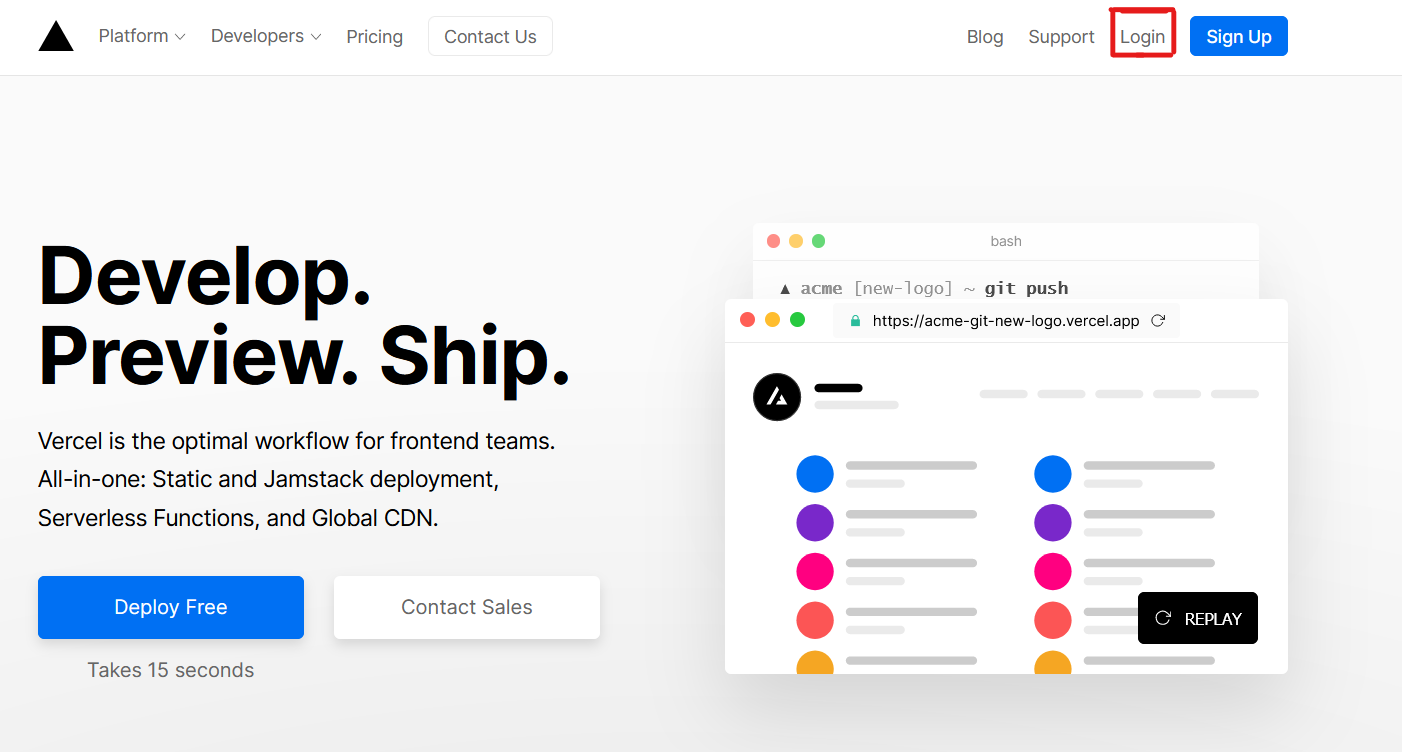
1. Klicke auf `Log in`
|
||||
|
||||
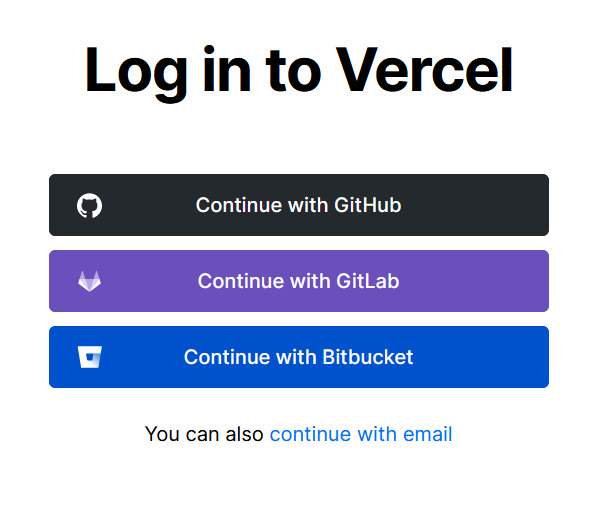
1. Melde dich mit deinem GitHub-account an, indem du `Continue with GitHub` klickst
|
||||
|
||||
1. Verbinde dich mit GitHub und erlaube den Zugriff auf alle Repositories, wenn gefordert
|
||||
1. Verbinde dich mit GitHub und erlaube den Zugriff auf alle Repositories (falls gefordert)
|
||||
1. Forke dieses Repository
|
||||
1. Gehe zurück zu deinem [Vercel dashboard](https://vercel.com/dashboard)
|
||||
1. Klick `Import Project`
|
||||
@@ -263,6 +324,6 @@ Vielen Dank! :heart:
|
||||
|
||||
---
|
||||
|
||||
Mitarbeit an dem Projekt is immer Willkommen! <3
|
||||
Mitarbeit an dem Projekt ist immer Willkommen! <3
|
||||
|
||||
Gebaut mit :heart: und JavaScript.
|
||||
@@ -8,6 +8,9 @@
|
||||
<a href="https://github.com/anuraghazra/github-readme-stats/actions">
|
||||
<img alt="Tests Passing" src="https://github.com/anuraghazra/github-readme-stats/workflows/Test/badge.svg" />
|
||||
</a>
|
||||
<a href="https://codecov.io/gh/anuraghazra/github-readme-stats">
|
||||
<img src="https://codecov.io/gh/anuraghazra/github-readme-stats/branch/master/graph/badge.svg" />
|
||||
</a>
|
||||
<a href="https://github.com/anuraghazra/github-readme-stats/issues">
|
||||
<img alt="Issues" src="https://img.shields.io/github/issues/anuraghazra/github-readme-stats?color=0088ff" />
|
||||
</a>
|
||||
@@ -32,11 +35,17 @@
|
||||
<a href="https://github.com/anuraghazra/github-readme-stats/issues/new/choose">Solicita una mejora</a>
|
||||
</p>
|
||||
<p align="center">
|
||||
<a href="readme.md">English</a>
|
||||
<a href="/docs/readme_cn.md">简体中文</a>
|
||||
·
|
||||
<a href="readme_cn.md">简体中文</a>
|
||||
<a href="/docs/readme_es.md">Español</a>
|
||||
·
|
||||
<a href="readme_ja.md">日本語</a>
|
||||
<a href="/docs/readme_de.md">Deutsch</a>
|
||||
·
|
||||
<a href="/docs/readme_ja.md">日本語</a>
|
||||
·
|
||||
<a href="/docs/readme_pt-BR.md">Português Brasileiro</a>
|
||||
·
|
||||
<a href="/docs/readme_kr.md">한국어</a>
|
||||
</p>
|
||||
</p>
|
||||
<p align="center">¿Te gusta este proyecto? ¡Por favor considera <a href="https://www.paypal.me/anuraghazra">donar</a> para ayudar a mejorarlo!
|
||||
@@ -44,7 +53,7 @@
|
||||
# Características
|
||||
|
||||
- [Tarjeta de estadísticas de GitHub](#tarjeta-de-estadísticas-de-github)
|
||||
- [Pins extra de GitHub](#pins-extra-de-github)
|
||||
- [Pins adicionales de GitHub](#pines-adicionales-de-github)
|
||||
- [Temas](#temas)
|
||||
- [Personalización](#personalización)
|
||||
- [Despliega por tu cuenta](#despliega-tu-propia-instancia-de-vercel)
|
||||
@@ -59,7 +68,7 @@ Cambia el valor `?username=` al nombre de tu usuario de GitHub.
|
||||
[](https://github.com/anuraghazra/github-readme-stats)
|
||||
```
|
||||
|
||||
_Nota: las clasificaciones se calculan basándose en las estadísticas del usuario. Ve [src/calculateRank.js](./src/calculateRank.js)._
|
||||
_Nota: las clasificaciones se calculan basándose en las estadísticas del usuario. Ve [src/calculateRank.js](../src/calculateRank.js)._
|
||||
|
||||
### Ocultar estadísticas individualmente
|
||||
|
||||
@@ -107,69 +116,59 @@ dark, radical, merko, gruvbox, tokyonight, onedark, cobalt, synthwave, highcontr
|
||||
|
||||
<img src="https://res.cloudinary.com/anuraghazra/image/upload/v1595174536/grs-themes_l4ynja.png" alt="GitHub Readme Stat Themes" width="600px"/>
|
||||
|
||||
Puedes ver una vista previa de [todos los temas disponibles](./themes/README.md) o ver el [archivo de configuración](./themes/index.js) del tema y también **puedes contribuir con nuevos temas** si lo deseas: D
|
||||
Puedes ver una vista previa de [todos los temas disponibles](../themes/README.md) o ver el [archivo de configuración](../themes/index.js) del tema y también **puedes contribuir con nuevos temas** si lo deseas :D
|
||||
|
||||
### Personalización
|
||||
|
||||
Puedes personalizar el aspecto de tu `Stats Card` o `Repo Card` de la manera que desees con los parámetros URL.
|
||||
|
||||
Opciones de personalización:
|
||||
#### Opciones Comunes:
|
||||
|
||||
| Option | type | description | Stats Card (default) | Repo Card (default) |
|
||||
| ----------- | --------- | ----------------------------- | -------------------- | ------------------- |
|
||||
| title_color | hex color | color del título | 2f80ed | 2f80ed |
|
||||
| text_color | hex color | color del contenido | 333 | 333 |
|
||||
| icon_color | hex color | color del ícono | 4c71f2 | 586069 |
|
||||
| bg_color | hex color | color de fondo | FFFEFE | FFFEFE |
|
||||
| line_height | number | controla el line_height | 30 | N/A |
|
||||
| hide_rank | boolean | oculta la clasificación | false | N/A |
|
||||
| hide_title | boolean | oculta el título | false | N/A |
|
||||
| hide_border | boolean | oculta el borde | false | N/A |
|
||||
| show_owner | boolean | muestra el propietario | N/A | false |
|
||||
| show_icons | boolean | muestra los íconos | false | N/A |
|
||||
| theme | string | establece un tema incorporado | 'default' | 'default_repocard' |
|
||||
- `title_color` - Color del título _(hex color)_
|
||||
- `text_color` - Color del contenido _(hex color)_
|
||||
- `icon_color` - Color de icono si esta disponible _(hex color)_
|
||||
- `bg_color` - Color de fondo _(hex color)_
|
||||
- `theme` - Nombre del tema, elige uno de [todos los temas disponible ](../themes/README.md)
|
||||
- `cache_seconds` - Cache _(min: 1800, max: 86400)_
|
||||
|
||||
> Nota sobre la caché: las tarjetas de Repo tienen un caché predeterminado de 30 minutos (1800 segundos) si el recuento forks y el recuento de estrellas es inferior a 1k; de lo contrario, son 2 horas (7200). También tenga en cuenta que el caché está sujeto a un mínimo de 30 minutos y un máximo de 24 horas
|
||||
|
||||
#### Opciones exclusivas de la tarjeta de estadísticas:
|
||||
|
||||
- `hide` - Ocultar los elementos especificados de las estadísticas _ (valores separados por comas) _
|
||||
- `hide_title` - _(boolean)_
|
||||
- `hide_rank` - _(boolean)_
|
||||
- `show_icons` - _(boolean)_
|
||||
- `include_all_commits` - Cuente los commits totales en lugar de solo los commits del año actual _(boolean)_
|
||||
- `count_private` - Cuenta los commits privadas _(boolean)_
|
||||
- `line_height` - Establece el alto de línea entre texto _(number)_
|
||||
|
||||
#### Opciones exclusivas de la tarjeta Repo:
|
||||
|
||||
- `show_owner` - Mostrar el nombre del propietario del repositorio _(boolean)_
|
||||
|
||||
#### Opciones exclusivas de la tarjeta de lenguajes:
|
||||
|
||||
- `hide` - Ocultar los lenguajes especificados de la tarjeta _(valores separados por comas)_
|
||||
- `hide_title` - _(boolean)_
|
||||
- `layout` - Cambiar entre dos diseños disponibles `default` & `compact`
|
||||
- `card_width` - Establecer el ancho de la tarjeta manualmente _(number)_
|
||||
|
||||
> :warning: **Importante:**
|
||||
> Los nombres de los idiomas deben tener escape de uri, como se especifica en [Código porciento](https://es.wikipedia.org/wiki/C%C3%B3digo_porciento)
|
||||
> (es decir: `c++` debería convertirse en `c%2B%2B`,`jupyter notebook` debería convertirse en `jupyter%20notebook`, etc.)
|
||||
|
||||
---
|
||||
|
||||
### Ejemplo
|
||||
# Pines adicionales de GitHub
|
||||
|
||||
- Predeterminado
|
||||
Los pines adicionales de GitHub le permiten fijar más de 6 repositorios en su perfil utilizando un readme de perfil de GitHub.
|
||||
|
||||

|
||||
|
||||
- Ocultando estadísticas específicas
|
||||
|
||||

|
||||
|
||||
- Mostrando íconos
|
||||
|
||||

|
||||
|
||||
- Temas
|
||||
|
||||
Elige uno de los [temas predeterminados](#temas)
|
||||
|
||||

|
||||
|
||||
- Personalizando la tarjeta de estadísticas
|
||||
|
||||

|
||||
|
||||
- Personalizando la tarjeta de repositorio
|
||||
|
||||

|
||||
|
||||
---
|
||||
|
||||
# Pins extra de GitHub
|
||||
|
||||
Los pins extra de GitHub te permiten anclar más de 6 repositorios en tu perfil utilizando el archivo README.md.
|
||||
|
||||
¡Bien! Ya no estás limitado a 6 repositorios anclados.
|
||||
Yey! Ya no está limitado a 6 repositorios anclados.
|
||||
|
||||
### Utilización
|
||||
|
||||
Copia y pega este código en tu README.md y cambia los links.
|
||||
Copie y pegue este código en su archivo Léame y cambie los enlaces.
|
||||
|
||||
Endpoint: `api/pin?username=anuraghazra&repo=github-readme-stats`
|
||||
|
||||
@@ -185,9 +184,89 @@ Utiliza la variable [show_owner](#customización) para incluir el nombre de usua
|
||||
|
||||
[](https://github.com/anuraghazra/github-readme-stats)
|
||||
|
||||
### Pequeño consejo (alinear las tarjetas de repositorios)
|
||||
# Tarjeta de lenguajes principales
|
||||
|
||||
Usualmente no serías capaz de alinear las imágenes una al lado de otra. Para lograrlo, puedes realizar esto:
|
||||
La tarjeta de lenguajes principales muestra los lenguajes principales del usuario de github que se han utilizado principalmente.
|
||||
|
||||
_NOTA: los lenguajes principales no indican mi nivel de habilidad o algo así, es una métrica de github de los lenguajes que tengo más código en github, es una nueva característica de github-readme-stats_
|
||||
|
||||
### Utilización
|
||||
|
||||
Copie y pegue este código en su readme y cambie los enlaces.
|
||||
|
||||
Endpoint: `api/top-langs?username=anuraghazra`
|
||||
|
||||
```md
|
||||
[](https://github.com/anuraghazra/github-readme-stats)
|
||||
```
|
||||
|
||||
### Ocultar lenguajes individuales
|
||||
|
||||
Puede usar el parámetro `? Hide = language1, language2` para ocultar lenguajes individuales.
|
||||
|
||||
```md
|
||||
[](https://github.com/anuraghazra/github-readme-stats)
|
||||
```
|
||||
|
||||
### Diseño de tarjeta de lenguaje compacta
|
||||
|
||||
Puede usar la opción `& layout = compact` para cambiar el diseño de la tarjeta.
|
||||
|
||||
```md
|
||||
[](https://github.com/anuraghazra/github-readme-stats)
|
||||
```
|
||||
|
||||
### Ejemplo
|
||||
|
||||
[](https://github.com/anuraghazra/github-readme-stats)
|
||||
|
||||
- Diseño compacto
|
||||
|
||||
[](https://github.com/anuraghazra/github-readme-stats)
|
||||
|
||||
---
|
||||
|
||||
### Todos los ejemplos
|
||||
|
||||
- Por Defecto
|
||||
|
||||

|
||||
|
||||
- Ocultar estadísticas específicas
|
||||
|
||||

|
||||
|
||||
- Mostrando iconos
|
||||
|
||||

|
||||
|
||||
- Incluir todos los Commits
|
||||
|
||||

|
||||
|
||||
- Temas
|
||||
|
||||
Elija entre cualquiera de los [temas predeterminados](#themes)
|
||||
|
||||

|
||||
|
||||
- Personalizando tarjeta de estadísticas
|
||||
|
||||

|
||||
|
||||
- Personalizar la tarjeta de repositorio
|
||||
|
||||

|
||||
|
||||
- Lenguajes Principales
|
||||
|
||||
[](https://github.com/anuraghazra/github-readme-stats)
|
||||
|
||||
---
|
||||
|
||||
### Consejo rápido (alinee las tarjetas de repositorio)
|
||||
|
||||
Por lo general, no podrá diseñar las imágenes una al lado de la otra. Para hacerlo, puede usar este enfoque:
|
||||
|
||||
```md
|
||||
<a href="https://github.com/anuraghazra/github-readme-stats">
|
||||
@@ -200,6 +279,8 @@ Usualmente no serías capaz de alinear las imágenes una al lado de otra. Para l
|
||||
|
||||
## Despliega tu propia instancia de vercel
|
||||
|
||||
#### [Check Out Step By Step Video Tutorial By @codeSTACKr](https://youtu.be/n6d4KHSKqGk?t=107)
|
||||
|
||||
Desde que la API de GitHub permite solo 5 mil peticiones por hora, es posible que mi `https://github-readme-stats.vercel.app/api` pueda llegar al límite. Si lo alojas en tu propio servidor de Vercel, no tendrás que preocuparte de nada. ¡Clickea en el botón "Deploy" para comenzar!
|
||||
|
||||
Nota: debido a esto [#58](https://github.com/anuraghazra/github-readme-stats/pull/58) podríamos manejar más de 5 mil peticiones sin tener ningún problema con el downtime :D
|
||||
@@ -222,7 +303,7 @@ Nota: debido a esto [#58](https://github.com/anuraghazra/github-readme-stats/pul
|
||||
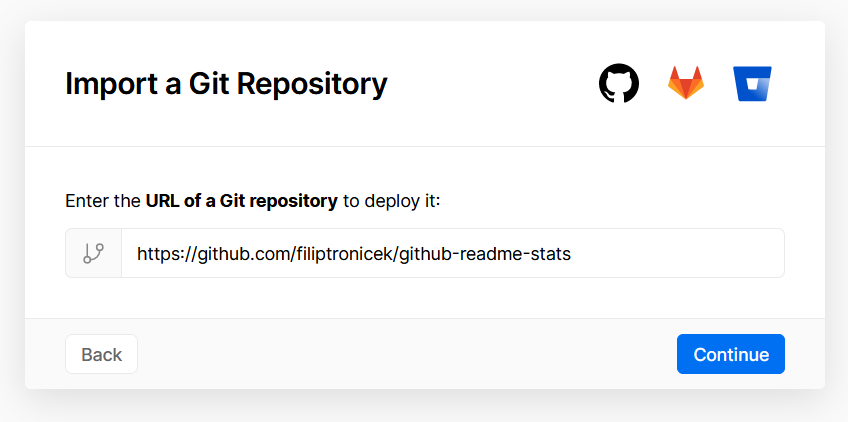
1. Selecciona `Import Git Repository`
|
||||
|
||||
1. Selecciona "root" y matén todo como está, simplemente añade tu variable de entorno llamada PAT_1 (como se muestra), la cual contendrá un token de acceso personal (PAT), el cual puedes crear fácilmente [aquí](https://github.com/settings/tokens/new) (mantén todo como está, simplemente asígnale un nombre, puede ser cualquiera que desees)
|
||||

|
||||

|
||||
1. Clickea "Deploy" y ya está listo. ¡Ve tus dominios para usar la API!
|
||||
|
||||
</details>
|
||||
@@ -0,0 +1,340 @@
|
||||
<p align="center">
|
||||
<img width="100px" src="https://res.cloudinary.com/anuraghazra/image/upload/v1594908242/logo_ccswme.svg" align="center" alt="GitHub Readme Stats" />
|
||||
<h2 align="center">GitHub Readme Stats</h2>
|
||||
<p align="center">Obtenez des statistiques GitHub générées dynamiquement sur vos ReadME !</p>
|
||||
</p>
|
||||
<p align="center">
|
||||
<a href="https://github.com/anuraghazra/github-readme-stats/actions">
|
||||
<img alt="Tests Passing" src="https://github.com/anuraghazra/github-readme-stats/workflows/Test/badge.svg" />
|
||||
</a>
|
||||
<a href="https://codecov.io/gh/anuraghazra/github-readme-stats">
|
||||
<img src="https://codecov.io/gh/anuraghazra/github-readme-stats/branch/master/graph/badge.svg" />
|
||||
</a>
|
||||
<a href="https://github.com/anuraghazra/github-readme-stats/issues">
|
||||
<img alt="Issues" src="https://img.shields.io/github/issues/anuraghazra/github-readme-stats?color=0088ff" />
|
||||
</a>
|
||||
<a href="https://github.com/anuraghazra/github-readme-stats/pulls">
|
||||
<img alt="GitHub pull requests" src="https://img.shields.io/github/issues-pr/anuraghazra/github-readme-stats?color=0088ff" />
|
||||
</a>
|
||||
<br />
|
||||
<br />
|
||||
<a href="https://a.paddle.com/v2/click/16413/119403?link=1227">
|
||||
<img src="https://img.shields.io/badge/Supporté%20par-VSCode%20Power%20User%20%E2%86%92-gray.svg?colorA=655BE1&colorB=4F44D6&style=for-the-badge"/>
|
||||
</a>
|
||||
<a href="https://a.paddle.com/v2/click/16413/119403?link=2345">
|
||||
<img src="https://img.shields.io/badge/Supporté%20par-Node%20Cli.com%20%E2%86%92-gray.svg?colorA=61c265&colorB=4CAF50&style=for-the-badge"/>
|
||||
</a>
|
||||
</p>
|
||||
|
||||
<p align="center">
|
||||
<a href="#demo">Voir la Demo</a>
|
||||
·
|
||||
<a href="https://github.com/anuraghazra/github-readme-stats/issues/new/choose">Soumettre un bug</a>
|
||||
·
|
||||
<a href="https://github.com/anuraghazra/github-readme-stats/issues/new/choose">Demander une nouveauté</a>
|
||||
</p>
|
||||
<p align="center">
|
||||
<a href="/docs/readme_cn.md">简体中文</a>
|
||||
·
|
||||
<a href="/docs/readme_es.md">Español</a>
|
||||
·
|
||||
<a href="/docs/readme_de.md">Deutsch</a>
|
||||
·
|
||||
<a href="/docs/readme_ja.md">日本語</a>
|
||||
·
|
||||
<a href="/docs/readme_pt-BR.md">Português Brasileiro</a>
|
||||
·
|
||||
<a href="/docs/readme_kr.md">한국어</a>
|
||||
</p>
|
||||
</p>
|
||||
<p align="center">Tu aimes ce projet? Penser <a href="https://www.paypal.me/anuraghazra">à faire un don</a> pour l'améliorer!
|
||||
|
||||
# Features
|
||||
|
||||
- [Carte des stats GitHub](#github-stats-card)
|
||||
- [GitHub Extra Pins](#github-extra-pins)
|
||||
- [Carte des meilleurs langages](#top-languages-card)
|
||||
- [Themes](#themes)
|
||||
- [Personnalisation](#customization)
|
||||
- [Deployer toi-même](#deploy-on-your-own-vercel-instance)
|
||||
|
||||
# Carte des Stats GitHub
|
||||
|
||||
Copiez-collez ceci dans votre Markdown, et c'est tout. C'est simple !
|
||||
|
||||
Remplacez la valeur `?username=` par le nom d'utilisateur de votre GitHub.
|
||||
|
||||
```md
|
||||
[](https://github.com/anuraghazra/github-readme-stats)
|
||||
```
|
||||
|
||||
_Note: Les rangs sont calculés sur la base des statistiques de l'utilisateur, voir [src/calculateRank.js](./src/calculateRank.js)_
|
||||
|
||||
### Cacher les statistiques individuelles
|
||||
|
||||
Pour masquer des statistiques spécifiques, vous pouvez passer un paramètre de requête `?hide=` avec des valeurs séparées par des virgules.
|
||||
|
||||
> Options: `&hide=stars,commits,prs,issues,contribs`
|
||||
|
||||
```md
|
||||

|
||||
```
|
||||
|
||||
### Ajouter le compte des contributions privées au compte des commits totaux
|
||||
|
||||
Vous pouvez ajouter le compte de toutes vos contributions privées au compte total des engagements en utilisant le paramètre de requête `?count_private=true`.
|
||||
|
||||
_Note: Si vous déployez vous-même ce projet, les contributions privées seront comptées par défaut ; sinon, vous devez choisir de partager les comptes de vos contributions privées._
|
||||
|
||||
> Options: `&count_private=true`
|
||||
|
||||
```md
|
||||

|
||||
```
|
||||
|
||||
### Afficher les icônes
|
||||
|
||||
Pour activer les icônes, vous pouvez passer `show_icons=true` dans le paramètre de requête, comme ceci :
|
||||
|
||||
```md
|
||||

|
||||
```
|
||||
|
||||
### Themes
|
||||
|
||||
Avec les thèmes intégrés, vous pouvez personnaliser l'apparence de la carte sans faire de [personnalisation manuelle](#customization).
|
||||
|
||||
Use `?theme=THEME_NAME` parameter like so :-
|
||||
|
||||
```md
|
||||

|
||||
```
|
||||
|
||||
#### Tous les thèmes intégrés :-
|
||||
|
||||
dark, radical, merko, gruvbox, tokyonight, onedark, cobalt, synthwave, highcontrast, dracula
|
||||
|
||||
<img src="https://res.cloudinary.com/anuraghazra/image/upload/v1595174536/grs-themes_l4ynja.png" alt="GitHub Readme Stat Themes" width="600px"/>
|
||||
|
||||
Vous pouvez consulter un aperçu de [tous les thèmes disponibles](./themes/README.md) ou consulter le [fichier de configuration des thèmes](./themes/index.js) & **vous pouvez également ajouter de nouveaux thèmes** si vous le souhaitez :D
|
||||
|
||||
### Personnalisation
|
||||
|
||||
Vous pouvez personnaliser l'apparence de votre `Stats Card` ou `Repo Card` comme vous le souhaitez avec les paramètres d'URL.
|
||||
|
||||
#### Common Options:
|
||||
|
||||
- `title_color` - Card's title color _(hex color)_
|
||||
- `text_color` - Body text color _(hex color)_
|
||||
- `icon_color` - Icons color if available _(hex color)_
|
||||
- `bg_color` - Card's background color _(hex color)_ **or** a gradient in the form of _angle,start,end_
|
||||
- `theme` - name of the theme, choose from [all available themes](./themes/README.md)
|
||||
- `cache_seconds` - set the cache header manually _(min: 1800, max: 86400)_
|
||||
|
||||
##### Gradient in bg_color
|
||||
|
||||
Vous pouvez fournir plusieurs valeurs (suivie d'une virgule) dans l'option bg_color pour rendre un degradé, le format du degradé est :-
|
||||
|
||||
```
|
||||
&bg_color=DEG,COLOR1,COLRO2,COLOR3...COLOR10
|
||||
```
|
||||
|
||||
> Note relative: Les cartes répo ont un cache par défaut de 30 minutes (1800 secondes) si le nombre de bifurcations et d'étoiles est inférieur à 1K, alors il est de 2 heures (7200). Notez également que la mémoire cache est limitée à 30 minutes au minimum et à 24 heures au maximum.
|
||||
|
||||
#### Stats Card Exclusive Options:
|
||||
|
||||
- `hide` - Cacher les éléments spécifiés dans les statistiques _(Comma seperated values)_
|
||||
- `hide_title` - _(boolean)_
|
||||
- `hide_rank` - _(boolean)_
|
||||
- `show_icons` - _(boolean)_
|
||||
- `include_all_commits` - Compter le total de commits au lieu de ne compter que les commits de l'année en cours _(boolean)_
|
||||
- `count_private` - Compter les commits privés _(boolean)_
|
||||
- `line_height` - Fixer la hauteur de la ligne entre les textes _(number)_
|
||||
|
||||
#### Repo Card Exclusive Options:
|
||||
|
||||
- `show_owner` - Affiche le nom du propriétaire du répo _(boolean)_
|
||||
|
||||
#### Language Card Exclusive Options:
|
||||
|
||||
- `hide` - Masquer les langages spécifiés sur la carte _(Comma seperated values)_
|
||||
- `hide_title` - _(boolean)_
|
||||
- `layout` - Switcher entre 2 mise en page `default` & `compact`
|
||||
- `card_width` - Fixer la width de la carte manuellement _(number)_
|
||||
|
||||
> :warning: **Important:**
|
||||
> Les noms des langages doivent être en format uri, comme spécifié dans [Percent Encoding](https://fr.wikipedia.org/wiki/Percent-encoding)
|
||||
> (c'est-à-dire que: `c++` devrait devenir `c%2B%2B`, `jupyter notebook` devrait devenir `jupyter%20notebook`, etc.)
|
||||
|
||||
---
|
||||
|
||||
# GitHub Extra Pins
|
||||
|
||||
Les épingles supplémentaires GitHub vous permettent d'épingler plus de 6 repos dans votre profil en utilisant un profil GitHub readme.
|
||||
|
||||
et OUI ! Vous n'êtes plus limité à 6 dépôts épinglés.
|
||||
|
||||
### Usage
|
||||
|
||||
Copiez-collez ce code dans votre readme et modifiez les liens.
|
||||
|
||||
Extrémité: `api/pin?username=anuraghazra&repo=github-readme-stats`
|
||||
|
||||
```md
|
||||
[](https://github.com/anuraghazra/github-readme-stats)
|
||||
```
|
||||
|
||||
### Demo
|
||||
|
||||
[](https://github.com/anuraghazra/github-readme-stats)
|
||||
|
||||
Utiliser la variable [show_owner](#customization) pour inclure l'username du propriétaire du repo.
|
||||
|
||||
[](https://github.com/anuraghazra/github-readme-stats)
|
||||
|
||||
# Carte des langages les + utilisés
|
||||
|
||||
La carte des langages principaux montre les langages les plus utilisées par les utilisateurs de GitHub.
|
||||
|
||||
_NOTE: Les langages affichés n'indiquent pas mon niveau de compétence ou quelque chose comme ça, c'est une métrique GitHub de quelles langages j'ai le plus de code sur GitHub, c'est une nouvelle fonctionnalité de github-readme-stats_
|
||||
|
||||
### Usage
|
||||
|
||||
Copiez-collez ce code dans votre readme et modifiez les liens.
|
||||
|
||||
Extrémité: `api/top-langs?username=anuraghazra`
|
||||
|
||||
```md
|
||||
[](https://github.com/anuraghazra/github-readme-stats)
|
||||
```
|
||||
|
||||
### Cacher certaines langages
|
||||
|
||||
Tu peux utiliser le paramètre `?hide=language1,language2` pour masquer les langages individuels.
|
||||
|
||||
```md
|
||||
[](https://github.com/anuraghazra/github-readme-stats)
|
||||
```
|
||||
|
||||
### Carte compacte des langages
|
||||
|
||||
Tu peux utiliser l'option `&layout=compact` pour changer le style de la carte.
|
||||
|
||||
```md
|
||||
[](https://github.com/anuraghazra/github-readme-stats)
|
||||
```
|
||||
|
||||
### Démo
|
||||
|
||||
[](https://github.com/anuraghazra/github-readme-stats)
|
||||
|
||||
- Carte compacte
|
||||
|
||||
[](https://github.com/anuraghazra/github-readme-stats)
|
||||
|
||||
---
|
||||
|
||||
### Toutes les démos
|
||||
|
||||
- Default
|
||||
|
||||

|
||||
|
||||
- Ne pas afficher des stats spécifiques
|
||||
|
||||

|
||||
|
||||
- Afficher les icônes
|
||||
|
||||

|
||||
|
||||
- Inclure tous les commits
|
||||
|
||||

|
||||
|
||||
- Themes
|
||||
|
||||
Choisissez parmi l'une des [default themes](#themes)
|
||||
|
||||

|
||||
|
||||
- Dégradé
|
||||
|
||||

|
||||
|
||||
- Personnaliser la carte des stats
|
||||
|
||||

|
||||
|
||||
- Personnaliser la carte repo
|
||||
|
||||

|
||||
|
||||
- Top Langages
|
||||
|
||||
[](https://github.com/anuraghazra/github-readme-stats)
|
||||
|
||||
---
|
||||
|
||||
### Conseil rapide (Aligner les cartes des repos)
|
||||
|
||||
En général, vous ne pourrez pas mettre les images côte à côte. Pour ce faire, vous pouvez utiliser cette approche :
|
||||
|
||||
```md
|
||||
<a href="https://github.com/anuraghazra/github-readme-stats">
|
||||
<img align="left" src="https://github-readme-stats.vercel.app/api/pin/?username=anuraghazra&repo=github-readme-stats" />
|
||||
</a>
|
||||
<a href="https://github.com/anuraghazra/convoychat">
|
||||
<img align="left" src="https://github-readme-stats.vercel.app/api/pin/?username=anuraghazra&repo=convoychat" />
|
||||
</a>
|
||||
```
|
||||
|
||||
## Déployer sur votre propre instance Vercel
|
||||
|
||||
#### [Check Out Step By Step Video Tutorial By @codeSTACKr](https://youtu.be/n6d4KHSKqGk?t=107)
|
||||
|
||||
Comme l'API GitHub ne permet que 5k requêtes par heure, il est possible que mon `https://github-readme-stats.vercel.app/api` puisse atteindre le limiteur de débit. Si vous l'hébergez sur votre propre serveur Vercel, alors vous n'avez pas à vous soucier de quoi que ce soit. Cliquez sur le bouton de déploiement pour commencer !
|
||||
|
||||
NOTE: Depuis [#58](https://github.com/anuraghazra/github-readme-stats/pull/58) nous devrions être en mesure de traiter plus de 5 000 demandes et ne pas avoir de problèmes de temps d'arrêt :D
|
||||
|
||||
[](https://vercel.com/import/project?template=https://github.com/anuraghazra/github-readme-stats)
|
||||
|
||||
<details>
|
||||
<summary><b> Guide pour la mise en place de Vercel 🔨 </b></summary>
|
||||
|
||||
1. Allez sur [vercel.com](https://vercel.com/)
|
||||
1. Cliquez sur `Log in`
|
||||

|
||||
1. Connectez-vous avec GitHub en cliquant `Continue with GitHub`
|
||||

|
||||
1. Connectez-vous à GitHub et autorisez l'accès à tous les dépôts, si vous y êtes invité
|
||||
1. Fork ce repo
|
||||
1. Retournez au [dashboard Vercel](https://vercel.com/dashboard)
|
||||
1. Selectez `Import Project`
|
||||

|
||||
1. Selectez `Import Git Repository`
|
||||

|
||||
1. Choisissez root et gardez tout tel quel, ajoutez simplement votre variable d'environnement nommée PAT_1 (comme indiqué), qui contiendra un jeton d'accès personnel (PAT), que vous pouvez facilement créer [ici](https://github.com/settings/tokens/new) (laissez tout tel quel, nommez le simplement quelque chose, cela peut être tout ce que vous voulez)
|
||||

|
||||
1. Cliquez sur "déployer" et vous êtes prêt à partir. Voir vos domaines pour utiliser l'API !
|
||||
|
||||
</details>
|
||||
|
||||
## :sparkling_heart: Supporter le project
|
||||
|
||||
Je mets open-source presque tout ce que je peux, et j'essaie de répondre à tous ceux qui ont besoin d'aide en utilisant ces projets. Évidemment,
|
||||
cela prend du temps. Vous pouvez utiliser ce service gratuitement.
|
||||
|
||||
Cependant, si vous utilisez ce projet et que vous en êtes satisfait ou si vous voulez simplement m'encourager à continuer à créer, il y a quelques façons de le faire :-
|
||||
|
||||
- Donner un crédit approprié lorsque vous utilisez github-readme-stats sur votre readme, avec un lien vers celui-ci :D
|
||||
- Mettre une étoile et partager le projet :rocket:
|
||||
- [](https://www.paypal.me/anuraghazra) - Vous pouvez faire des dons uniques via PayPal. Je vais probablement acheter un ~~café~~ thé. :tea:
|
||||
|
||||
Merci! :heart:
|
||||
|
||||
---
|
||||
|
||||
Les Contributions sont les bienvenus! <3
|
||||
|
||||
Fais avec :heart: et JavaScript.
|
||||
+310
-302
@@ -1,302 +1,310 @@
|
||||
<p align="center">
|
||||
<img width="100px" src="https://res.cloudinary.com/anuraghazra/image/upload/v1594908242/logo_ccswme.svg" align="center" alt="GitHub Readme Stats" />
|
||||
<h2 align="center">GitHub Readme Stats</h2>
|
||||
<p align="center">あなたのREADMEに動的に生成されたGitHubの統計情報を載せましょう!</p>
|
||||
</p>
|
||||
|
||||
<p align="center">
|
||||
<a href="https://github.com/anuraghazra/github-readme-stats/actions">
|
||||
<img alt="Tests Passing" src="https://github.com/anuraghazra/github-readme-stats/workflows/Test/badge.svg" />
|
||||
</a>
|
||||
<a href="https://codecov.io/gh/anuraghazra/github-readme-stats">
|
||||
<img src="https://codecov.io/gh/anuraghazra/github-readme-stats/branch/master/graph/badge.svg" />
|
||||
</a>
|
||||
<a href="https://github.com/anuraghazra/github-readme-stats/issues">
|
||||
<img alt="Issues" src="https://img.shields.io/github/issues/anuraghazra/github-readme-stats?color=0088ff" />
|
||||
</a>
|
||||
<a href="https://github.com/anuraghazra/github-readme-stats/pulls">
|
||||
<img alt="GitHub pull requests" src="https://img.shields.io/github/issues-pr/anuraghazra/github-readme-stats?color=0088ff" />
|
||||
</a>
|
||||
<br />
|
||||
<br />
|
||||
<a href="https://a.paddle.com/v2/click/16413/119403?link=1227">
|
||||
<img src="https://img.shields.io/badge/Supported%20by-VSCode%20Power%20User%20%E2%86%92-gray.svg?colorA=655BE1&colorB=4F44D6&style=for-the-badge"/>
|
||||
</a>
|
||||
<a href="https://a.paddle.com/v2/click/16413/119403?link=2345">
|
||||
<img src="https://img.shields.io/badge/Supported%20by-Node%20Cli.com%20%E2%86%92-gray.svg?colorA=61c265&colorB=4CAF50&style=for-the-badge"/>
|
||||
</a>
|
||||
</p>
|
||||
|
||||
<p align="center">
|
||||
<a href="#demo">View Demo</a>
|
||||
·
|
||||
<a href="https://github.com/anuraghazra/github-readme-stats/issues/new/choose">Report Bug</a>
|
||||
·
|
||||
<a href="https://github.com/anuraghazra/github-readme-stats/issues/new/choose">Request Feature</a>
|
||||
</p>
|
||||
<p align="center">
|
||||
<a href="readme.md">English</a>
|
||||
·
|
||||
<a href="readme_cn.md">简体中文</a>
|
||||
·
|
||||
<a href="readme_es.md">Español</a>
|
||||
</p>
|
||||
</p>
|
||||
<p align="center">このプロジェクトを気に入っていただけましたか?<br>もしよろしければ、プロジェクトのさらなる改善のために<a href="https://www.paypal.me/anuraghazra">寄付</a>を検討して頂けると嬉しいです!</p>
|
||||
|
||||
# Features
|
||||
|
||||
- [GitHub Stats Card](#github-stats-card)
|
||||
- [GitHub Extra Pins](#github-extra-pins)
|
||||
- [Top Languages Card](#top-languages-card)
|
||||
- [Themes](#themes)
|
||||
- [Customization](#customization)
|
||||
- [Deploy Yourself](#deploy-on-your-own-vercel-instance)
|
||||
|
||||
# GitHub Stats Card
|
||||
|
||||
以下の構文をコピーして、あなたの Markdown ファイルに貼り付けるだけです。
|
||||
簡単ですね!
|
||||
|
||||
`?username=` の値は、あなたの GitHub アカウントのユーザー名に変更してください。
|
||||
|
||||
```md
|
||||
[](https://github.com/anuraghazra/github-readme-stats)
|
||||
```
|
||||
|
||||
_Note: カードに表示されるランクはユーザの統計情報に基づいて計算されています。詳しくは、[src/calculateRank.js](./src/calculateRank.js)を見てください。_
|
||||
|
||||
### Hiding individual stats
|
||||
|
||||
クエリパラメータ `?hide=` にカンマ区切りの値を渡すことで、特定の統計情報を隠すことができます。
|
||||
|
||||
> Options: `&hide=stars,commits,prs,issues,contribs`
|
||||
|
||||
```md
|
||||

|
||||
```
|
||||
|
||||
### Adding private contributions count to total commits count
|
||||
|
||||
クエリパラメータ `?count_private=true` を使用することで、private contributions の数をコミット総数に追加することができます。
|
||||
|
||||
_Note: このプロジェクトを自分でデプロイしている場合、デフォルトでは非公開の貢献がカウントされます。_
|
||||
|
||||
> Options: `&count_private=true`
|
||||
|
||||
```md
|
||||

|
||||
```
|
||||
|
||||
### Showing icons
|
||||
|
||||
クエリパラメータ `?show_icons=true` を使用することで、アイコンが表示が有効になります。
|
||||
|
||||
```md
|
||||

|
||||
```
|
||||
|
||||
### Themes
|
||||
|
||||
内蔵されているテーマを使用することで、任意の[手動のカスタマイズ](#customization)を行うことなく、カードの外観をカスタマイズすることができます。
|
||||
|
||||
`?theme=THEME_NAME` は以下のように使います。
|
||||
|
||||
```md
|
||||

|
||||
```
|
||||
|
||||
#### All inbuilt themes :-
|
||||
|
||||
dark, radical, merko, gruvbox, tokyonight, onedark, cobalt, synthwave, highcontrast, dracula
|
||||
|
||||
<img src="https://res.cloudinary.com/anuraghazra/image/upload/v1595174536/grs-themes_l4ynja.png" alt="GitHub Readme Stat Themes" width="600px"/>
|
||||
|
||||
用意されている全てのテーマの[プレビュー](./themes/README.md)や[設定ファイル](./themes/index.js)を見ることができます。もしよろしければ、**新しいテーマを投稿してみてください** (´∀` )
|
||||
|
||||
### Customization
|
||||
|
||||
`Stats Card` や `Repo Card` の外観を URL パラメーターを使って好きなようにカスタマイズすることができます。
|
||||
|
||||
Customization Options:
|
||||
|
||||
| Option | type | description | Stats Card (default) | Repo Card (default) | Top Lang Card (default) |
|
||||
| ------------- | --------- | -------------------------------------------- | -------------------- | ------------------- | ----------------------- |
|
||||
| title_color | hex color | タイトルの色 | 2f80ed | 2f80ed | 2f80ed |
|
||||
| text_color | hex color | 文字の色 | 333 | 333 | 333 |
|
||||
| icon_color | hex color | アイコンの色 | 4c71f2 | 586069 | 586069 |
|
||||
| bg_color | hex color | カードの背景色 | FFFEFE | FFFEFE | FFFEFE |
|
||||
| line_height | number | 字間距離 | 30 | N/A | N/A |
|
||||
| hide | CSV | 項目の非表示 | undefined | N/A | undefined |
|
||||
| hide_rank | boolean | ranking の非表示 | false | N/A | N/A |
|
||||
| hide_title | boolean | タイトルの非表示 | false | N/A | false |
|
||||
| hide_border | boolean | 枠線の非表示 | false | N/A | N/A |
|
||||
| show_owner | boolean | オーナー名の表示 | N/A | false | N/A |
|
||||
| show_icons | boolean | アイコンの表示 | false | N/A | N/A |
|
||||
| theme | string | 用意されているテーマ | 'default' | 'default_repocard' | 'default' |
|
||||
| cache_seconds | number | キャッシュコントロール | 1800 | 1800 | 1800 |
|
||||
| count_private | boolean | private contributions 数をコミット総数に追加 | false | N/A | N/A |
|
||||
| layout | string | レイアウトのオプション選択 | N/A | N/A | 'default' |
|
||||
|
||||
> キャッシュに関する注意点: Repo cards のデフォルトのキャッシュは、フォーク数とスター数が 1k 未満の場合は 30 分(1800 秒) で、それ以外の場合は 2 時間(7200) です。また、キャッシュは最低でも 30 分、最大でも 24 時間に制限されていることに注意してください。
|
||||
|
||||
# GitHub Extra Pins
|
||||
|
||||
GitHub extra pins を使うと、GitHub の readme プロフィールを使って、自分のプロフィールに 6 つ以上のリポジトリをピン留めすることができます。
|
||||
|
||||
イェーイ! もはや 6 つのピン留めされたリポジトリに制限されることはありません。
|
||||
|
||||
### Usage
|
||||
|
||||
以下のコードをあなたの readme にコピー & ペーストし、リンクを変更してください。
|
||||
|
||||
Endpoint: `api/pin?username=anuraghazra&repo=github-readme-stats`
|
||||
|
||||
```md
|
||||
[](https://github.com/anuraghazra/github-readme-stats)
|
||||
```
|
||||
|
||||
### Demo
|
||||
|
||||
[](https://github.com/anuraghazra/github-readme-stats)
|
||||
|
||||
リポジトリのオーナーのユーザー名を含める場合は、show_owner 変数を使用します。
|
||||
|
||||
[](https://github.com/anuraghazra/github-readme-stats)
|
||||
|
||||
# Top Languages Card
|
||||
|
||||
Top languages card には、その GitHub ユーザーが最も利用している Top languages が表示されます。
|
||||
|
||||
_NOTE: Top languages は、ユーザのスキルレベルを示すものではなく、GitHub 上でどの言語で最も多くのコードを書いているかを示す GitHub の指標です。_
|
||||
|
||||
### Usage
|
||||
|
||||
以下のコードをあなたの readme にコピー & ペーストし、リンクを変更してください。
|
||||
|
||||
Endpoint: `api/top-langs?username=anuraghazra`
|
||||
|
||||
```md
|
||||
[](https://github.com/anuraghazra/github-readme-stats)
|
||||
```
|
||||
|
||||
### Hide individual languages
|
||||
|
||||
クエリパラメータ `?hide=language1,language2` 使用することで、個々の言語を非表示にすることができます。
|
||||
|
||||
```md
|
||||
[](https://github.com/anuraghazra/github-readme-stats)
|
||||
```
|
||||
|
||||
### Compact Language Card Layout
|
||||
|
||||
クエリパラメータ `&layout=compact` を使用することで、カードのデザインを変更することができます。
|
||||
|
||||
```md
|
||||
[](https://github.com/anuraghazra/github-readme-stats)
|
||||
```
|
||||
|
||||
### Demo
|
||||
|
||||
[](https://github.com/anuraghazra/github-readme-stats)
|
||||
|
||||
- Compact layout
|
||||
|
||||
[](https://github.com/anuraghazra/github-readme-stats)
|
||||
|
||||
---
|
||||
|
||||
### All Demos
|
||||
|
||||
- Default
|
||||
|
||||

|
||||
|
||||
- Hiding specific stats
|
||||
|
||||

|
||||
|
||||
- Showing icons
|
||||
|
||||

|
||||
|
||||
- Themes
|
||||
|
||||
任意の[テーマ](#themes)を選択できます。
|
||||
|
||||

|
||||
|
||||
- Customizing stats card
|
||||
|
||||

|
||||
|
||||
- Customizing repo card
|
||||
|
||||

|
||||
|
||||
- Top languages
|
||||
|
||||
[](https://github.com/anuraghazra/github-readme-stats)
|
||||
|
||||
---
|
||||
|
||||
### Quick Tip (Align The Repo Cards)
|
||||
|
||||
通常、画像を並べてレイアウトすることはできません。そのためには、次のような方法があります。
|
||||
|
||||
```md
|
||||
<a href="https://github.com/anuraghazra/github-readme-stats">
|
||||
<img align="left" src="https://github-readme-stats.vercel.app/api/pin/?username=anuraghazra&repo=github-readme-stats" />
|
||||
</a>
|
||||
<a href="https://github.com/anuraghazra/convoychat">
|
||||
<img align="left" src="https://github-readme-stats.vercel.app/api/pin/?username=anuraghazra&repo=convoychat" />
|
||||
</a>
|
||||
```
|
||||
|
||||
## Deploy on your own Vercel instance
|
||||
|
||||
GitHub API は 1 時間あたり 5k リクエストしか受け付けていないので、私の `https://github-readme-stats.vercel.app/api` がレートリミッターを超えてしまう可能性があります。自分の Vercel サーバーでホストしているのであれば、何も心配する必要はありません。デプロイボタンをクリックして始めましょう!
|
||||
|
||||
NOTE: [#58](https://github.com/anuraghazra/github-readme-stats/pull/58) 以降は 5k 以上のリクエストに対応できるようになり、ダウンタイムの問題もなくなりました (´∀` )
|
||||
|
||||
[](https://vercel.com/import/project?template=https://github.com/anuraghazra/github-readme-stats)
|
||||
|
||||
<details>
|
||||
<summary>Vercelの設定ガイド</summary>
|
||||
|
||||
1. [vercel.com](https://vercel.com/)に行きます。
|
||||
1. `Log in`をクリックします。
|
||||

|
||||
1. `Continue with GitHub` を押して GitHub にサインインします。
|
||||

|
||||
1. GitHub にサインインし、すべてのリポジトリへのアクセスを許可します。
|
||||
1. このリポジトリをフォークします。
|
||||
1. [Vercel dashboard](https://vercel.com/dashboard)に戻ります。
|
||||
1. `Import Project` を選択します。
|
||||

|
||||
1. `Import Git Repository` を選択します。
|
||||

|
||||
1. root を選択して、すべてをそのままにしておき、PAT_1 という名前の環境変数を(下図のように)追加します。これには個人アクセストークン (PAT) が含まれており、[ここ](https://github.com/settings/tokens/new)で簡単に作成することができます (すべてをそのままにしておいて、何かに名前を付けてください。)
|
||||

|
||||
1. デプロイをクリックすれば完了です。API を使用するためにあなたのドメインを参照してください!
|
||||
|
||||
</details>
|
||||
|
||||
## :sparkling_heart: Support the project
|
||||
|
||||
私はできる限りのことをオープンソースで行い、これらのプロジェクトを利用して支援を必要としている皆さんに返信するようにしています。もちろんです。
|
||||
これは時間がかかります。無料でご利用いただけます。
|
||||
|
||||
しかし、もしあなたがこのプロジェクトを使っていて、それに満足しているのであれば、あるいは単に私にものを作り続けることを奨励したいのであれば、いくつかの方法があります。
|
||||
|
||||
- あなたの readme で github-readme-stats を使用して適切なクレジットを付与し、それにリンクします (´∀` )
|
||||
- 主演とプロジェクトの共有 :rocket:
|
||||
- [](https://www.paypal.me/anuraghazra) - PayPal を介して 1 回限りの寄付を行うことができます。私はおそらく ~~コーヒー~~ お茶買うでしょう。 :tea:
|
||||
|
||||
Thanks! :heart:
|
||||
|
||||
---
|
||||
|
||||
Contributions を歓迎します! <3
|
||||
|
||||
このプロジェクトは :heart: と JavaScript で作られています。
|
||||
<p align="center">
|
||||
<img width="100px" src="https://res.cloudinary.com/anuraghazra/image/upload/v1594908242/logo_ccswme.svg" align="center" alt="GitHub Readme Stats" />
|
||||
<h2 align="center">GitHub Readme Stats</h2>
|
||||
<p align="center">あなたのREADMEに動的に生成されたGitHubの統計情報を載せましょう!</p>
|
||||
</p>
|
||||
|
||||
<p align="center">
|
||||
<a href="https://github.com/anuraghazra/github-readme-stats/actions">
|
||||
<img alt="Tests Passing" src="https://github.com/anuraghazra/github-readme-stats/workflows/Test/badge.svg" />
|
||||
</a>
|
||||
<a href="https://codecov.io/gh/anuraghazra/github-readme-stats">
|
||||
<img src="https://codecov.io/gh/anuraghazra/github-readme-stats/branch/master/graph/badge.svg" />
|
||||
</a>
|
||||
<a href="https://github.com/anuraghazra/github-readme-stats/issues">
|
||||
<img alt="Issues" src="https://img.shields.io/github/issues/anuraghazra/github-readme-stats?color=0088ff" />
|
||||
</a>
|
||||
<a href="https://github.com/anuraghazra/github-readme-stats/pulls">
|
||||
<img alt="GitHub pull requests" src="https://img.shields.io/github/issues-pr/anuraghazra/github-readme-stats?color=0088ff" />
|
||||
</a>
|
||||
<br />
|
||||
<br />
|
||||
<a href="https://a.paddle.com/v2/click/16413/119403?link=1227">
|
||||
<img src="https://img.shields.io/badge/Supported%20by-VSCode%20Power%20User%20%E2%86%92-gray.svg?colorA=655BE1&colorB=4F44D6&style=for-the-badge"/>
|
||||
</a>
|
||||
<a href="https://a.paddle.com/v2/click/16413/119403?link=2345">
|
||||
<img src="https://img.shields.io/badge/Supported%20by-Node%20Cli.com%20%E2%86%92-gray.svg?colorA=61c265&colorB=4CAF50&style=for-the-badge"/>
|
||||
</a>
|
||||
</p>
|
||||
|
||||
<p align="center">
|
||||
<a href="#demo">View Demo</a>
|
||||
·
|
||||
<a href="https://github.com/anuraghazra/github-readme-stats/issues/new/choose">Report Bug</a>
|
||||
·
|
||||
<a href="https://github.com/anuraghazra/github-readme-stats/issues/new/choose">Request Feature</a>
|
||||
</p>
|
||||
<p align="center">
|
||||
<a href="/docs/readme_cn.md">简体中文</a>
|
||||
·
|
||||
<a href="/docs/readme_es.md">Español</a>
|
||||
·
|
||||
<a href="/docs/readme_de.md">Deutsch</a>
|
||||
·
|
||||
<a href="/docs/readme_ja.md">日本語</a>
|
||||
·
|
||||
<a href="/docs/readme_pt-BR.md">Português Brasileiro</a>
|
||||
·
|
||||
<a href="/docs/readme_kr.md">한국어</a>
|
||||
</p>
|
||||
</p>
|
||||
<p align="center">このプロジェクトを気に入っていただけましたか?<br>もしよろしければ、プロジェクトのさらなる改善のために<a href="https://www.paypal.me/anuraghazra">寄付</a>を検討して頂けると嬉しいです!</p>
|
||||
|
||||
# Features
|
||||
|
||||
- [GitHub Stats Card](#github-stats-card)
|
||||
- [GitHub Extra Pins](#github-extra-pins)
|
||||
- [Top Languages Card](#top-languages-card)
|
||||
- [Themes](#themes)
|
||||
- [Customization](#customization)
|
||||
- [Deploy Yourself](#deploy-on-your-own-vercel-instance)
|
||||
|
||||
# GitHub Stats Card
|
||||
|
||||
以下の構文をコピーして、あなたの Markdown ファイルに貼り付けるだけです。
|
||||
簡単ですね!
|
||||
|
||||
`?username=` の値は、あなたの GitHub アカウントのユーザー名に変更してください。
|
||||
|
||||
```md
|
||||
[](https://github.com/anuraghazra/github-readme-stats)
|
||||
```
|
||||
|
||||
_Note: カードに表示されるランクはユーザの統計情報に基づいて計算されています。詳しくは、[src/calculateRank.js](../src/calculateRank.js)を見てください。_
|
||||
|
||||
### Hiding individual stats
|
||||
|
||||
クエリパラメータ `?hide=` にカンマ区切りの値を渡すことで、特定の統計情報を隠すことができます。
|
||||
|
||||
> Options: `&hide=stars,commits,prs,issues,contribs`
|
||||
|
||||
```md
|
||||

|
||||
```
|
||||
|
||||
### Adding private contributions count to total commits count
|
||||
|
||||
クエリパラメータ `?count_private=true` を使用することで、private contributions の数をコミット総数に追加することができます。
|
||||
|
||||
_Note: このプロジェクトを自分でデプロイしている場合、デフォルトでは非公開の貢献がカウントされます。_
|
||||
|
||||
> Options: `&count_private=true`
|
||||
|
||||
```md
|
||||

|
||||
```
|
||||
|
||||
### Showing icons
|
||||
|
||||
クエリパラメータ `?show_icons=true` を使用することで、アイコンが表示が有効になります。
|
||||
|
||||
```md
|
||||

|
||||
```
|
||||
|
||||
### Themes
|
||||
|
||||
内蔵されているテーマを使用することで、任意の[手動のカスタマイズ](#customization)を行うことなく、カードの外観をカスタマイズすることができます。
|
||||
|
||||
`?theme=THEME_NAME` は以下のように使います。
|
||||
|
||||
```md
|
||||

|
||||
```
|
||||
|
||||
#### All inbuilt themes :-
|
||||
|
||||
dark, radical, merko, gruvbox, tokyonight, onedark, cobalt, synthwave, highcontrast, dracula
|
||||
|
||||
<img src="https://res.cloudinary.com/anuraghazra/image/upload/v1595174536/grs-themes_l4ynja.png" alt="GitHub Readme Stat Themes" width="600px"/>
|
||||
|
||||
用意されている全てのテーマの[プレビュー](../themes/README.md)や[設定ファイル](../themes/index.js)を見ることができます。もしよろしければ、**新しいテーマを投稿してみてください** (´∀` )
|
||||
|
||||
### Customization
|
||||
|
||||
`Stats Card` や `Repo Card` の外観を URL パラメーターを使って好きなようにカスタマイズすることができます。
|
||||
|
||||
Customization Options:
|
||||
|
||||
| Option | type | description | Stats Card (default) | Repo Card (default) | Top Lang Card (default) |
|
||||
| ------------- | --------- | -------------------------------------------- | -------------------- | ------------------- | ----------------------- |
|
||||
| title_color | hex color | タイトルの色 | 2f80ed | 2f80ed | 2f80ed |
|
||||
| text_color | hex color | 文字の色 | 333 | 333 | 333 |
|
||||
| icon_color | hex color | アイコンの色 | 4c71f2 | 586069 | 586069 |
|
||||
| bg_color | hex color | カードの背景色 | FFFEFE | FFFEFE | FFFEFE |
|
||||
| line_height | number | 字間距離 | 30 | N/A | N/A |
|
||||
| hide | CSV | 項目の非表示 | undefined | N/A | undefined |
|
||||
| hide_rank | boolean | ranking の非表示 | false | N/A | N/A |
|
||||
| hide_title | boolean | タイトルの非表示 | false | N/A | false |
|
||||
| hide_border | boolean | 枠線の非表示 | false | N/A | N/A |
|
||||
| show_owner | boolean | オーナー名の表示 | N/A | false | N/A |
|
||||
| show_icons | boolean | アイコンの表示 | false | N/A | N/A |
|
||||
| theme | string | 用意されているテーマ | 'default' | 'default_repocard' | 'default' |
|
||||
| cache_seconds | number | キャッシュコントロール | 1800 | 1800 | 1800 |
|
||||
| count_private | boolean | private contributions 数をコミット総数に追加 | false | N/A | N/A |
|
||||
| layout | string | レイアウトのオプション選択 | N/A | N/A | 'default' |
|
||||
|
||||
> キャッシュに関する注意点: Repo cards のデフォルトのキャッシュは、フォーク数とスター数が 1k 未満の場合は 30 分(1800 秒) で、それ以外の場合は 2 時間(7200) です。また、キャッシュは最低でも 30 分、最大でも 24 時間に制限されていることに注意してください。
|
||||
|
||||
# GitHub Extra Pins
|
||||
|
||||
GitHub extra pins を使うと、GitHub の readme プロフィールを使って、自分のプロフィールに 6 つ以上のリポジトリをピン留めすることができます。
|
||||
|
||||
イェーイ! もはや 6 つのピン留めされたリポジトリに制限されることはありません。
|
||||
|
||||
### Usage
|
||||
|
||||
以下のコードをあなたの readme にコピー & ペーストし、リンクを変更してください。
|
||||
|
||||
Endpoint: `api/pin?username=anuraghazra&repo=github-readme-stats`
|
||||
|
||||
```md
|
||||
[](https://github.com/anuraghazra/github-readme-stats)
|
||||
```
|
||||
|
||||
### Demo
|
||||
|
||||
[](https://github.com/anuraghazra/github-readme-stats)
|
||||
|
||||
リポジトリのオーナーのユーザー名を含める場合は、show_owner 変数を使用します。
|
||||
|
||||
[](https://github.com/anuraghazra/github-readme-stats)
|
||||
|
||||
# Top Languages Card
|
||||
|
||||
Top languages card には、その GitHub ユーザーが最も利用している Top languages が表示されます。
|
||||
|
||||
_NOTE: Top languages は、ユーザのスキルレベルを示すものではなく、GitHub 上でどの言語で最も多くのコードを書いているかを示す GitHub の指標です。_
|
||||
|
||||
### Usage
|
||||
|
||||
以下のコードをあなたの readme にコピー & ペーストし、リンクを変更してください。
|
||||
|
||||
Endpoint: `api/top-langs?username=anuraghazra`
|
||||
|
||||
```md
|
||||
[](https://github.com/anuraghazra/github-readme-stats)
|
||||
```
|
||||
|
||||
### Hide individual languages
|
||||
|
||||
クエリパラメータ `?hide=language1,language2` 使用することで、個々の言語を非表示にすることができます。
|
||||
|
||||
```md
|
||||
[](https://github.com/anuraghazra/github-readme-stats)
|
||||
```
|
||||
|
||||
### Compact Language Card Layout
|
||||
|
||||
クエリパラメータ `&layout=compact` を使用することで、カードのデザインを変更することができます。
|
||||
|
||||
```md
|
||||
[](https://github.com/anuraghazra/github-readme-stats)
|
||||
```
|
||||
|
||||
### Demo
|
||||
|
||||
[](https://github.com/anuraghazra/github-readme-stats)
|
||||
|
||||
- Compact layout
|
||||
|
||||
[](https://github.com/anuraghazra/github-readme-stats)
|
||||
|
||||
---
|
||||
|
||||
### All Demos
|
||||
|
||||
- Default
|
||||
|
||||

|
||||
|
||||
- Hiding specific stats
|
||||
|
||||

|
||||
|
||||
- Showing icons
|
||||
|
||||

|
||||
|
||||
- Themes
|
||||
|
||||
任意の[テーマ](#themes)を選択できます。
|
||||
|
||||

|
||||
|
||||
- Customizing stats card
|
||||
|
||||

|
||||
|
||||
- Customizing repo card
|
||||
|
||||

|
||||
|
||||
- Top languages
|
||||
|
||||
[](https://github.com/anuraghazra/github-readme-stats)
|
||||
|
||||
---
|
||||
|
||||
### Quick Tip (Align The Repo Cards)
|
||||
|
||||
通常、画像を並べてレイアウトすることはできません。そのためには、次のような方法があります。
|
||||
|
||||
```md
|
||||
<a href="https://github.com/anuraghazra/github-readme-stats">
|
||||
<img align="left" src="https://github-readme-stats.vercel.app/api/pin/?username=anuraghazra&repo=github-readme-stats" />
|
||||
</a>
|
||||
<a href="https://github.com/anuraghazra/convoychat">
|
||||
<img align="left" src="https://github-readme-stats.vercel.app/api/pin/?username=anuraghazra&repo=convoychat" />
|
||||
</a>
|
||||
```
|
||||
|
||||
## Deploy on your own Vercel instance
|
||||
|
||||
#### [Check Out Step By Step Video Tutorial By @codeSTACKr](https://youtu.be/n6d4KHSKqGk?t=107)
|
||||
|
||||
GitHub API は 1 時間あたり 5k リクエストしか受け付けていないので、私の `https://github-readme-stats.vercel.app/api` がレートリミッターを超えてしまう可能性があります。自分の Vercel サーバーでホストしているのであれば、何も心配する必要はありません。デプロイボタンをクリックして始めましょう!
|
||||
|
||||
NOTE: [#58](https://github.com/anuraghazra/github-readme-stats/pull/58) 以降は 5k 以上のリクエストに対応できるようになり、ダウンタイムの問題もなくなりました (´∀` )
|
||||
|
||||
[](https://vercel.com/import/project?template=https://github.com/anuraghazra/github-readme-stats)
|
||||
|
||||
<details>
|
||||
<summary>Vercelの設定ガイド</summary>
|
||||
|
||||
1. [vercel.com](https://vercel.com/)に行きます。
|
||||
1. `Log in`をクリックします。
|
||||

|
||||
1. `Continue with GitHub` を押して GitHub にサインインします。
|
||||

|
||||
1. GitHub にサインインし、すべてのリポジトリへのアクセスを許可します。
|
||||
1. このリポジトリをフォークします。
|
||||
1. [Vercel dashboard](https://vercel.com/dashboard)に戻ります。
|
||||
1. `Import Project` を選択します。
|
||||

|
||||
1. `Import Git Repository` を選択します。
|
||||

|
||||
1. root を選択して、すべてをそのままにしておき、PAT_1 という名前の環境変数を(下図のように)追加します。これには個人アクセストークン (PAT) が含まれており、[ここ](https://github.com/settings/tokens/new)で簡単に作成することができます (すべてをそのままにしておいて、何かに名前を付けてください。)
|
||||

|
||||
1. デプロイをクリックすれば完了です。API を使用するためにあなたのドメインを参照してください!
|
||||
|
||||
</details>
|
||||
|
||||
## :sparkling_heart: Support the project
|
||||
|
||||
私はできる限りのことをオープンソースで行い、これらのプロジェクトを利用して支援を必要としている皆さんに返信するようにしています。
|
||||
もちろんそれには時間が掛かる場合がありますが、無料でご利用いただけます。
|
||||
|
||||
しかし、もしあなたがこのプロジェクトを使っていて、それに満足しているのであれば、あるいは単に私にものを作り続けることを奨励したいのであれば、いくつかの方法があります。
|
||||
|
||||
- あなたの readme で github-readme-stats を使用して適切なクレジットを付与し、それにリンクします (´∀` )
|
||||
- このプロジェクトにスターを贈り、他の人達にもシェアしてください :rocket:
|
||||
- [](https://www.paypal.me/anuraghazra) - PayPal を介して 1 回限りの寄付を行うことができます。私はおそらく ~~コーヒー~~ お茶を買うでしょう。 :tea:
|
||||
|
||||
Thanks! :heart:
|
||||
|
||||
---
|
||||
|
||||
Contributions を歓迎します! <3
|
||||
|
||||
このプロジェクトは :heart: と JavaScript で作られています。
|
||||
@@ -0,0 +1,328 @@
|
||||
<p align="center">
|
||||
<img width="100px" src="https://res.cloudinary.com/anuraghazra/image/upload/v1594908242/logo_ccswme.svg" align="center" alt="GitHub Readme Stats" />
|
||||
<h2 align="center">GitHub Readme Stats</h2>
|
||||
<p align="center">동적으로 생성된 Github의 통계를 여러분의 README에 올려보세요!</p>
|
||||
</p>
|
||||
<p align="center">
|
||||
<a href="https://github.com/anuraghazra/github-readme-stats/actions">
|
||||
<img alt="Tests Passing" src="https://github.com/anuraghazra/github-readme-stats/workflows/Test/badge.svg" />
|
||||
</a>
|
||||
<a href="https://codecov.io/gh/anuraghazra/github-readme-stats">
|
||||
<img src="https://codecov.io/gh/anuraghazra/github-readme-stats/branch/master/graph/badge.svg" />
|
||||
</a>
|
||||
<a href="https://github.com/anuraghazra/github-readme-stats/issues">
|
||||
<img alt="Issues" src="https://img.shields.io/github/issues/anuraghazra/github-readme-stats?color=0088ff" />
|
||||
</a>
|
||||
<a href="https://github.com/anuraghazra/github-readme-stats/pulls">
|
||||
<img alt="GitHub pull requests" src="https://img.shields.io/github/issues-pr/anuraghazra/github-readme-stats?color=0088ff" />
|
||||
</a>
|
||||
<br />
|
||||
<br />
|
||||
<a href="https://a.paddle.com/v2/click/16413/119403?link=1227">
|
||||
<img src="https://img.shields.io/badge/Supported%20by-VSCode%20Power%20User%20%E2%86%92-gray.svg?colorA=655BE1&colorB=4F44D6&style=for-the-badge"/>
|
||||
</a>
|
||||
<a href="https://a.paddle.com/v2/click/16413/119403?link=2345">
|
||||
<img src="https://img.shields.io/badge/Supported%20by-Node%20Cli.com%20%E2%86%92-gray.svg?colorA=61c265&colorB=4CAF50&style=for-the-badge"/>
|
||||
</a>
|
||||
</p>
|
||||
|
||||
<p align="center">
|
||||
<a href="#데모">View Demo</a>
|
||||
·
|
||||
<a href="https://github.com/anuraghazra/github-readme-stats/issues/new/choose">Report Bug</a>
|
||||
·
|
||||
<a href="https://github.com/anuraghazra/github-readme-stats/issues/new/choose">Request Feature</a>
|
||||
</p>
|
||||
<p align="center">
|
||||
<a href="/docs/readme_cn.md">简体中文</a>
|
||||
·
|
||||
<a href="/docs/readme_es.md">Español</a>
|
||||
·
|
||||
<a href="/docs/readme_de.md">Deutsch</a>
|
||||
·
|
||||
<a href="/docs/readme_ja.md">日本語</a>
|
||||
·
|
||||
<a href="/docs/readme_pt-BR.md">Português Brasileiro</a>
|
||||
·
|
||||
<a href="/docs/readme_kr.md">한국어</a>
|
||||
</p>
|
||||
</p>
|
||||
<p align="center">이 프로젝트가 마음에 드나요? 괜찮으시다면 더 나은 개선을 위해 <a href="https://www.paypal.me/anuraghazra">기부</a>를 고려해주세요!
|
||||
|
||||
# Features
|
||||
|
||||
- [GitHub Stats Card](#github-stats-card)
|
||||
- [GitHub Extra Pins](#github-extra-pins)
|
||||
- [상위 언어 카드](#상위-언어-카드)
|
||||
- [테마](#테마)
|
||||
- [사용자정의](#사용자정의)
|
||||
- [직접 배포하기](#자체-Vercel-인스턴스에-배포하기)
|
||||
|
||||
# GitHub Stats Card
|
||||
|
||||
아래 코드를 복사해서 당신의 마크다운 파일에 넣으면 됩니다. 간단합니다!
|
||||
|
||||
`?username=` 영역의 값은 당신의 Github 계정의 이름으로 바꿔주세요.
|
||||
|
||||
```md
|
||||
[](https://github.com/anuraghazra/github-readme-stats)
|
||||
```
|
||||
|
||||
_참고: 순위는 사용자의 통계를 기반으로 계산됩니다. [src/calculateRank.js](../src/calculateRank.js) 참고_
|
||||
|
||||
### 개별 통계 숨기기
|
||||
|
||||
특정 통계를 숨기려면 콤마로 구분된 값을 `?hide=` 쿼리 파라미터 값으로 나열하면 됩니다.
|
||||
|
||||
> 예시: `&hide=stars,commits,prs,issues,contribs`
|
||||
|
||||
```md
|
||||

|
||||
```
|
||||
|
||||
### 총 커밋 수에 private 컨트리뷰트 개수 추가하기
|
||||
|
||||
`?count_private=true` 쿼리 파라미터를 사용하면 총 커밋 수에 private 컨트리뷰트 개수를 추가할 수 있습니다.
|
||||
|
||||
_참고: 이 프로젝트를 직접 배포하는 경우 private 컨트리뷰트는 기본적으로 계산됩니다. 그렇지 않은 경우 private 컨트리뷰트 개수를 추가하도록 설정해야 합니다._
|
||||
|
||||
> 예시: `&count_private=true`
|
||||
|
||||
```md
|
||||

|
||||
```
|
||||
|
||||
### 아이콘 표기
|
||||
|
||||
아이콘을 활성화하려면 다음과 같이 `show_icons=true` 쿼리 파라미터를 사용하세요.
|
||||
|
||||
```md
|
||||

|
||||
```
|
||||
|
||||
### 테마
|
||||
|
||||
내장된 테마를 사용하여 수동 [사용자정의](#사용자정의)할 필요 없이 카드의 모양을 커스터마이징할 수 있습니다.
|
||||
|
||||
아래와 같이 `?theme=THEME_NAME` 파라미터를 사용하세요. :-
|
||||
|
||||
```md
|
||||

|
||||
```
|
||||
|
||||
#### 모든 내장된 테마 :-
|
||||
|
||||
dark, radical, merko, gruvbox, tokyonight, onedark, cobalt, synthwave, highcontrast, dracula
|
||||
|
||||
<img src="https://res.cloudinary.com/anuraghazra/image/upload/v1595174536/grs-themes_l4ynja.png" alt="GitHub Readme Stat Themes" width="600px"/>
|
||||
|
||||
[사용 가능한 모든 테마](../themes/README.md)의 미리보기와 [테마 설정 파일](../themes/index.js)을 확인할 수 있습니다. 괜찮으시다면 **새로운 테마를 만드셔서, 코드를 기여** 해주세요 :D
|
||||
|
||||
### 사용자정의
|
||||
|
||||
URL 파라미터를 사용하여 원하는대로 `Stats Card` 또는 `Repo Card` 모양을 사용자 정의할 수 있습니다.
|
||||
|
||||
#### Common Options:
|
||||
|
||||
- `title_color` - 카드 제목 색상 _(hex color)_
|
||||
- `text_color` - 본문 글자 색상 _(hex color)_
|
||||
- `icon_color` - 아이콘 색상(활성화된 경우) _(hex color)_
|
||||
- `bg_color` - 카드 배경 색상 _(hex color)_
|
||||
- `theme` - 테마의 이름, [사용 가능한 모든 테마](../themes/README.md)에서 선택
|
||||
- `cache_seconds` - 캐시 헤더를 수동으로 설정 _(min: 1800, max: 86400)_
|
||||
|
||||
> 캐시 관련 참고: Repo 카드는 fork 개수와 star 카운트가 1천 개 미만인 경우 기본 캐시가 30분(1800초)이고, 그렇지 않은 경우 2시간(7200초) 입니다. 또한 캐시는 최소 30분 및 최대 24시간으로 고정됩니다.
|
||||
|
||||
#### Stats Card의 제외 옵션:
|
||||
|
||||
- `hide` - 통계에서 특정 항목을 제외한다. _(콤마로 구분된 값)_
|
||||
- `hide_title` - _(boolean)_
|
||||
- `hide_rank` - _(boolean)_
|
||||
- `show_icons` - _(boolean)_
|
||||
- `include_all_commits` - 현재 년도 대신 전체 커밋 개수 카운트 _(boolean)_
|
||||
- `count_private` - private 커밋도 카운트 _(boolean)_
|
||||
- `line_height` - 글자 사이의 line-height 값 설정(자간) _(number)_
|
||||
|
||||
#### Repo Card의 제외 옵션:
|
||||
|
||||
- `show_owner` - repo의 소유자 이름 표기 _(boolean)_
|
||||
|
||||
#### Language Card의 제외 옵션:
|
||||
|
||||
- `hide` - 카드에서 특정 언어 숨기기 _(콤마로 구분된 값)_
|
||||
- `hide_title` - _(boolean)_
|
||||
- `layout` - `default` & `compact` 레이아웃 간의 전환
|
||||
- `card_width` - 카드의 너비를 수동으로 설정 _(숫자)_
|
||||
|
||||
> :warning: **중요:**
|
||||
> 언어 이름은 URI 이스케이프 처리되어야 합니다. [Percent Encoding](https://en.wikipedia.org/wiki/Percent-encoding)를 참고하세요.
|
||||
> (i.e: `c++` 는 `c%2B%2B`, `jupyter notebook` 는 `jupyter%20notebook`, etc.)
|
||||
|
||||
---
|
||||
|
||||
# GitHub Extra Pins
|
||||
|
||||
GitHub extra pins을 사용하면 Github readme 프로필에 6개 이상의 저장소를 고정할 수 있습니다.
|
||||
그렇습니다! 더 이상 고정된 6개의 저장소로 제한되지 않습니다.
|
||||
|
||||
### 사용법
|
||||
|
||||
이 코드를 복사해서 readme에 넣고 링크를 변경해주세요.
|
||||
|
||||
Endpoint: `api/pin?username=anuraghazra&repo=github-readme-stats`
|
||||
|
||||
```md
|
||||
[](https://github.com/anuraghazra/github-readme-stats)
|
||||
```
|
||||
|
||||
### 데모
|
||||
|
||||
[](https://github.com/anuraghazra/github-readme-stats)
|
||||
|
||||
[show_owner](#사용자정의) 값을 사용하여 저장소 소유자 이름을 포함할 수 있습니다.
|
||||
|
||||
[](https://github.com/anuraghazra/github-readme-stats)
|
||||
|
||||
# 상위 언어 카드
|
||||
|
||||
상위 언어 카드는 그 Github 사용자가 가장 많이 사용하고 있는 언어가 표시됩니다.
|
||||
|
||||
_참고: Top languages는 사용자의 기술 수준을 나타내는 것이 아니라 GitHub에서 어떤 언어로 코드를 많이 작성하는지 나타내는 Github 지표이며 github-readme-stats의 새로운 기능입니다._
|
||||
|
||||
### 사용법
|
||||
|
||||
이 코드를 복사해서 readme에 넣고 링크를 변경해주세요.
|
||||
|
||||
Endpoint: `api/top-langs?username=anuraghazra`
|
||||
|
||||
```md
|
||||
[](https://github.com/anuraghazra/github-readme-stats)
|
||||
```
|
||||
|
||||
### 개별 언어 숨기기
|
||||
|
||||
`?hide=language1,language2` 파라미터를 사용하여 특정 언어를 숨길 수 있습니다.
|
||||
|
||||
```md
|
||||
[](https://github.com/anuraghazra/github-readme-stats)
|
||||
```
|
||||
|
||||
### 컴팩트 언어 카드 레이아웃
|
||||
|
||||
`&layout=compact` 파라미터를 사용하여 카드의 디자인을 변경할 수 있습니다.
|
||||
|
||||
```md
|
||||
[](https://github.com/anuraghazra/github-readme-stats)
|
||||
```
|
||||
|
||||
### 데모
|
||||
|
||||
[](https://github.com/anuraghazra/github-readme-stats)
|
||||
|
||||
- 컴팩트 레이아웃
|
||||
|
||||
[](https://github.com/anuraghazra/github-readme-stats)
|
||||
|
||||
---
|
||||
|
||||
### 모든 데모
|
||||
|
||||
- 기본 설정
|
||||
|
||||

|
||||
|
||||
- 특정 통계 숨김
|
||||
|
||||

|
||||
|
||||
- 아이콘 표기
|
||||
|
||||

|
||||
|
||||
- 모든 커밋 표기
|
||||
|
||||

|
||||
|
||||
- 테마
|
||||
|
||||
[default themes](#테마)에서 선택
|
||||
|
||||

|
||||
|
||||
- Stats 카드 사용자 정의
|
||||
|
||||

|
||||
|
||||
- Repo 카드 사용자 정의
|
||||
|
||||

|
||||
|
||||
- 상위 언어
|
||||
|
||||
[](https://github.com/anuraghazra/github-readme-stats)
|
||||
|
||||
---
|
||||
|
||||
### 꿀팁 (Repo 카드 정렬)
|
||||
|
||||
일반적으로 사진을 나란히 배치할 수 없습니다. 따라서 다음과 같은 방법을 사용할 수 있습니다.
|
||||
|
||||
```md
|
||||
<a href="https://github.com/anuraghazra/github-readme-stats">
|
||||
<img align="left" src="https://github-readme-stats.vercel.app/api/pin/?username=anuraghazra&repo=github-readme-stats" />
|
||||
</a>
|
||||
<a href="https://github.com/anuraghazra/convoychat">
|
||||
<img align="left" src="https://github-readme-stats.vercel.app/api/pin/?username=anuraghazra&repo=convoychat" />
|
||||
</a>
|
||||
```
|
||||
|
||||
## 자체 Vercel 인스턴스에 배포하기
|
||||
|
||||
#### [Check Out Step By Step Video Tutorial By @codeSTACKr](https://youtu.be/n6d4KHSKqGk?t=107)
|
||||
|
||||
Github API는 시간당 5k 요청만을 허용하기 때문에, 이 `https://github-readme-stats.vercel.app/api`이 제한에 도달할 수 있습니다.
|
||||
물론 자신의 Vercel 서버에서 호스팅하는 것이라면 아무것도 걱정할 필요가 없습니다. 시작하려면 배포 버튼을 클릭하세요!
|
||||
|
||||
참고: [#58](https://github.com/anuraghazra/github-readme-stats/pull/58) 이슈 이후로는 5k 이상의 요청을 처리할 수 있게 되어, 다운 타임의 문제가 발생하지 않습니다 :D
|
||||
|
||||
[](https://vercel.com/import/project?template=https://github.com/anuraghazra/github-readme-stats)
|
||||
|
||||
<details>
|
||||
<summary><b> Guide on setting up Vercel 🔨 </b></summary>
|
||||
|
||||
1. [vercel.com](https://vercel.com/)에 접속하세요.
|
||||
1. `Log in` 클릭합니다.
|
||||

|
||||
1. `Continue with GitHub` 를 클릭하여 Github로 로그인하세요.
|
||||

|
||||
1. Github에 로그인하고 메시지가 표시되면 모든 저장소에 대한 접근을 허용합니다.
|
||||
1. 이 저장소를 fork 합니다.
|
||||
1. [Vercel dashboard](https://vercel.com/dashboard)로 돌아갑니다.
|
||||
1. `Import Project` 를 선택합니다.
|
||||

|
||||
1. `Import Git Repository` 를 선택합니다.
|
||||

|
||||
1. 루트를 선택한 다음에 다른 것들은 그대로 두고 PAT_1 이라는 환경 변수(아래처럼)를 추가합니다. 여기에는 개인 접근 토큰(PAT)이 포함되며, 토큰은 [여기](https://github.com/settings/tokens/new)에서 쉽게 만들 수 있습니다. (모두 그대로 두고, 이름만 지정하면 됩니다.)
|
||||

|
||||
1. 배포를 클릭하면 완료됩니다. API를 사용하기 위해 당신의 도메인을 참조하세요!
|
||||
|
||||
</details>
|
||||
|
||||
## :sparkling_heart: 프로젝트 후원
|
||||
|
||||
저는 제가 할 수 있는 거의 모든 것을 오픈소스로 제공하고, 이 프로젝트를 사용하면서 도움이 필요한 분들에게 회신하려고 합니다.
|
||||
분명한 것은, 이는 시간이 걸리는 일입니다. 하지만 여러분은 이 서비스를 무료로 사용할 수 있습니다.
|
||||
|
||||
하지만 여러분이 이 프로젝트를 사용하고 거기에 만족한다면, 아니면 제가 하는 활동을 격려하고자 싶다면 몇가지 방법이 있습니다. :-
|
||||
|
||||
- readme에서 github-readme-stats를 사용하고 다시 링크해주세요 :D
|
||||
- star를 눌러주거나 이 프로젝트를 공유해주세요. :rocket:
|
||||
- [](https://www.paypal.me/anuraghazra) - PayPal을 통해서 일회성 기부를 할 수 있습니다. 저는 아마 ~~커피~~ 차를 살겁니다.
|
||||
|
||||
고맙습니다! :heart:
|
||||
|
||||
---
|
||||
|
||||
코드 기여는 환영합니다!
|
||||
|
||||
:heart: and JavaScript로 만들어졌습니다.
|
||||
@@ -0,0 +1,328 @@
|
||||
<p align="center">
|
||||
<img width="100px" src="https://res.cloudinary.com/anuraghazra/image/upload/v1594908242/logo_ccswme.svg" align="center" alt="GitHub Readme Stats" />
|
||||
<h2 align="center">GitHub Readme Stats</h2>
|
||||
<p align="center">Adicione suas estatísticas no GitHub geradas dinamicamente em seus readmes!</p>
|
||||
</p>
|
||||
<p align="center">
|
||||
<a href="https://github.com/anuraghazra/github-readme-stats/actions">
|
||||
<img alt="Testes aprovados" src="https://github.com/anuraghazra/github-readme-stats/workflows/Test/badge.svg" />
|
||||
</a>
|
||||
<a href="https://codecov.io/gh/anuraghazra/github-readme-stats">
|
||||
<img src="https://codecov.io/gh/anuraghazra/github-readme-stats/branch/master/graph/badge.svg" />
|
||||
</a>
|
||||
<a href="https://github.com/anuraghazra/github-readme-stats/issues">
|
||||
<img alt="Issues" src="https://img.shields.io/github/issues/anuraghazra/github-readme-stats?color=0088ff" />
|
||||
</a>
|
||||
<a href="https://github.com/anuraghazra/github-readme-stats/pulls">
|
||||
<img alt="GitHub pull requests" src="https://img.shields.io/github/issues-pr/anuraghazra/github-readme-stats?color=0088ff" />
|
||||
</a>
|
||||
<br />
|
||||
<br />
|
||||
<a href="https://a.paddle.com/v2/click/16413/119403?link=1227">
|
||||
<img src="https://img.shields.io/badge/Apoiado%20por-VSCode%20Power%20User%20%E2%86%92-gray.svg?colorA=655BE1&colorB=4F44D6&style=for-the-badge"/>
|
||||
</a>
|
||||
<a href="https://a.paddle.com/v2/click/16413/119403?link=2345">
|
||||
<img src="https://img.shields.io/badge/Apoiado%20por-Node%20Cli.com%20%E2%86%92-gray.svg?colorA=61c265&colorB=4CAF50&style=for-the-badge"/>
|
||||
</a>
|
||||
</p>
|
||||
|
||||
<p align="center">
|
||||
<a href="#demo">Ver demonstração</a>
|
||||
·
|
||||
<a href="https://github.com/anuraghazra/github-readme-stats/issues/new/choose">Reportar erros</a>
|
||||
·
|
||||
<a href="https://github.com/anuraghazra/github-readme-stats/issues/new/choose">Solicitar recursos</a>
|
||||
</p>
|
||||
<p align="center">
|
||||
<a href="/docs/readme_cn.md">简体中文</a>
|
||||
·
|
||||
<a href="/docs/readme_es.md">Español</a>
|
||||
·
|
||||
<a href="/docs/readme_de.md">Deutsch</a>
|
||||
·
|
||||
<a href="/docs/readme_ja.md">日本語</a>
|
||||
·
|
||||
<a href="/docs/readme_pt-BR.md">Português Brasileiro</a>
|
||||
·
|
||||
<a href="/docs/readme_kr.md">한국어</a>
|
||||
</p>
|
||||
</p>
|
||||
<p align="center">Gostou do projeto? Por favor considere <a href="https://www.paypal.me/anuraghazra">fazer uma doação</a> para ajudar a melhorá-lo!
|
||||
|
||||
# Características
|
||||
|
||||
- [Cartão de estatísticas do GitHub](#cartão-de-estatísticas-do-github)
|
||||
- [Pins extras do GitHub](#pins-extras-do-github)
|
||||
- [Cartão de principais linguagens de programação](#cartão-de-principais-linguagens-de-programação)
|
||||
- [Temas](#temas)
|
||||
- [Personalização](#personalização)
|
||||
- [Faça suas próprias implantações](#faça-suas-próprias-implantações)
|
||||
|
||||
# Cartão de estatísticas do GitHub
|
||||
|
||||
Copie e cole isso no seu conteúdo de remarcação e é isso. Simples!
|
||||
|
||||
Mude o valor de `?username=` para o seu nome de usuário no GitHub.
|
||||
|
||||
```md
|
||||
[](https://github.com/anuraghazra/github-readme-stats)
|
||||
```
|
||||
|
||||
_Nota: As classificações são baseadas nas estatísticas do usuário, veja [src/calculateRank.js](../src/calculateRank.js)_
|
||||
|
||||
### Ocultando estatísticas específicas
|
||||
|
||||
Para ocultar estatísticas individualmente, você pode passar um parâmetro de consulta `?hide=` com valores separados por vírgula.
|
||||
|
||||
> Opções: `&hide=stars,commits,prs,issues,contribs`
|
||||
|
||||
```md
|
||||

|
||||
```
|
||||
|
||||
### Adicionando contagem de contribuições privadas à contagem total de commits
|
||||
|
||||
Adicione a contagem de todas as suas contribuições privadas à contagem total de confirmações usando o parâmetro de consulta `?count_private=true`.
|
||||
|
||||
_Nota: Se você estiver implantando este projeto, as contribuições privadas serão contadas por padrão; caso contrário, você precisará compartilhar suas contagens de contribuições privadas._
|
||||
|
||||
> Opções: `&count_private=true`
|
||||
|
||||
```md
|
||||

|
||||
```
|
||||
|
||||
### Exibindo ícones
|
||||
|
||||
Para habilitar ícones, basta utilizar o parâmetro `show_icons=true` na sua requisição, da seguinte forma:
|
||||
|
||||
```md
|
||||

|
||||
```
|
||||
|
||||
### Temas
|
||||
|
||||
Com temas predefinidos, pode personalizar a aparência dos cartões sem precisar fazer nenhuma [configuração manual](#personalização).
|
||||
|
||||
Utilize o parâmetro `?theme=THEME_NAME`, da seguinte forma:
|
||||
|
||||
```md
|
||||

|
||||
```
|
||||
|
||||
#### Todos os temas predefinidos :
|
||||
|
||||
dark, radical, merko, gruvbox, tokyonight, onedark, cobalt, synthwave, highcontrast, dracula
|
||||
|
||||
<img src="https://res.cloudinary.com/anuraghazra/image/upload/v1595174536/grs-themes_l4ynja.png" alt="GitHub Readme Stat Themes" width="600px"/>
|
||||
|
||||
Visualize [todos o temas disponíveis](../themes/README.md) ou o [arquivo de configuração de tema](../themes/index.js), além de **também poder contribuir com novos temas**, se desejar :D
|
||||
|
||||
### Personalização
|
||||
|
||||
Personalize a aparência do seu `Stats Card` ou `Repo Card` da maneira que desejar com os parâmetros de URL.
|
||||
|
||||
#### Opções comuns
|
||||
|
||||
- `title_color` - Cor do título do cartão _(hex color)_
|
||||
- `text_color` - Cor de texto do conteúdo _(hex color)_
|
||||
- `icon_color` - Cor dos ícones (se disponível) _(hex color)_
|
||||
- `bg_color` - Cor de fundo do cartão _(hex color)_
|
||||
- `theme` - Nome do tema, escolha em [todos os temas disponíveis](../themes/README.md)
|
||||
- `cache_seconds` - Defina o cabeçalho do cache manualmente _(min: 1800, max: 86400)_
|
||||
|
||||
> Nota sobre o cache: Cartões de repositório tem um cache padrão de 30 minutos (1800 segundos), se o número a contagem de forks e contagem de estrelas é menor que 1 mil o padrão é 2 horas (7200). Note também que o cache é limitado a um mínimo de 30 minutos e um máximo de 24 horas.
|
||||
|
||||
#### Opções exclusivas do cartão de estatísticas:
|
||||
|
||||
- `hide` - Oculta itens específicos das estatísticas _(Valores separados por vírgulas)_
|
||||
- `hide_title` - Ocutar o título _(boolean)_
|
||||
- `hide_rank` - Ocultar a classificação _(boolean)_
|
||||
- `show_icons` - Mostrar ícones _(boolean)_
|
||||
- `include_all_commits` - Contabiliza todos os commits ao invés de apenas os atual ano _(boolean)_
|
||||
- `count_private` - Contabiliza commits privados _(boolean)_
|
||||
- `line_height` - Define a altura do espaçamento entre o texto _(number)_
|
||||
|
||||
#### Opções exclusivas do cartão de repositórios:
|
||||
|
||||
- `show_owner` - Exibir o nome da pessoa a quem o repositório pertence _(boolean)_
|
||||
|
||||
#### Opções exclusivas do cartão de linguagens:
|
||||
|
||||
- `hide` - Oculta linguagens específicas _(Valores separados por vírgulas)_
|
||||
- `hide_title` - Oculta o título _(boolean)_
|
||||
- `layout` - Alterna entre os dois layouts disponíveis `default` & `compact`
|
||||
- `card_width` - Define a largura do cartão manualmente _(number)_
|
||||
|
||||
> :warning: **Importante:**
|
||||
> Nomes de linguagens devem ser uma sequência escapada de URI, como específicado em [Codificação por cento](https://pt.wikipedia.org/wiki/Codificação_por_cento)
|
||||
> (Isso é: `c++` deve se tornar `c%2B%2B`, `jupyter notebook` deve se tornar `jupyter%20notebook`, etc.)
|
||||
|
||||
---
|
||||
|
||||
# Pins extras do GitHub
|
||||
|
||||
Os Pins extras do GitHub permitem fixar mais de 6 repositórios no seu perfil usando um perfil README.me do GitHub.
|
||||
|
||||
Uhu! Você não está mais limitado a 6 repositórios fixados.
|
||||
|
||||
### Utilização
|
||||
|
||||
Copie e cole esse código no seu README.md e altere os atributos.
|
||||
|
||||
Endpoint: `api/pin?username=anuraghazra&repo=github-readme-stats`
|
||||
|
||||
```md
|
||||
[](https://github.com/anuraghazra/github-readme-stats)
|
||||
```
|
||||
|
||||
### Demonstração
|
||||
|
||||
[](https://github.com/anuraghazra/github-readme-stats)
|
||||
|
||||
Utilize a variável [show_owner](#personalização) para incluir o nome de usuário do proprietária do repositório
|
||||
|
||||
[](https://github.com/anuraghazra/github-readme-stats)
|
||||
|
||||
# Cartão de principais linguagens de programação
|
||||
|
||||
Exibe uma métrica de linguagens de programação mais usadas pelo usuário do GitHub.
|
||||
|
||||
_Nota: As principais linguagens de programação não fazem declarações sobre habilidades pessoais ou similares, é apenas uma figura-chave com base nas estatísticas do GitHub do usuário indicando a frequência com que cada uma foi utilizada._
|
||||
|
||||
### Utilização
|
||||
|
||||
Copie e cole esse código no seu README.md e altere os atributos.
|
||||
|
||||
Endpoint: `api/top-langs?username=anuraghazra`
|
||||
|
||||
```md
|
||||
[](https://github.com/anuraghazra/github-readme-stats)
|
||||
```
|
||||
|
||||
### Ocultar linguagens individualmente
|
||||
|
||||
Utilize o parâmetro `?hide=language1,language2` para ocultar linguagens específicas.
|
||||
|
||||
```md
|
||||
[](https://github.com/anuraghazra/github-readme-stats)
|
||||
```
|
||||
|
||||
### Layout de cartão de linguagens compacto
|
||||
|
||||
Utilize a opção `&layout=compact` para mudar o layout do cartão.
|
||||
|
||||
```md
|
||||
[](https://github.com/anuraghazra/github-readme-stats)
|
||||
```
|
||||
|
||||
### Demonstração
|
||||
|
||||
[](https://github.com/anuraghazra/github-readme-stats)
|
||||
|
||||
- Layout compacto
|
||||
|
||||
[](https://github.com/anuraghazra/github-readme-stats)
|
||||
|
||||
---
|
||||
|
||||
### Todas as demonstrações
|
||||
|
||||
- Padronizado
|
||||
|
||||

|
||||
|
||||
- Ocultando estatísticas específicas
|
||||
|
||||

|
||||
|
||||
- Mostrando ícones
|
||||
|
||||

|
||||
|
||||
- Incluir todos os commits
|
||||
|
||||

|
||||
|
||||
- Temas
|
||||
|
||||
Escolha entre um dos [temas predefinidos](#temas)
|
||||
|
||||

|
||||
|
||||
- Personalizando o cartão de estatísticas
|
||||
|
||||

|
||||
|
||||
- Customizando o cartão de repositório
|
||||
|
||||

|
||||
|
||||
- Principais linguagens
|
||||
|
||||
[](https://github.com/anuraghazra/github-readme-stats)
|
||||
|
||||
---
|
||||
|
||||
### Dica (Alinhandos os cartões de repositório)
|
||||
|
||||
Por padrão, você não poderá organizar as imagens lado a lado. Para fazer isso, você pode usar a seguinte abordagem:
|
||||
|
||||
```md
|
||||
<a href="https://github.com/anuraghazra/github-readme-stats">
|
||||
<img align="left" src="https://github-readme-stats.vercel.app/api/pin/?username=anuraghazra&repo=github-readme-stats" />
|
||||
</a>
|
||||
<a href="https://github.com/anuraghazra/convoychat">
|
||||
<img align="left" src="https://github-readme-stats.vercel.app/api/pin/?username=anuraghazra&repo=convoychat" />
|
||||
</a>
|
||||
```
|
||||
|
||||
## Implante em sua própria instância do Vercel
|
||||
|
||||
#### [Check Out Step By Step Video Tutorial By @codeSTACKr](https://youtu.be/n6d4KHSKqGk?t=107)
|
||||
|
||||
Como a API do GitHub permite apenas 5 mil solicitações por hora, é possível que minha `https://github-readme-stats.vercel.app/api` atinja a cota limite. Se hospedar em seu próprio servidor Vercel, não precisará se preocupar com nada. Clique no botão de implantação para começar!
|
||||
|
||||
Nota: Desde [#58](https://github.com/anuraghazra/github-readme-stats/pull/58) há possibilidade de lidar com mais de 5 mil chamadas por hora, sem interrupções :D
|
||||
|
||||
[](https://vercel.com/import/project?template=https://github.com/anuraghazra/github-readme-stats)
|
||||
|
||||
<details>
|
||||
<summary>Guia de configuração do Vercel</summary>
|
||||
|
||||
1. Acesse [vercel.com](https://vercel.com/)
|
||||
1. Clique em `Login`
|
||||

|
||||
1. Acesse com o GitHub clicando em `Continue with GitHub`
|
||||

|
||||
1. Entre no GitHub e permita acesso a todos os repositórios, se solicitado
|
||||
1. Faça Fork neste repositório
|
||||
1. Volte ao seu [painel principal do Vercel](https://vercel.com/dashboard)
|
||||
1. Selecione `Import Project`
|
||||

|
||||
1. Selecione `Import Git Repository`
|
||||

|
||||
1. Selecione a raiz e mantenha tudo como está, basta adicionar sua variável de ambiente chamada PAT_1 (que será exibida), que conterá um token de acesso pessoal (PAT), que você pode criar facilmente [aqui](https://github.com/settings/tokens/new) (deixe tudo como está, apenas dê um nome, que pode ser o que você quiser)
|
||||

|
||||
1. Clique em `deploy` e já estará tudo pronto. Veja seus domínios para usar a API!
|
||||
|
||||
</details>
|
||||
|
||||
## :sparkling_heart: Apoie o projeto
|
||||
|
||||
Disponibilizo como código aberto quase tudo o que posso e tento responder a todos que precisam de ajuda para utilizar esses projetos. Claro,
|
||||
isso demanda tempo. Utilize este serviço gratuitamente.
|
||||
|
||||
No entanto, se você utilizar este projeto e estiver satisfeito com ele, ou apenas quiser me encorajar a continuar criando coisas, existem algumas formas fazê-lo:
|
||||
|
||||
- Dando os devidos créditos ao usar github-readme-stats no seu README.me, adicionando uma referência ao projeto :D
|
||||
- Dando uma estrela (Starring) e compartilhando o projeto 🚀
|
||||
- [](https://www.paypal.me/anuraghazra) - Você pode fazer doações únicas via PayPal. Provavelmente vou comprar um ~~café~~ chá. :tea:
|
||||
|
||||
Obrigado! :heart:
|
||||
|
||||
---
|
||||
|
||||
Contribuições são bem-vindas! <3
|
||||
|
||||
Feito com :heart: e JavaScript.
|
||||
+6
-2
@@ -6,18 +6,22 @@
|
||||
"scripts": {
|
||||
"test": "jest --coverage",
|
||||
"test:watch": "jest --watch",
|
||||
"theme-readme-gen": "node scripts/generate-theme-doc"
|
||||
"theme-readme-gen": "node scripts/generate-theme-doc",
|
||||
"preview-theme": "node scripts/preview-theme"
|
||||
},
|
||||
"author": "Anurag Hazra",
|
||||
"license": "MIT",
|
||||
"devDependencies": {
|
||||
"@actions/core": "^1.2.4",
|
||||
"@actions/github": "^4.0.0",
|
||||
"@testing-library/dom": "^7.20.0",
|
||||
"@testing-library/jest-dom": "^5.11.0",
|
||||
"axios": "^0.19.2",
|
||||
"axios-mock-adapter": "^1.18.1",
|
||||
"css-to-object": "^1.1.0",
|
||||
"husky": "^4.2.5",
|
||||
"jest": "^26.1.0"
|
||||
"jest": "^26.1.0",
|
||||
"parse-diff": "^0.7.0"
|
||||
},
|
||||
"dependencies": {
|
||||
"dotenv": "^8.2.0",
|
||||
|
||||
@@ -34,13 +34,19 @@
|
||||
<a href="https://github.com/anuraghazra/github-readme-stats/issues/new/choose">Request Feature</a>
|
||||
</p>
|
||||
<p align="center">
|
||||
<a href="readme_cn.md">简体中文</a>
|
||||
<a href="/docs/readme_fr.md">Français </a>
|
||||
·
|
||||
<a href="readme_es.md">Español</a>
|
||||
<a href="/docs/readme_cn.md">简体中文</a>
|
||||
·
|
||||
<a href="readme_de.md">Deutsch</a>
|
||||
<a href="/docs/readme_es.md">Español</a>
|
||||
·
|
||||
<a href="readme_ja.md">日本語</a>
|
||||
<a href="/docs/readme_de.md">Deutsch</a>
|
||||
·
|
||||
<a href="/docs/readme_ja.md">日本語</a>
|
||||
·
|
||||
<a href="/docs/readme_pt-BR.md">Português Brasileiro</a>
|
||||
·
|
||||
<a href="/docs/readme_kr.md">한국어</a>
|
||||
</p>
|
||||
</p>
|
||||
<p align="center">Loved the project? Please consider <a href="https://www.paypal.me/anuraghazra">donating</a> to help it improve!
|
||||
@@ -123,19 +129,27 @@ You can customize the appearance of your `Stats Card` or `Repo Card` however you
|
||||
- `title_color` - Card's title color _(hex color)_
|
||||
- `text_color` - Body text color _(hex color)_
|
||||
- `icon_color` - Icons color if available _(hex color)_
|
||||
- `bg_color` - Card's background color _(hex color)_
|
||||
- `bg_color` - Card's background color _(hex color)_ **or** a gradient in the form of _angle,start,end_
|
||||
- `theme` - name of the theme, choose from [all available themes](./themes/README.md)
|
||||
- `cache_seconds` - set the cache header manually _(min: 1800, max: 86400)_
|
||||
|
||||
> Note on cache: Repo cards have default cache of 30mins (1800 seconds) if the fork count & star count is less than 1k otherwise it's 2hours (7200). Also note that cache is clamped to minimum of 30min and maximum of 24hours
|
||||
##### Gradient in bg_color
|
||||
|
||||
You can provide multiple comma separated values in bg_color option to render a gradient, the format of the gradient is :-
|
||||
|
||||
```
|
||||
&bg_color=DEG,COLOR1,COLRO2,COLOR3...COLOR10
|
||||
```
|
||||
|
||||
> Note on cache: Repo cards have default cache of 4hours (14400 seconds) if the fork count & star count is less than 1k otherwise it's 2hours (7200). Also note that cache is clamped to minimum of 2hours and maximum of 24hours
|
||||
|
||||
#### Stats Card Exclusive Options:
|
||||
|
||||
- `hide` - Hide's the specified items from stats _(Comma seperated values)_
|
||||
- `hide` - Hides the specified items from stats _(Comma seperated values)_
|
||||
- `hide_title` - _(boolean)_
|
||||
- `hide_rank` - _(boolean)_
|
||||
- `show_icons` - _(boolean)_
|
||||
- `include_total_commits` - Count total commits instead of just the current year commits _(boolean)_
|
||||
- `include_all_commits` - Count total commits instead of just the current year commits _(boolean)_
|
||||
- `count_private` - Count private commits _(boolean)_
|
||||
- `line_height` - Sets the line-height between text _(number)_
|
||||
|
||||
@@ -182,7 +196,7 @@ Use [show_owner](#customization) variable to include the repo's owner username
|
||||
|
||||
# Top Languages Card
|
||||
|
||||
Top languages card shows github user's top langauges which has been mostly used.
|
||||
Top languages card shows github user's top languages which has been mostly used.
|
||||
|
||||
_NOTE: Top languages does not indicate my skill level or something like that, it's a github metric of which languages i have the most code on github, it's a new feature of github-readme-stats_
|
||||
|
||||
@@ -246,6 +260,10 @@ Choose from any of the [default themes](#themes)
|
||||
|
||||

|
||||
|
||||
- Gradient
|
||||
|
||||

|
||||
|
||||
- Customizing stats card
|
||||
|
||||

|
||||
@@ -275,6 +293,8 @@ You usually won't be able to layout the images side by side. To do that you can
|
||||
|
||||
## Deploy on your own Vercel instance
|
||||
|
||||
#### [Check Out Step By Step Video Tutorial By @codeSTACKr](https://youtu.be/n6d4KHSKqGk?t=107)
|
||||
|
||||
Since the GitHub API only allows 5k requests per hour, it is possible that my `https://github-readme-stats.vercel.app/api` could hit the rate limiter. If you host it on your own Vercel server, then you don't have to worry about anything. Click on the deploy button to get started!
|
||||
|
||||
NOTE: Since [#58](https://github.com/anuraghazra/github-readme-stats/pull/58) we should be able to handle more than 5k requests and have no issues with downtime :D
|
||||
@@ -282,7 +302,7 @@ NOTE: Since [#58](https://github.com/anuraghazra/github-readme-stats/pull/58) we
|
||||
[](https://vercel.com/import/project?template=https://github.com/anuraghazra/github-readme-stats)
|
||||
|
||||
<details>
|
||||
<summary>Guide on setting up Vercel</summary>
|
||||
<summary><b> Guide on setting up Vercel 🔨 </b></summary>
|
||||
|
||||
1. Go to [vercel.com](https://vercel.com/)
|
||||
1. Click on `Log in`
|
||||
|
||||
@@ -0,0 +1,87 @@
|
||||
const core = require("@actions/core");
|
||||
const github = require("@actions/github");
|
||||
const parse = require("parse-diff");
|
||||
require("dotenv").config();
|
||||
|
||||
function getPrNumber() {
|
||||
const pullRequest = github.context.payload.pull_request;
|
||||
if (!pullRequest) {
|
||||
return undefined;
|
||||
}
|
||||
|
||||
return pullRequest.number;
|
||||
}
|
||||
|
||||
async function run() {
|
||||
try {
|
||||
const token = core.getInput("token");
|
||||
const octokit = github.getOctokit(token || process.env.PERSONAL_TOKEN);
|
||||
const pullRequestId = getPrNumber();
|
||||
|
||||
if (!pullRequestId) {
|
||||
console.log("PR not found");
|
||||
return;
|
||||
}
|
||||
|
||||
let res = await octokit.pulls.get({
|
||||
owner: "anuraghazra",
|
||||
repo: "github-readme-stats",
|
||||
pull_number: pullRequestId,
|
||||
mediaType: {
|
||||
format: "diff",
|
||||
},
|
||||
});
|
||||
|
||||
let diff = parse(res.data);
|
||||
let colorStrings = diff
|
||||
.find((file) => file.to === "themes/index.js")
|
||||
.chunks[0].changes.filter((c) => c.type === "add")
|
||||
.map((c) => c.content.replace("+", ""))
|
||||
.join("");
|
||||
|
||||
let matches = colorStrings.match(/(title_color:.*bg_color.*\")/);
|
||||
let colors = matches && matches[0].split(",");
|
||||
|
||||
if (!colors) {
|
||||
await octokit.issues.createComment({
|
||||
owner: "anuraghazra",
|
||||
repo: "github-readme-stats",
|
||||
body: `
|
||||
\rTheme preview (bot)
|
||||
Cannot create theme preview
|
||||
`,
|
||||
issue_number: pullRequestId,
|
||||
});
|
||||
return;
|
||||
}
|
||||
colors = colors.map((color) =>
|
||||
color.replace(/.*\:\s/, "").replace(/\"/g, "")
|
||||
);
|
||||
|
||||
let titleColor = colors[0];
|
||||
let iconColor = colors[1];
|
||||
let textColor = colors[2];
|
||||
let bgColor = colors[3];
|
||||
const url = `https://github-readme-stats.vercel.app/api?username=anuraghazra&title_color=${titleColor}&icon_color=${iconColor}&text_color=${textColor}&bg_color=${bgColor}&show_icons=true`;
|
||||
|
||||
await octokit.issues.createComment({
|
||||
owner: "anuraghazra",
|
||||
repo: "github-readme-stats",
|
||||
body: `
|
||||
\rTheme preview (bot)
|
||||
|
||||
\ntitle-color: <code>#${titleColor}</code>
|
||||
\nicon-color: <code>#${iconColor}</code>
|
||||
\ntext-color: <code>#${textColor}</code>
|
||||
\nbg-color: <code>#${bgColor}</code>
|
||||
|
||||
\r[](${url})
|
||||
`,
|
||||
issue_number: pullRequestId,
|
||||
});
|
||||
} catch (error) {
|
||||
console.log(error);
|
||||
}
|
||||
}
|
||||
|
||||
run();
|
||||
@@ -4,10 +4,10 @@ const {
|
||||
getCardColors,
|
||||
FlexLayout,
|
||||
wrapTextMultiline,
|
||||
} = require("../src/utils");
|
||||
const icons = require("./icons");
|
||||
} = require("../common/utils");
|
||||
const icons = require("../common/icons");
|
||||
const Card = require("../common/Card");
|
||||
const toEmoji = require("emoji-name-map");
|
||||
const Card = require("./Card");
|
||||
|
||||
const renderRepoCard = (repo, options = {}) => {
|
||||
const {
|
||||
@@ -3,10 +3,10 @@ const {
|
||||
getCardColors,
|
||||
FlexLayout,
|
||||
encodeHTML,
|
||||
} = require("../src/utils");
|
||||
const { getStyles } = require("./getStyles");
|
||||
const icons = require("./icons");
|
||||
const Card = require("./Card");
|
||||
} = require("../common/utils");
|
||||
const { getStyles } = require("../getStyles");
|
||||
const icons = require("../common/icons");
|
||||
const Card = require("../common/Card");
|
||||
|
||||
const createTextNode = ({
|
||||
icon,
|
||||
@@ -34,7 +34,7 @@ const createTextNode = ({
|
||||
<text class="stat bold" ${labelOffset} y="12.5">${label}:</text>
|
||||
<text
|
||||
class="stat"
|
||||
x="${shiftValuePos ? 170 : 150}"
|
||||
x="${shiftValuePos ? (showIcons ? 200 : 170) : 150}"
|
||||
y="12.5"
|
||||
data-testid="${id}"
|
||||
>${kValue}</text>
|
||||
@@ -1,5 +1,5 @@
|
||||
const { getCardColors, FlexLayout, clampValue } = require("../src/utils");
|
||||
const Card = require("./Card");
|
||||
const { getCardColors, FlexLayout, clampValue } = require("../common/utils");
|
||||
const Card = require("../common/Card");
|
||||
|
||||
const createProgressNode = ({ width, color, name, progress }) => {
|
||||
const paddingRight = 95;
|
||||
@@ -1,5 +1,5 @@
|
||||
const { FlexLayout } = require("./utils");
|
||||
const { getAnimations } = require("./getStyles");
|
||||
const { FlexLayout } = require("../common/utils");
|
||||
const { getAnimations } = require("../getStyles");
|
||||
|
||||
class Card {
|
||||
constructor({
|
||||
@@ -85,6 +85,27 @@ class Card {
|
||||
`;
|
||||
}
|
||||
|
||||
renderGradient() {
|
||||
if (typeof this.colors.bgColor !== "object") return;
|
||||
|
||||
const gradients = this.colors.bgColor.slice(1);
|
||||
return typeof this.colors.bgColor === "object"
|
||||
? `
|
||||
<defs>
|
||||
<linearGradient
|
||||
id="gradient"
|
||||
gradientTransform="rotate(${this.colors.bgColor[0]})"
|
||||
>
|
||||
${gradients.map((grad, index) => {
|
||||
let offset = (index * 100) / (gradients.length - 1);
|
||||
return `<stop offset="${offset}%" stop-color="#${grad}" />`;
|
||||
})}
|
||||
</linearGradient>
|
||||
</defs>
|
||||
`
|
||||
: "";
|
||||
}
|
||||
|
||||
render(body) {
|
||||
return `
|
||||
<svg
|
||||
@@ -109,6 +130,8 @@ class Card {
|
||||
}
|
||||
</style>
|
||||
|
||||
${this.renderGradient()}
|
||||
|
||||
<rect
|
||||
data-testid="card-bg"
|
||||
x="0.5"
|
||||
@@ -117,7 +140,11 @@ class Card {
|
||||
height="99%"
|
||||
stroke="#E4E2E2"
|
||||
width="${this.width - 1}"
|
||||
fill="${this.colors.bgColor}"
|
||||
fill="${
|
||||
typeof this.colors.bgColor === "object"
|
||||
? "url(#gradient)"
|
||||
: this.colors.bgColor
|
||||
}"
|
||||
stroke-opacity="${this.hideBorder ? 0 : 1}"
|
||||
/>
|
||||
|
||||
@@ -0,0 +1,3 @@
|
||||
const blacklist = ["renovate-bot", "technote-space", "sw-yx"];
|
||||
|
||||
module.exports = blacklist;
|
||||
@@ -1,8 +1,8 @@
|
||||
const { logger } = require("./utils");
|
||||
const { logger, CustomError } = require("../common/utils");
|
||||
|
||||
const retryer = async (fetcher, variables, retries = 0) => {
|
||||
if (retries > 7) {
|
||||
throw new Error("Maximum retries exceeded");
|
||||
throw new CustomError("Maximum retries exceeded", CustomError.MAX_RETRY);
|
||||
}
|
||||
try {
|
||||
logger.log(`Trying PAT_${retries + 1}`);
|
||||
@@ -1,6 +1,6 @@
|
||||
const axios = require("axios");
|
||||
const wrap = require("word-wrap");
|
||||
const themes = require("../themes");
|
||||
const themes = require("../../themes");
|
||||
|
||||
const renderError = (message, secondaryMessage = "") => {
|
||||
return `
|
||||
@@ -14,7 +14,7 @@ const renderError = (message, secondaryMessage = "") => {
|
||||
<text x="25" y="45" class="text">Something went wrong! file an issue at https://git.io/JJmN9</text>
|
||||
<text data-testid="message" x="25" y="55" class="text small">
|
||||
<tspan x="25" dy="18">${encodeHTML(message)}</tspan>
|
||||
<tspan x="25" dy="18" class="gray">${secondaryMessage}</tspan>
|
||||
<tspan x="25" dy="18" class="gray">${secondaryMessage}</tspan>
|
||||
</text>
|
||||
</svg>
|
||||
`;
|
||||
@@ -60,8 +60,22 @@ function clampValue(number, min, max) {
|
||||
return Math.max(min, Math.min(number, max));
|
||||
}
|
||||
|
||||
function isValidGradient(colors) {
|
||||
return isValidHexColor(colors[1]) && isValidHexColor(colors[2]);
|
||||
}
|
||||
|
||||
function fallbackColor(color, fallbackColor) {
|
||||
return (isValidHexColor(color) && `#${color}`) || fallbackColor;
|
||||
let colors = color.split(",");
|
||||
let gradient = null;
|
||||
|
||||
if (colors.length > 1 && isValidGradient(colors)) {
|
||||
gradient = colors;
|
||||
}
|
||||
|
||||
return (
|
||||
(gradient ? gradient : isValidHexColor(color) && `#${color}`) ||
|
||||
fallbackColor
|
||||
);
|
||||
}
|
||||
|
||||
function request(data, headers) {
|
||||
@@ -153,9 +167,27 @@ const logger =
|
||||
const CONSTANTS = {
|
||||
THIRTY_MINUTES: 1800,
|
||||
TWO_HOURS: 7200,
|
||||
FOUR_HOURS: 14400,
|
||||
ONE_DAY: 86400,
|
||||
};
|
||||
|
||||
const SECONDARY_ERROR_MESSAGES = {
|
||||
MAX_RETRY:
|
||||
"Please add an env variable called PAT_1 with your github token in vercel",
|
||||
USER_NOT_FOUND: "Make sure the provided username is not an organization",
|
||||
};
|
||||
|
||||
class CustomError extends Error {
|
||||
constructor(message, type) {
|
||||
super(message);
|
||||
this.type = type;
|
||||
this.secondaryMessage = SECONDARY_ERROR_MESSAGES[type] || "adsad";
|
||||
}
|
||||
|
||||
static MAX_RETRY = "MAX_RETRY";
|
||||
static USER_NOT_FOUND = "USER_NOT_FOUND";
|
||||
}
|
||||
|
||||
module.exports = {
|
||||
renderError,
|
||||
kFormatter,
|
||||
@@ -171,4 +203,5 @@ module.exports = {
|
||||
wrapTextMultiline,
|
||||
logger,
|
||||
CONSTANTS,
|
||||
CustomError,
|
||||
};
|
||||
@@ -1,5 +1,5 @@
|
||||
const { request } = require("./utils");
|
||||
const retryer = require("./retryer");
|
||||
const { request } = require("../common/utils");
|
||||
const retryer = require("../common/retryer");
|
||||
|
||||
const fetcher = (variables, token) => {
|
||||
return request(
|
||||
@@ -1,7 +1,7 @@
|
||||
const { request, logger } = require("./utils");
|
||||
const { request, logger, CustomError } = require("../common/utils");
|
||||
const axios = require("axios");
|
||||
const retryer = require("./retryer");
|
||||
const calculateRank = require("./calculateRank");
|
||||
const retryer = require("../common/retryer");
|
||||
const calculateRank = require("../calculateRank");
|
||||
const githubUsernameRegex = require("github-username-regex");
|
||||
|
||||
require("dotenv").config();
|
||||
@@ -109,7 +109,10 @@ async function fetchStats(
|
||||
|
||||
if (res.data.errors) {
|
||||
logger.error(res.data.errors);
|
||||
throw Error(res.data.errors[0].message || "Could not fetch user");
|
||||
throw new CustomError(
|
||||
res.data.errors[0].message || "Could not fetch user",
|
||||
CustomError.USER_NOT_FOUND
|
||||
);
|
||||
}
|
||||
|
||||
const user = res.data.data.user;
|
||||
@@ -1,5 +1,5 @@
|
||||
const { request, logger } = require("./utils");
|
||||
const retryer = require("./retryer");
|
||||
const { request, logger } = require("../common/utils");
|
||||
const retryer = require("../common/retryer");
|
||||
require("dotenv").config();
|
||||
|
||||
const fetcher = (variables, token) => {
|
||||
@@ -49,14 +49,14 @@ async function fetchTopLanguages(username) {
|
||||
.filter((node) => {
|
||||
return node.languages.edges.length > 0;
|
||||
})
|
||||
// flatten the list of language nodes
|
||||
// flatten the list of language nodes
|
||||
.reduce((acc, curr) => curr.languages.edges.concat(acc), [])
|
||||
.sort((a, b) => b.size - a.size)
|
||||
.reduce((acc, prev) => {
|
||||
// get the size of the language (bytes)
|
||||
let langSize = prev.size;
|
||||
|
||||
// if we already have the language in the accumulator
|
||||
// if we already have the language in the accumulator
|
||||
// & the current language name is same as previous name
|
||||
// add the size to the language size.
|
||||
if (acc[prev.node.name] && prev.node.name === acc[prev.node.name].name) {
|
||||
+7
-7
@@ -2,8 +2,8 @@ require("@testing-library/jest-dom");
|
||||
const axios = require("axios");
|
||||
const MockAdapter = require("axios-mock-adapter");
|
||||
const api = require("../api/index");
|
||||
const renderStatsCard = require("../src/renderStatsCard");
|
||||
const { renderError, CONSTANTS } = require("../src/utils");
|
||||
const renderStatsCard = require("../src/cards/stats-card");
|
||||
const { renderError, CONSTANTS } = require("../src/common/utils");
|
||||
const calculateRank = require("../src/calculateRank");
|
||||
|
||||
const stats = {
|
||||
@@ -143,17 +143,17 @@ describe("Test /api/", () => {
|
||||
|
||||
expect(res.setHeader.mock.calls).toEqual([
|
||||
["Content-Type", "image/svg+xml"],
|
||||
["Cache-Control", `public, max-age=${CONSTANTS.THIRTY_MINUTES}`],
|
||||
["Cache-Control", `public, max-age=${CONSTANTS.TWO_HOURS}`],
|
||||
]);
|
||||
});
|
||||
|
||||
it("should set proper cache", async () => {
|
||||
const { req, res } = faker({ cache_seconds: 2000 }, data);
|
||||
const { req, res } = faker({ cache_seconds: 8000 }, data);
|
||||
await api(req, res);
|
||||
|
||||
expect(res.setHeader.mock.calls).toEqual([
|
||||
["Content-Type", "image/svg+xml"],
|
||||
["Cache-Control", `public, max-age=${2000}`],
|
||||
["Cache-Control", `public, max-age=${8000}`],
|
||||
]);
|
||||
});
|
||||
|
||||
@@ -175,7 +175,7 @@ describe("Test /api/", () => {
|
||||
|
||||
expect(res.setHeader.mock.calls).toEqual([
|
||||
["Content-Type", "image/svg+xml"],
|
||||
["Cache-Control", `public, max-age=${CONSTANTS.THIRTY_MINUTES}`],
|
||||
["Cache-Control", `public, max-age=${CONSTANTS.TWO_HOURS}`],
|
||||
]);
|
||||
}
|
||||
|
||||
@@ -185,7 +185,7 @@ describe("Test /api/", () => {
|
||||
|
||||
expect(res.setHeader.mock.calls).toEqual([
|
||||
["Content-Type", "image/svg+xml"],
|
||||
["Cache-Control", `public, max-age=${CONSTANTS.THIRTY_MINUTES}`],
|
||||
["Cache-Control", `public, max-age=${CONSTANTS.TWO_HOURS}`],
|
||||
]);
|
||||
}
|
||||
});
|
||||
|
||||
+40
-3
@@ -1,8 +1,8 @@
|
||||
require("@testing-library/jest-dom");
|
||||
const cssToObject = require("css-to-object");
|
||||
const Card = require("../src/Card");
|
||||
const icons = require("../src/icons");
|
||||
const { getCardColors } = require("../src/utils");
|
||||
const Card = require("../src/common/Card");
|
||||
const icons = require("../src/common/icons");
|
||||
const { getCardColors } = require("../src/common/utils");
|
||||
const { queryByTestId } = require("@testing-library/dom");
|
||||
|
||||
describe("Card", () => {
|
||||
@@ -133,4 +133,41 @@ describe("Card", () => {
|
||||
"#fff"
|
||||
);
|
||||
});
|
||||
it("should render gradient backgrounds", () => {
|
||||
const { titleColor, textColor, iconColor, bgColor } = getCardColors({
|
||||
title_color: "f00",
|
||||
icon_color: "0f0",
|
||||
text_color: "00f",
|
||||
bg_color: "90,fff,000,f00",
|
||||
theme: "default",
|
||||
});
|
||||
|
||||
const card = new Card({
|
||||
height: 200,
|
||||
colors: {
|
||||
titleColor,
|
||||
textColor,
|
||||
iconColor,
|
||||
bgColor,
|
||||
},
|
||||
});
|
||||
document.body.innerHTML = card.render(``);
|
||||
expect(queryByTestId(document.body, "card-bg")).toHaveAttribute(
|
||||
"fill",
|
||||
"url(#gradient)"
|
||||
);
|
||||
expect(document.querySelector("defs linearGradient")).toHaveAttribute(
|
||||
"gradientTransform",
|
||||
"rotate(90)"
|
||||
);
|
||||
expect(
|
||||
document.querySelector("defs linearGradient stop:nth-child(1)")
|
||||
).toHaveAttribute("stop-color", "#fff");
|
||||
expect(
|
||||
document.querySelector("defs linearGradient stop:nth-child(2)")
|
||||
).toHaveAttribute("stop-color", "#000");
|
||||
expect(
|
||||
document.querySelector("defs linearGradient stop:nth-child(3)")
|
||||
).toHaveAttribute("stop-color", "#f00");
|
||||
});
|
||||
});
|
||||
|
||||
@@ -1,7 +1,7 @@
|
||||
require("@testing-library/jest-dom");
|
||||
const axios = require("axios");
|
||||
const MockAdapter = require("axios-mock-adapter");
|
||||
const fetchRepo = require("../src/fetchRepo");
|
||||
const fetchRepo = require("../src/fetchers/repo-fetcher");
|
||||
|
||||
const data_repo = {
|
||||
repository: {
|
||||
|
||||
@@ -1,7 +1,7 @@
|
||||
require("@testing-library/jest-dom");
|
||||
const axios = require("axios");
|
||||
const MockAdapter = require("axios-mock-adapter");
|
||||
const fetchStats = require("../src/fetchStats");
|
||||
const fetchStats = require("../src/fetchers/stats-fetcher");
|
||||
const calculateRank = require("../src/calculateRank");
|
||||
|
||||
const data = {
|
||||
|
||||
@@ -1,7 +1,7 @@
|
||||
require("@testing-library/jest-dom");
|
||||
const axios = require("axios");
|
||||
const MockAdapter = require("axios-mock-adapter");
|
||||
const fetchTopLanguages = require("../src/fetchTopLanguages");
|
||||
const fetchTopLanguages = require("../src/fetchers/top-languages-fetcher");
|
||||
|
||||
const mock = new MockAdapter(axios);
|
||||
|
||||
|
||||
+3
-3
@@ -2,8 +2,8 @@ require("@testing-library/jest-dom");
|
||||
const axios = require("axios");
|
||||
const MockAdapter = require("axios-mock-adapter");
|
||||
const pin = require("../api/pin");
|
||||
const renderRepoCard = require("../src/renderRepoCard");
|
||||
const { renderError } = require("../src/utils");
|
||||
const renderRepoCard = require("../src/cards/repo-card");
|
||||
const { renderError } = require("../src/common/utils");
|
||||
|
||||
const data_repo = {
|
||||
repository: {
|
||||
@@ -17,7 +17,7 @@ const data_repo = {
|
||||
name: "TypeScript",
|
||||
},
|
||||
forkCount: 100,
|
||||
isTemplate: false
|
||||
isTemplate: false,
|
||||
},
|
||||
};
|
||||
|
||||
|
||||
@@ -1,6 +1,6 @@
|
||||
require("@testing-library/jest-dom");
|
||||
const cssToObject = require("css-to-object");
|
||||
const renderRepoCard = require("../src/renderRepoCard");
|
||||
const renderRepoCard = require("../src/cards/repo-card");
|
||||
|
||||
const { queryByTestId } = require("@testing-library/dom");
|
||||
const themes = require("../themes");
|
||||
|
||||
@@ -1,6 +1,6 @@
|
||||
require("@testing-library/jest-dom");
|
||||
const cssToObject = require("css-to-object");
|
||||
const renderStatsCard = require("../src/renderStatsCard");
|
||||
const renderStatsCard = require("../src/cards/stats-card");
|
||||
|
||||
const {
|
||||
getByTestId,
|
||||
@@ -188,7 +188,6 @@ describe("Test renderStatsCard", () => {
|
||||
);
|
||||
});
|
||||
|
||||
|
||||
it("should render icons correctly", () => {
|
||||
document.body.innerHTML = renderStatsCard(stats, {
|
||||
show_icons: true,
|
||||
|
||||
@@ -1,12 +1,8 @@
|
||||
require("@testing-library/jest-dom");
|
||||
const cssToObject = require("css-to-object");
|
||||
const renderTopLanguages = require("../src/renderTopLanguages");
|
||||
const renderTopLanguages = require("../src/cards/top-languages-card");
|
||||
|
||||
const {
|
||||
getByTestId,
|
||||
queryByTestId,
|
||||
queryAllByTestId,
|
||||
} = require("@testing-library/dom");
|
||||
const { queryByTestId, queryAllByTestId } = require("@testing-library/dom");
|
||||
const themes = require("../themes");
|
||||
|
||||
describe("Test renderTopLanguages", () => {
|
||||
@@ -72,7 +68,7 @@ describe("Test renderTopLanguages", () => {
|
||||
|
||||
// multiple languages passed
|
||||
document.body.innerHTML = renderTopLanguages(langs, {
|
||||
hide: ["HTML","css"],
|
||||
hide: ["HTML", "css"],
|
||||
});
|
||||
expect(queryAllByTestId(document.body, "lang-name")[0]).toBeInTheDocument(
|
||||
"javascript"
|
||||
@@ -189,18 +185,35 @@ describe("Test renderTopLanguages", () => {
|
||||
});
|
||||
});
|
||||
|
||||
it('should render with layout compact', () => {
|
||||
document.body.innerHTML = renderTopLanguages(langs, {layout: 'compact'});
|
||||
it("should render with layout compact", () => {
|
||||
document.body.innerHTML = renderTopLanguages(langs, { layout: "compact" });
|
||||
|
||||
expect(queryByTestId(document.body, "header")).toHaveTextContent("Most Used Languages");
|
||||
expect(queryByTestId(document.body, "header")).toHaveTextContent(
|
||||
"Most Used Languages"
|
||||
);
|
||||
|
||||
expect(queryAllByTestId(document.body, "lang-name")[0]).toHaveTextContent("HTML 40.00%");
|
||||
expect(queryAllByTestId(document.body, "lang-progress")[0]).toHaveAttribute("width","120.00");
|
||||
expect(queryAllByTestId(document.body, "lang-name")[0]).toHaveTextContent(
|
||||
"HTML 40.00%"
|
||||
);
|
||||
expect(queryAllByTestId(document.body, "lang-progress")[0]).toHaveAttribute(
|
||||
"width",
|
||||
"120.00"
|
||||
);
|
||||
|
||||
expect(queryAllByTestId(document.body, "lang-name")[1]).toHaveTextContent("javascript 40.00%");
|
||||
expect(queryAllByTestId(document.body, "lang-progress")[1]).toHaveAttribute("width","120.00");
|
||||
expect(queryAllByTestId(document.body, "lang-name")[1]).toHaveTextContent(
|
||||
"javascript 40.00%"
|
||||
);
|
||||
expect(queryAllByTestId(document.body, "lang-progress")[1]).toHaveAttribute(
|
||||
"width",
|
||||
"120.00"
|
||||
);
|
||||
|
||||
expect(queryAllByTestId(document.body, "lang-name")[2]).toHaveTextContent("css 20.00%");
|
||||
expect(queryAllByTestId(document.body, "lang-progress")[2]).toHaveAttribute("width","60.00");
|
||||
})
|
||||
expect(queryAllByTestId(document.body, "lang-name")[2]).toHaveTextContent(
|
||||
"css 20.00%"
|
||||
);
|
||||
expect(queryAllByTestId(document.body, "lang-progress")[2]).toHaveAttribute(
|
||||
"width",
|
||||
"60.00"
|
||||
);
|
||||
});
|
||||
});
|
||||
|
||||
@@ -1,6 +1,6 @@
|
||||
require("@testing-library/jest-dom");
|
||||
const retryer = require("../src/retryer");
|
||||
const { logger } = require("../src/utils");
|
||||
const retryer = require("../src/common/retryer");
|
||||
const { logger } = require("../src/common/utils");
|
||||
|
||||
const fetcher = jest.fn((variables, token) => {
|
||||
logger.log(variables, token);
|
||||
|
||||
@@ -2,8 +2,8 @@ require("@testing-library/jest-dom");
|
||||
const axios = require("axios");
|
||||
const MockAdapter = require("axios-mock-adapter");
|
||||
const topLangs = require("../api/top-langs");
|
||||
const renderTopLanguages = require("../src/renderTopLanguages");
|
||||
const { renderError } = require("../src/utils");
|
||||
const renderTopLanguages = require("../src/cards/top-languages-card");
|
||||
const { renderError } = require("../src/common/utils");
|
||||
|
||||
const data_langs = {
|
||||
data: {
|
||||
|
||||
+1
-1
@@ -6,7 +6,7 @@ const {
|
||||
FlexLayout,
|
||||
getCardColors,
|
||||
wrapTextMultiline,
|
||||
} = require("../src/utils");
|
||||
} = require("../src/common/utils");
|
||||
|
||||
const { queryByTestId } = require("@testing-library/dom");
|
||||
|
||||
|
||||
+38
-2
@@ -22,7 +22,12 @@ Use `?theme=THEME_NAME` parameter like so :-
|
||||
| `highcontrast` ![highcontrast][highcontrast] | `dracula` ![dracula][dracula] | `prussian` ![prussian][prussian] |
|
||||
| `monokai` ![monokai][monokai] | `vue` ![vue][vue] | `shades-of-purple` ![shades-of-purple][shades-of-purple] |
|
||||
| `nightowl` ![nightowl][nightowl] | `buefy` ![buefy][buefy] | `blue-green` ![blue-green][blue-green] |
|
||||
| `algolia` ![algolia][algolia] | `great-gatsby` ![great-gatsby][great-gatsby] | [Add your theme][add-theme] |
|
||||
| `algolia` ![algolia][algolia] | `great-gatsby` ![great-gatsby][great-gatsby] | `darcula` ![darcula][darcula] |
|
||||
| `bear` ![bear][bear] | `solarized-dark` ![solarized-dark][solarized-dark] | `solarized-light` ![solarized-light][solarized-light] |
|
||||
| `chartreuse-dark` ![chartreuse-dark][chartreuse-dark] | `nord` ![nord][nord] | `gotham` ![gotham][gotham] |
|
||||
| `material-palenight` ![material-palenight][material-palenight] | `graywhite` ![graywhite][graywhite] | `vision-friendly-dark` ![vision-friendly-dark][vision-friendly-dark] |
|
||||
| `vue-dark` ![vue-dark][vue-dark] | `ayu-mirage` ![ayu-mirage][ayu-mirage] | `calm` ![calm][calm] |
|
||||
| [Add your theme][add-theme] | | |
|
||||
|
||||
## Repo Card
|
||||
|
||||
@@ -36,7 +41,12 @@ Use `?theme=THEME_NAME` parameter like so :-
|
||||
| `highcontrast` ![highcontrast][highcontrast_repo] | `dracula` ![dracula][dracula_repo] | `prussian` ![prussian][prussian_repo] |
|
||||
| `monokai` ![monokai][monokai_repo] | `vue` ![vue][vue_repo] | `shades-of-purple` ![shades-of-purple][shades-of-purple_repo] |
|
||||
| `nightowl` ![nightowl][nightowl_repo] | `buefy` ![buefy][buefy_repo] | `blue-green` ![blue-green][blue-green_repo] |
|
||||
| `algolia` ![algolia][algolia_repo] | `great-gatsby` ![great-gatsby][great-gatsby_repo] | [Add your theme][add-theme] |
|
||||
| `algolia` ![algolia][algolia_repo] | `great-gatsby` ![great-gatsby][great-gatsby_repo] | `darcula` ![darcula][darcula_repo] |
|
||||
| `bear` ![bear][bear_repo] | `solarized-dark` ![solarized-dark][solarized-dark_repo] | `solarized-light` ![solarized-light][solarized-light_repo] |
|
||||
| `chartreuse-dark` ![chartreuse-dark][chartreuse-dark_repo] | `nord` ![nord][nord_repo] | `gotham` ![gotham][gotham_repo] |
|
||||
| `material-palenight` ![material-palenight][material-palenight_repo] | `graywhite` ![graywhite][graywhite_repo] | `vision-friendly-dark` ![vision-friendly-dark][vision-friendly-dark_repo] |
|
||||
| `vue-dark` ![vue-dark][vue-dark_repo] | `ayu-mirage` ![ayu-mirage][ayu-mirage_repo] | `calm` ![calm][calm_repo] |
|
||||
| [Add your theme][add-theme] | | |
|
||||
|
||||
|
||||
[default]: https://github-readme-stats.vercel.app/api?username=anuraghazra&show_icons=true&hide=contribs,prs&cache_seconds=86400&theme=default
|
||||
@@ -60,6 +70,19 @@ Use `?theme=THEME_NAME` parameter like so :-
|
||||
[blue-green]: https://github-readme-stats.vercel.app/api?username=anuraghazra&show_icons=true&hide=contribs,prs&cache_seconds=86400&theme=blue-green
|
||||
[algolia]: https://github-readme-stats.vercel.app/api?username=anuraghazra&show_icons=true&hide=contribs,prs&cache_seconds=86400&theme=algolia
|
||||
[great-gatsby]: https://github-readme-stats.vercel.app/api?username=anuraghazra&show_icons=true&hide=contribs,prs&cache_seconds=86400&theme=great-gatsby
|
||||
[darcula]: https://github-readme-stats.vercel.app/api?username=anuraghazra&show_icons=true&hide=contribs,prs&cache_seconds=86400&theme=darcula
|
||||
[bear]: https://github-readme-stats.vercel.app/api?username=anuraghazra&show_icons=true&hide=contribs,prs&cache_seconds=86400&theme=bear
|
||||
[solarized-dark]: https://github-readme-stats.vercel.app/api?username=anuraghazra&show_icons=true&hide=contribs,prs&cache_seconds=86400&theme=solarized-dark
|
||||
[solarized-light]: https://github-readme-stats.vercel.app/api?username=anuraghazra&show_icons=true&hide=contribs,prs&cache_seconds=86400&theme=solarized-light
|
||||
[chartreuse-dark]: https://github-readme-stats.vercel.app/api?username=anuraghazra&show_icons=true&hide=contribs,prs&cache_seconds=86400&theme=chartreuse-dark
|
||||
[nord]: https://github-readme-stats.vercel.app/api?username=anuraghazra&show_icons=true&hide=contribs,prs&cache_seconds=86400&theme=nord
|
||||
[gotham]: https://github-readme-stats.vercel.app/api?username=anuraghazra&show_icons=true&hide=contribs,prs&cache_seconds=86400&theme=gotham
|
||||
[material-palenight]: https://github-readme-stats.vercel.app/api?username=anuraghazra&show_icons=true&hide=contribs,prs&cache_seconds=86400&theme=material-palenight
|
||||
[graywhite]: https://github-readme-stats.vercel.app/api?username=anuraghazra&show_icons=true&hide=contribs,prs&cache_seconds=86400&theme=graywhite
|
||||
[vision-friendly-dark]: https://github-readme-stats.vercel.app/api?username=anuraghazra&show_icons=true&hide=contribs,prs&cache_seconds=86400&theme=vision-friendly-dark
|
||||
[vue-dark]: https://github-readme-stats.vercel.app/api?username=anuraghazra&show_icons=true&hide=contribs,prs&cache_seconds=86400&theme=vue-dark
|
||||
[ayu-mirage]: https://github-readme-stats.vercel.app/api?username=anuraghazra&show_icons=true&hide=contribs,prs&cache_seconds=86400&theme=ayu-mirage
|
||||
[calm]: https://github-readme-stats.vercel.app/api?username=anuraghazra&show_icons=true&hide=contribs,prs&cache_seconds=86400&theme=calm
|
||||
|
||||
|
||||
[default_repo]: https://github-readme-stats.vercel.app/api/pin/?username=anuraghazra&repo=github-readme-stats&cache_seconds=86400&theme=default
|
||||
@@ -83,6 +106,19 @@ Use `?theme=THEME_NAME` parameter like so :-
|
||||
[blue-green_repo]: https://github-readme-stats.vercel.app/api/pin/?username=anuraghazra&repo=github-readme-stats&cache_seconds=86400&theme=blue-green
|
||||
[algolia_repo]: https://github-readme-stats.vercel.app/api/pin/?username=anuraghazra&repo=github-readme-stats&cache_seconds=86400&theme=algolia
|
||||
[great-gatsby_repo]: https://github-readme-stats.vercel.app/api/pin/?username=anuraghazra&repo=github-readme-stats&cache_seconds=86400&theme=great-gatsby
|
||||
[darcula_repo]: https://github-readme-stats.vercel.app/api/pin/?username=anuraghazra&repo=github-readme-stats&cache_seconds=86400&theme=darcula
|
||||
[bear_repo]: https://github-readme-stats.vercel.app/api/pin/?username=anuraghazra&repo=github-readme-stats&cache_seconds=86400&theme=bear
|
||||
[solarized-dark_repo]: https://github-readme-stats.vercel.app/api/pin/?username=anuraghazra&repo=github-readme-stats&cache_seconds=86400&theme=solarized-dark
|
||||
[solarized-light_repo]: https://github-readme-stats.vercel.app/api/pin/?username=anuraghazra&repo=github-readme-stats&cache_seconds=86400&theme=solarized-light
|
||||
[chartreuse-dark_repo]: https://github-readme-stats.vercel.app/api/pin/?username=anuraghazra&repo=github-readme-stats&cache_seconds=86400&theme=chartreuse-dark
|
||||
[nord_repo]: https://github-readme-stats.vercel.app/api/pin/?username=anuraghazra&repo=github-readme-stats&cache_seconds=86400&theme=nord
|
||||
[gotham_repo]: https://github-readme-stats.vercel.app/api/pin/?username=anuraghazra&repo=github-readme-stats&cache_seconds=86400&theme=gotham
|
||||
[material-palenight_repo]: https://github-readme-stats.vercel.app/api/pin/?username=anuraghazra&repo=github-readme-stats&cache_seconds=86400&theme=material-palenight
|
||||
[graywhite_repo]: https://github-readme-stats.vercel.app/api/pin/?username=anuraghazra&repo=github-readme-stats&cache_seconds=86400&theme=graywhite
|
||||
[vision-friendly-dark_repo]: https://github-readme-stats.vercel.app/api/pin/?username=anuraghazra&repo=github-readme-stats&cache_seconds=86400&theme=vision-friendly-dark
|
||||
[vue-dark_repo]: https://github-readme-stats.vercel.app/api/pin/?username=anuraghazra&repo=github-readme-stats&cache_seconds=86400&theme=vue-dark
|
||||
[ayu-mirage_repo]: https://github-readme-stats.vercel.app/api/pin/?username=anuraghazra&repo=github-readme-stats&cache_seconds=86400&theme=ayu-mirage
|
||||
[calm_repo]: https://github-readme-stats.vercel.app/api/pin/?username=anuraghazra&repo=github-readme-stats&cache_seconds=86400&theme=calm
|
||||
|
||||
|
||||
[add-theme]: https://github.com/anuraghazra/github-readme-stats/edit/master/themes/index.js
|
||||
|
||||
+80
-2
@@ -113,18 +113,96 @@ const themes = {
|
||||
text_color: "0cf574",
|
||||
bg_color: "040f0f",
|
||||
},
|
||||
"algolia": {
|
||||
algolia: {
|
||||
title_color: "00AEFF",
|
||||
icon_color: "2DDE98",
|
||||
text_color: "FFFFFF",
|
||||
bg_color: "050F2C",
|
||||
},
|
||||
"great-gatsby":{
|
||||
"great-gatsby": {
|
||||
title_color: "ffa726",
|
||||
icon_color: "ffb74d",
|
||||
text_color: "ffd95b",
|
||||
bg_color: "000000",
|
||||
},
|
||||
darcula: {
|
||||
title_color: "BA5F17",
|
||||
icon_color: "84628F",
|
||||
text_color: "BEBEBE",
|
||||
bg_color: "242424",
|
||||
},
|
||||
bear: {
|
||||
title_color: "e03c8a",
|
||||
icon_color: "00AEFF",
|
||||
text_color: "bcb28d",
|
||||
bg_color: "1f2023",
|
||||
},
|
||||
"solarized-dark": {
|
||||
title_color: "268bd2",
|
||||
icon_color: "b58900",
|
||||
text_color: "859900",
|
||||
bg_color: "002b36",
|
||||
},
|
||||
"solarized-light": {
|
||||
title_color: "268bd2",
|
||||
icon_color: "b58900",
|
||||
text_color: "859900",
|
||||
bg_color: "fdf6e3",
|
||||
},
|
||||
"chartreuse-dark": {
|
||||
title_color: "7fff00",
|
||||
icon_color: "00AEFF",
|
||||
text_color: "fff",
|
||||
bg_color: "000",
|
||||
},
|
||||
"nord": {
|
||||
title_color: "81a1c1",
|
||||
text_color: "d8dee9",
|
||||
icon_color: "88c0d0",
|
||||
bg_color: "2e3440",
|
||||
},
|
||||
"gotham": {
|
||||
title_color: "2aa889",
|
||||
icon_color: "599cab",
|
||||
text_color: "99d1ce",
|
||||
bg_color: "0c1014",
|
||||
},
|
||||
"material-palenight": {
|
||||
title_color: "c792ea",
|
||||
icon_color: "89ddff",
|
||||
text_color: "a6accd",
|
||||
bg_color: "292d3e",
|
||||
},
|
||||
"graywhite": {
|
||||
title_color: "24292e",
|
||||
icon_color: "24292e",
|
||||
text_color: "24292e",
|
||||
bg_color: "ffffff",
|
||||
},
|
||||
"vision-friendly-dark": {
|
||||
title_color: "ffb000",
|
||||
icon_color: "785ef0",
|
||||
text_color: "ffffff",
|
||||
bg_color: "000000",
|
||||
},
|
||||
"vue-dark":{
|
||||
title_color: "19f9d8",
|
||||
icon_color: "19f9d8",
|
||||
text_color: "ffffff",
|
||||
bg_color: "002b36",
|
||||
},
|
||||
"ayu-mirage": {
|
||||
title_color: "f4cd7c",
|
||||
icon_color: "73d0ff",
|
||||
text_color: "c7c8c2",
|
||||
bg_color: "1f2430",
|
||||
},
|
||||
calm: {
|
||||
title_color: "e07a5f",
|
||||
icon_color: "edae49",
|
||||
text_color: "ebcfb2",
|
||||
bg_color: "373f51",
|
||||
},
|
||||
};
|
||||
|
||||
module.exports = themes;
|
||||
|
||||
Reference in New Issue
Block a user